NOTE: The description names for all the connections can not be edited once you create the connection.
Conguring and managing Citrix connections
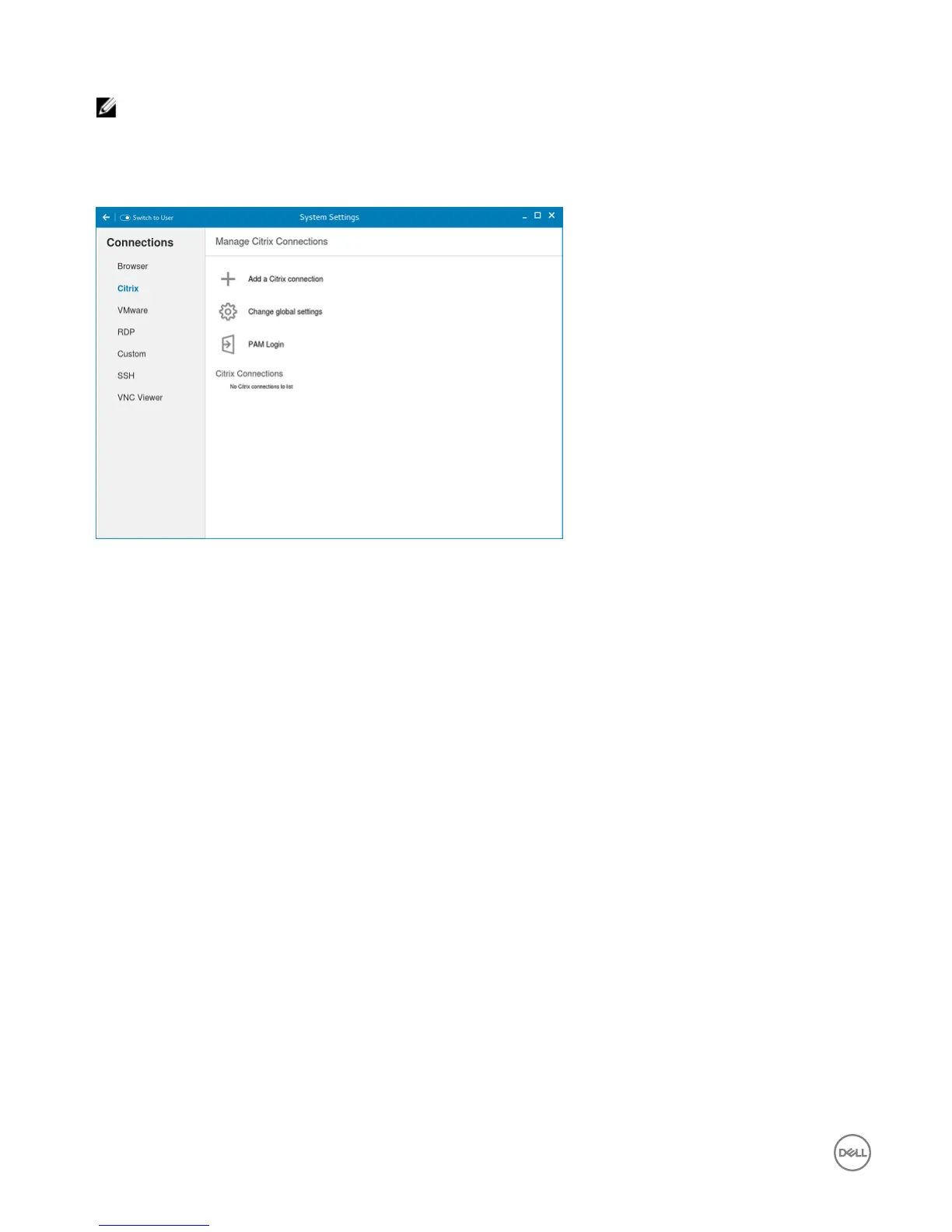
The Citrix Connections page enables you to create and manage the Citrix connections both locally and globally.
Figure 12. Citrix connection settings
To congure the local Citrix settings:
1. Click the + icon to add a new Citrix Connection.
The Citrix Connections page is displayed.
2. Enter the name of the Citrix connection for which you specify the Server URL address.
3. From the Connection Type drop-down list, select any of the following connection types:
• Server
• Published Application
• Storefront
4. Click Save to save the changes.
Conguring and managing VMware connections
The VMware connections page enables you to create and manage the View client 3.5 connections.
To congure the VMware Settings, complete the following task:
1. Click the + icon to add a new VMware Connection.
The VMware Connections page is displayed.
40


 To Next Page