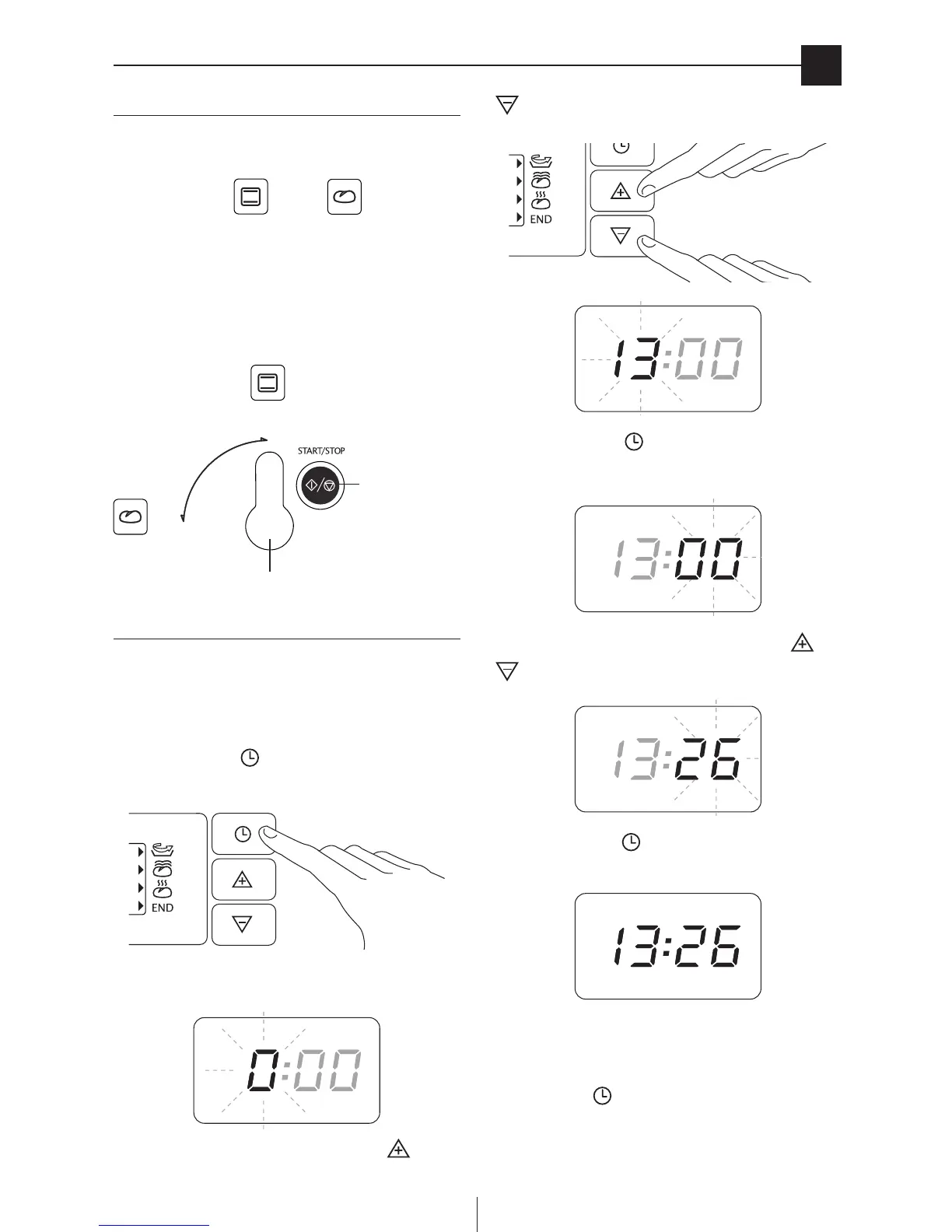
turning the appliance on
en
Turning on
• Plugintothemainssocket.
• Pressthemainswitch(G).
• Turnthe“oven/breadmaker”modeselector(R)tothere-
quired position: (oven) or (bread maker).
• Iftheselectorisalreadyintherequiredposition,justpress
the START/STOP button to activate the chosen mode and
prepare it for programming.
• After3minutes,theappliancereturnstostandby.
Setting the clock
The rst time the appliance is connected to the mains electri-
city supply or after it has been without power for some time, it
emits a beep and four dashes (“-- : --”) appear on the display.
To set the time, proceed as follows:
Press the clock button on the control panel (Q) for at
least 3 seconds.
(The hour ashes).
Set the required hour by repeatedly pressing the and
buttons on the control panel (Q).
Press the clock button .
(The minutes ash).
Set the required minutes by repeatedly pressing the and
buttons.
Press the clock button .
(The set time is displayed).
If you want to change the time later, repeat the setting proce-
dure described above.
During cooking, you can display the time (if set) by pressing
the clock button .
START/STOP
buttonon,oand
standby
Oven/bread maker mode selector



 To Next Page