7
Setting the temperature
Please note:
This unit will only show temperature in
Fahrenheit. It is not possible to switch to Celsius.
To modify the temperature set point, turn the dial clockwise
to increase and counter clockwise to decrease the tempera-
ture.
Temperature settings available are 41°F, and 50°F through
83 °F.
Setting to 41°F turns the unit to anti-freeze function. (see
Anti-freeze function at page 8).
Selected power levels versus working power levels
There are 3 power levels (min/med/max) as well as ECO
mode.
med max max + eco
Depending on the selected power level, the working power
level may be less or equal to the selected power level.
The working heating power is always shown by the unit’s dis-
play by means of the thin bars below of the selected power
level.
- If the current room temperature is much lower than the
selected temperature, the appliance will start to heat
the room as rapidly as possible at the selected power
level.
- If the current room temperature is close to the selected
temperature, the appliance will heat the room using a
heating power lower than the selected power level.
- When the selected temperature is reached, the unit
stops heating.
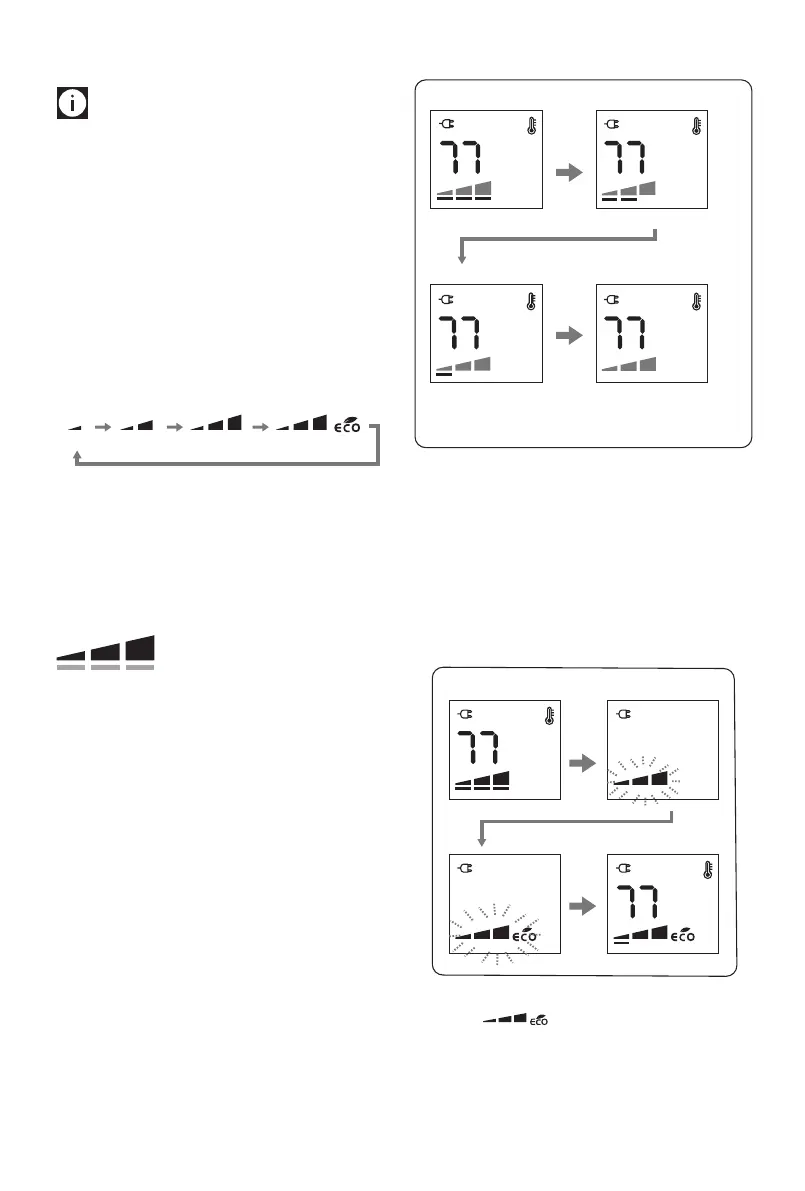
Example: Operation is started at room temperature 64 °F, the
set temperature is 77 °F, and the selected power level is MAX.
Example of display:
Working power level: Max
Working power level: Min
When the room
temperature is reached
the appliance stops heating
Working power level: Med
❸
❹
Room temperature 64°
Room temperature 75° Room temperature 77°
Room temperature 71°
Setting the power level
1. Press twice dial during heating operation.
2. The power level will blink.
3. Choose one of the available power levels by turning the
dial.
4. Press the dial to conrm.
Example of display:
❸
❹
Eco mode
When the eco mode is activated, the unit will automatically
select the most convenient working power level from Max to
Min, and, if necessary, reduce the set temperature in order to
achieve energy savings while guaranteeing optimum comfort.
Selected power level
Working power level




 To Next Page