6 Using the inReach | DeLorme inReach User Manual
Using the inReach
You can use the inReach as a standalone device when you don’t want to use it with a compatible device. You can also
interact with the inReach directly when it is connected to a compatible device.
Power
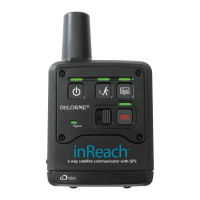
• To turn the inReach on, press and hold the Power button until the Power LED ashes green and then release the
button. When the inReach is powered on, the Power LED will ash green once every three seconds.
• To turn the inReach off, press and hold the Power button until the Power LED ashes rapidly and then release the
button.
• When power is low, the Power LED ashes red once every three seconds. See Batteries on page 4 for more
information.
• When there is not enough power to send any messages or tracking points, the Power LED ashes red every 1.5
seconds. See Batteries on page 4 for more information.
Tracking
The Tracking button allows you to send your location to explore.delorme.com when you are using the inReach in
standalone mode. When you are moving, your location is sent every 10 minutes. When you are stationary, your location
is sent every four hours; if you move more than 100 meters, tracking at 10 minute intervals resumes.
• To start tracking, press and hold the Tracking button until the Tracking LED ashes and then release the button.
The LED will ash green once every three seconds while tracking until you cancel tracking or turn off the inReach.
• To stop tracking, press and hold the Tracking button until the Tracking LED ashes rapidly and then release the
button.
You can also use tracking when connected with an Earthmate PN-60w (see page 12) or mobile device (see page
21 for Android and page 25 for iOS). In addition, tracking can be initiated from explore.delorme.com by anyone
who can log in to your account. See the Help at explore.delorme.com for more information.
Message
Use the Message button to send predened inReach messages that you created on explore.delorme.com. You can
create up to three messages—it’s a good idea to make a note of the messages in the proper order and take it with you.
The message is sent to contacts you designated on explore.delorme.com when you created the message.
• To send predened message one, press and hold the Message button until the Message LED ashes once and
then release the button. The Message LED will ash once every three seconds until the message is sent.
• To send predened message two, press and hold the Message button until the Message LED ashes twice and
then release the button. The Message LED will ash twice every three seconds until the message is sent.
• To send predened message three, press and hold the Message button until the Message LED ashes three
times and then release the button. The Message LED will ash three times every three seconds until the message
is sent.
Notes
The LED ashes for choosing the message will cycle in order until you release the Message button to make a
selection.


 To Next Page