7DeLorme inReach User Manual | Using the inReach
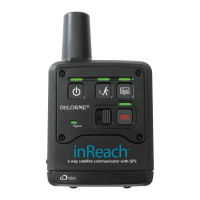
Message LED
• Sending a message—The Message LED ashes green once every three seconds when you send a message
(including SOS messages); it stops ashing when the message has been sent. You should also watch the Signal
LED to ensure you have a good signal; see page 8 for more information.
• New message—The Message LED ashes green twice every 1.5 seconds when a message has been sent to
you. You can view incoming messages on a connected device.
To dismiss the new message indicator, press and release the Message button. You can also dismiss the message
by viewing it on a connected device.
SOS
IMPORTANT! Use SOS only in an emergency. Do not test SOS—all SOS activations are real and a false activation
could result in charges to you.
The inReach cannot be powered off while an SOS message is being sent or cancelled.
Use the SOS button to send an emergency message to search and rescue when you are using the inReach in
standalone mode. You can also use the SOS button on the inReach when it is paired with a compatible device. Your
location will be relayed to search and rescue and they will dispatch emergency services and notify the emergency
contacts listed on your account at explore.delorme.com account. Your location will automatically update until you
cancel the SOS.
Your location will be sent to search and rescue as follows:
• First ten minutes, every sixty seconds
• Ten minutes to one hour, every ten minutes
• One hour to eight hours, every 15 minutes
• Eight hours to 24 hours, every 60 minutes
After the rst ten minutes, if you are stationary, your location is sent every thirty minutes; the transmission rate is
slowed to preserve battery life.
If your position changes by more than 100 meters, your location will be sent again. If you don’t need to move for safety
reasons, stay where you are to preserve battery life and to make it easier for search and rescue to locate you.
Note If you do not have a clear view of the sky, the SOS messages will be stored and then sent as soon as you have
a good signal. The Signal LED will ash green when you have a good signal; it will ash red when you do not have a
good signal; see page 8 for more information.
To send an SOS message
1. Press and slide the SOS button lock to the left.
2. Press and hold the SOS button until the SOS LED begins to ash and then release the button. The SOS LED
ashes green once every three seconds. In addition, the Message LED ashes green once every three seconds
while the message is being sent.
When the SOS and Message LEDs begin ashing green more rapidly (every 1.5 seconds), it indicates that your
SOS message was received by an emergency responder and they are acknowledging your message.
To conrm that you know search and rescue has received your message, press and immediately release the SOS
button. The SOS LED resumes ashing green every three seconds.
If you are unable to conrm that you know your message was received, help will still be sent.
To cancel an SOS message
1. Press and hold the SOS button until the SOS LED ashes rapidly and then release the button.
This sends a message to search and rescue to let them know that the emergency has been resolved and
assistance is no longer needed.
2. Press and slide the SOS button lock to the right.


 To Next Page