The CALYBOX 1020 WT is an energy manager designed to control heating and domestic hot water (DHW) systems across one or two zones. It offers comprehensive energy management, including programming, consumption monitoring, and various override functions, making it suitable for residential applications.
Function Description:
The CALYBOX 1020 WT serves as a central control unit for managing energy consumption, primarily for heating and DHW. It monitors the active program in up to two zones and controls the output for a pellet stove or similar heating system. The device supports both local and remote control via home automation gateways, allowing users to manage heating, view consumption data, and adjust settings from a smartphone or tablet.
Key functions include:
- Automatic Mode (AUTO): Monitors active programs, controls heating output, and allows for heating and DHW overrides. It also provides access to consumption data and automatically switches to standby after a period of inactivity.
- Programming: Users can create and modify daily heating programs (P0 to P6) for each day of the week and for each zone. P0 is a "Days home" program, while P1 to P5 are editable programs, and P6 is a non-editable program applied to all days when programmed. The control output (pellet stove) monitors programming for zone 1.
- Consumption Data Display: Provides detailed insights into energy usage, including total electric consumption, cooling consumption, heating consumption, DHW consumption, and consumption of devices connected to the mains. This data can be viewed for the current month and historically for previous months and years.
- Overrides: Offers temporary overrides for heating (e.g., setting a comfort mode before a scheduled time) and DHW (restarting DHW for a set period). It also includes an "Absence" mode for prolonged periods away, setting the heating to 'Frost Protection' and turning off DHW.
- Home Automation Integration: Compatible with TYDOM home automation gateways (e.g., TYDOM 2000), enabling remote control of heating (heat/cool, auto/off/absence/override modes) and consumption data display via smartphones or tablets.
- Stop Mode: In this mode, heating is off, DHW override is possible, consumption data is displayed, and system status/faults can be viewed. It also shows the operating hours meter for the heating regulation and the number of days until maintenance is due.
Important Technical Specifications:
The technical unit features several indicator lights for system status:
- Bus indicator light: Blinks in sync with data, steady blinking indicates a Bus fault, and off indicates power supply failure.
- Electronic meter indicator light: On for normal operation, blinking for remote-info fault.
- Load control indicator light: On when load control is in progress, blinking for pilot wire wiring fault.
- DHW indicator light: On when DHW is ON, off when DHW is OFF.
- "Control output" indicator light: On when control output is ON, off when control output is OFF.
The device requires a 230V~50Hz power supply (4VA) and supports a 3A-230V~ load. It includes terminals for various connections, including bus A, Ti1, Ti2, Ti3, and load control outputs (FP1, FP2, FP3).
Usage Features:
The CALYBOX 1020 WT is designed for intuitive use with a combination of a selector knob, '+' and '-' buttons, and an 'OK' button.
- Navigation: The selector knob is used to navigate through menus and change values.
- Confirmation: The 'OK' button confirms selections and settings.
- Adjustment: '+' and '-' buttons are used to adjust values like temperature or time.
- Date and Time Settings: Simple process to enter the current date and time.
- Temperature Settings: Easy adjustment of control output temperatures for heating and cooling, with specific ranges (e.g., 5-30°C for heating, 5-16°C for cooling).
- Programming Modes: Offers "Comfort" and "Economy" periods within programs, allowing users to customize heating schedules.
- Consumption Data Access: The selector knob is used to switch between different consumption types (electricity, cooling, heating, DHW, mains devices).
- Fault Indication: The "i" button in Stop mode provides access to system status and fault codes (e.g., dEF 6 for communication fault with technical unit, dEF 7 for communication fault with electronic meter).
Maintenance Features:
The CALYBOX 1020 WT includes features to help users monitor and manage device maintenance:
- Maintenance Indicator: In Stop mode, the device displays the number of days remaining until maintenance is due for the connected control output (stove).
- Operating Hours Meter: Tracks the operating hours of the on/off regulation (stove), which can be reset.
- Maintenance Period Initialization: After each maintenance operation, the period before the next maintenance must be initialized.
- Consumption Data Reset: The consumption indices and history can be reset through the installer menu (menu 2-24).
- Troubleshooting: The "Help" section provides guidance for common issues, such as no display (check power supply/circuit breaker), missing DHW symbol (DHW not managed by device), or blinking maintenance symbol (maintenance due soon or system fault).

 Need help?
 General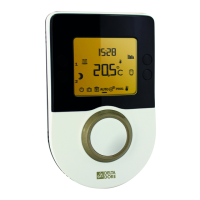

 To Next Page