16
SWING
Fig. 15
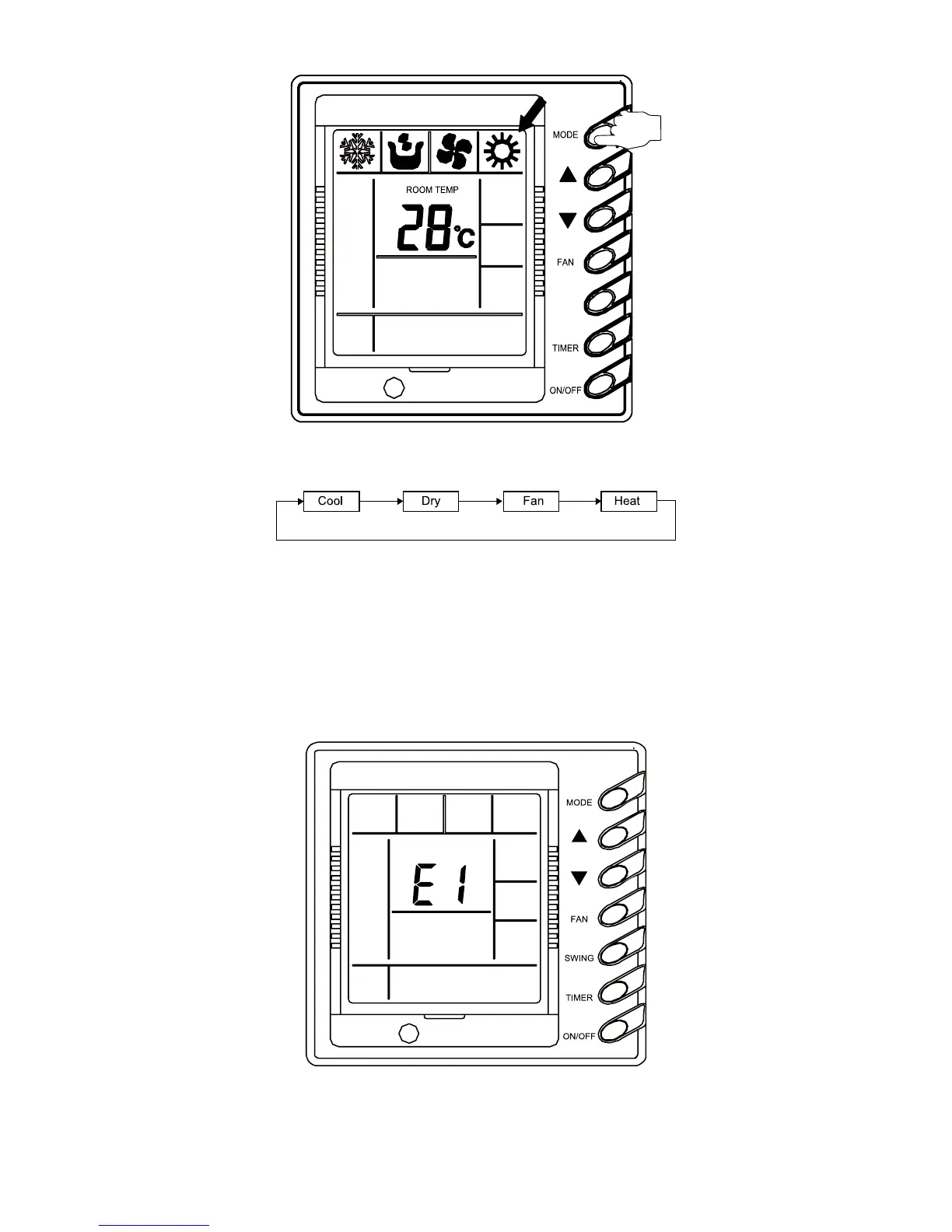
Every press of the Mode button will change the running mode according to the following
order:
Under the COOL mode, the display of the COOL icon will on. The set temperature should be
lower than the present room temp. If not, the air conditioner would not perform cooling.
Under the DRY mode, the display of the DRY icon will on. Fan will run at the low speed in
VRPHFHUWDLQWHPSHUDWXUHUDQJH7KHHI¿FLHQF\XQGHUWKLVPRGHLVEHWWHUWKDQWKDWXQGHUWKH&22/
mode and saves more energy.
Under the HEAT mode, the display of the HEAT icon will on. The set temperature should be
higher than the room; If not, the air conditioner would not perform heating.
Under the FAN mode, the display of the FAN icon will on.
ƹ
Error Display (Fig. 16)
Fig. 16
When some error happens, the error code will be shown in the environmental temperature
display zone. Fig. 9 indicates that the compressor is under high pressure protection.
When some error happens, except the FAN mode under which the unit will still work normally,



 To Next Page