18
5.2 Wireless Controller
CAUTION!
Ɣ
Make sure there is no obstruction between the wireless controller and the signal receiver.
Ɣ
The signal receiving distance of the wireless controller can be up to 10 metes.
Ɣ
Never drop or throw the wireless controller randomly.
Ɣ
1HYHUOHWDQ\OLTXLGÀRZLQWRWKHZLUHOHVVFRQWUROOHU
Ɣ
Never expose the wireless controller under the sunlight directly or where it is very hot.
Ɣ
The wireless controller for the duct type indoor unit is an optional part.
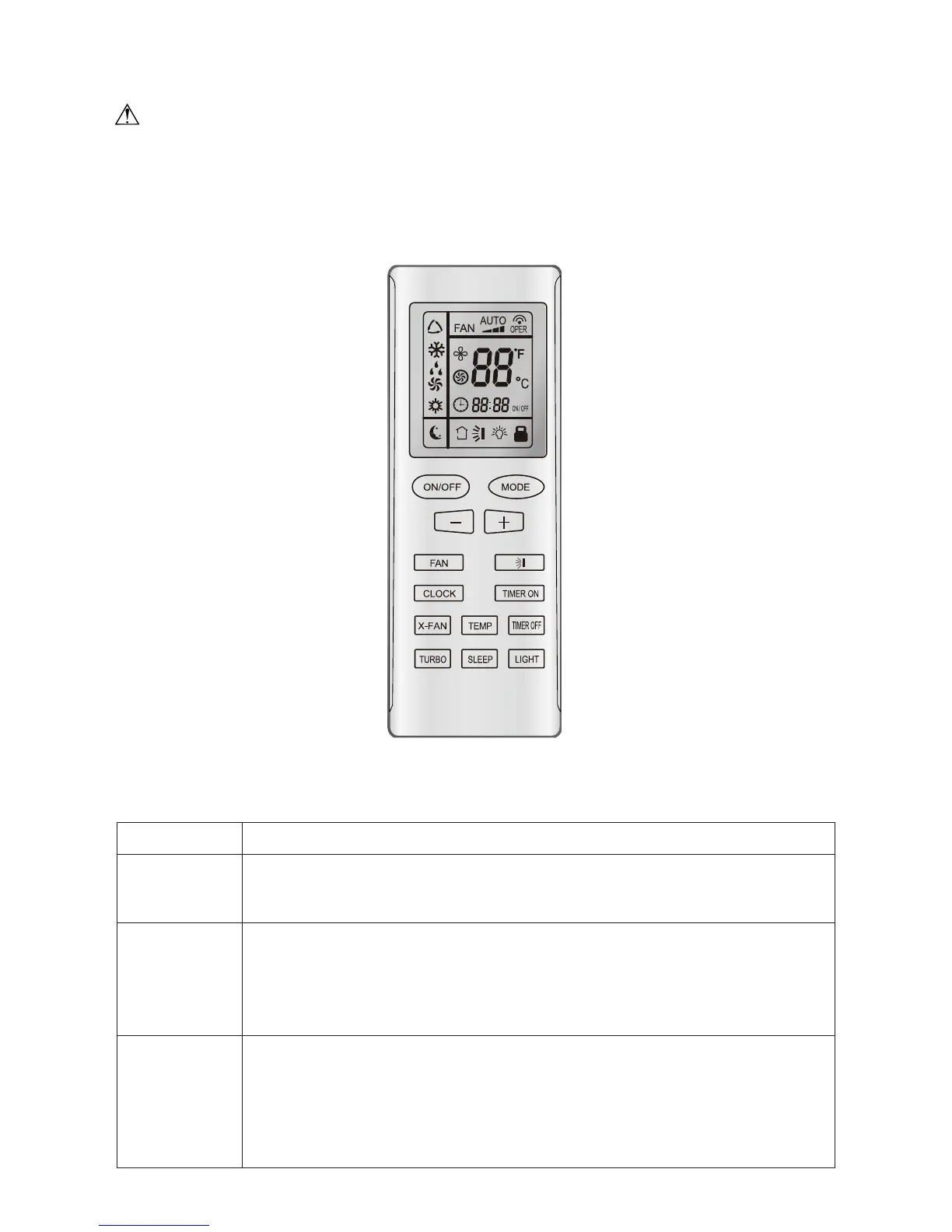
Fig. 17
5.2.1 Control Panel of the Wireless Controller
Table 6
Name Function Description
ON/OFF button
Ɣ
Press this button, and the unit will be turned on; press it once more, and the
unit
will be turned off. When turning on or turning off the unit, the Timer, Sleep
function will be canceled, but the presetting time is still remained.
- button
Ɣ
Preset temperature can be decreased by pressing this button. Continuous pressing
this button for more than two seconds can make the temperature changed quickly
until release this button and then transmit this order, in which case,
ć
(
) will be
displayed all the time. The temperature adjustment is unavailable under the Auto
mode, but the order can be sent by pressing this button.
+ button
Ɣ
The preset temperature can be increased by pressing this button.
Continuously
pressing this button for more than 2 seconds cam make the temperature
changed quickly until release the button and then
transimit this order, in
which case,
ć
(
) is displaying all the time.
The temperature adjustment is
unavailable under the Auto mode, but the order can be sent by pressing this
button. Centigrade setting
range: 16-30; Fahrenheit scale setting range 61-86.



 To Next Page