Chapter 7 Optional AccessoriesCP2000
7-80
Frame F
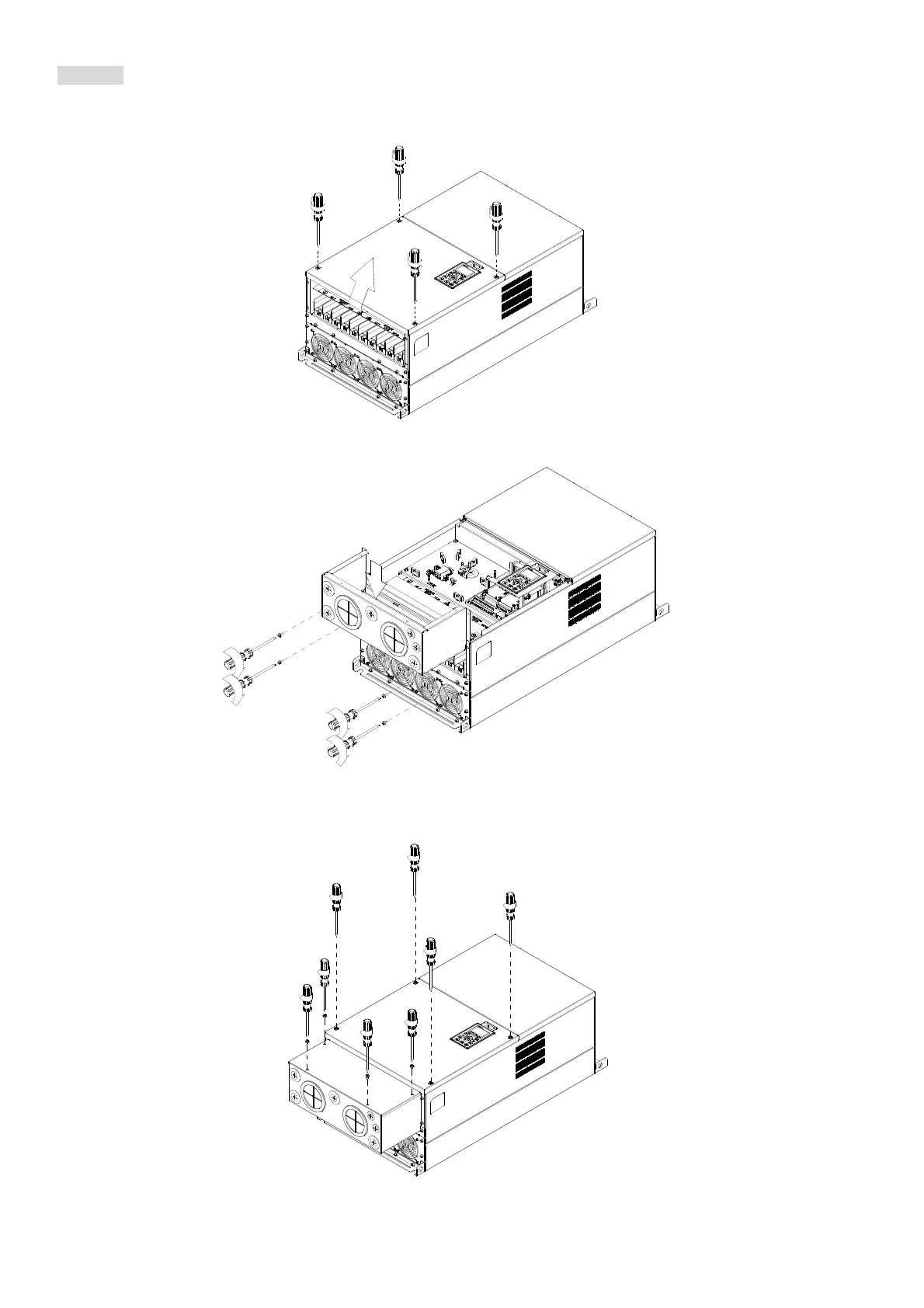
1. Loosen the cover screws and press the tabs on each side of the cover to remove the cover, as shown in the
following figure. Screw torque: 12–15 kg-cm / [10.4–13 Ib-in.] / [1.2–1.5 Nm]
2
3
4
1
2. Install the conduit box by fastens the 4 screws, as shown in the following figure.
Screw torque: 24–26 kg-cm / [20.8–22.6 Ib-in.] / [2.4–2.5 Nm]
5
6
7
8
3. Install the conduit box by fasten all the screws shown in the following figure
Screw 9–12 torque: 12–15 kg-cm / [10.4–13 Ib-in.] / [1.2–1.5 Nm]
Screw 13–16 torque: 24–26 kg-cm / [20.8–22.6 Ib-in.] / [2.4–2.5 Nm]
9
10
11
12
13
14
15
16




 To Next Page