Need help?
Do you have a question about the DeltaLab DGFX1 and is the answer not in the manual?
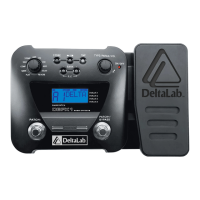
Welcomes the user and advises reading the manual for optimal use of the DGFX1.
Lists key capabilities: 54 effects, 11 simultaneous effects, 48 user/factory patches, expression pedal control, and drum machine.
Advises on firm handling, avoiding physical shocks, excessive force, and strong vibrations to prevent damage.
Guides on placement to minimize interference, avoiding sunlight/moisture, and cleaning with a soft cloth.
Details connecting cables, switching on the unit, and initial display for powering the DGFX1.
Explains the unit's patch system, including the number of default and user patches available.
Guides on selecting patches using the EFFECT SELECTION knob and BANK buttons.
Explains how to adjust the overall output volume using the TYPE/PARAM/VOL knob.
Details how the expression pedal controls volume and can be activated for other functions.
Explains the Noise Gate effect, its purpose, and parameter settings.
Describes the Compressor effect, its benefits, and parameter settings.
Explains the Wah effect, its range, and available types with parameters.
Introduces the stompbox simulation models and their parameters like Drive, Level, and Tone.
Explains the EQ effect for shaping bass, midrange, and treble, and its parameter ranges.
Describes the speaker simulation models and their various cabinet configurations.
Explains the Delay effect, its time, feedback, and level parameters.
Describes the Reverb effect for adding ambience and its parameters like Time, Density, and Level.
 General
| Power | 9V DC |
|---|---|
| Inputs | 1 x 1/4" instrument input |
| Power Supply | 9V DC adapter (included) |
| Type | Multi-effects |
| Effects | Delay, Reverb, Modulation, Distortion |
| Display | LED |

 To Next Page