I-984 Page 4 of 5
Rev. M-43434 11/10/17
B. Programming the Dispensing Events: Up to 8 independent dispensing events can be programmed
1. Press and release the TIMER button to enter the programming mode. The event number will be in the
bottom left corner. Note: To program a full event, a pump start time and stop time will have to be
programmed.
NOTE: THE PUMP WILL RUN FOR 23 HRS 59 MIN IF A START TIME IS SET BUT NOT A
STOP TIME.
a) Press the “DAY” button until all of the days are shown that the first event should be turned on.
b) Press the “HOUR” and “MINUTE” buttons until the time is reached when the pump should turn on.
Note: AM or PM in top left corner of screen.
2. Press and release the TIMER button again to move to programming the pump to turn off.
a) This program will be used to turn the pump off. Use the
pump’s output to determine how long the pump must run to
dispense the desired amount.
b) Press the “DAY” button until the days match the days
programmed in the pump on portion of the programming.
c) Press the “HOUR” and “MINUTE” buttons until the
desired run time is reached.
3. To program another event, press TIMER button again for
Programs 2-8 and follow Programming Steps 1 and 2 above. Every ON function needs a corresponding
OFF function in order to turn the pump off.
4. When finished programming, push the CLOCK button again to return to time of day (normal) display.
C. Priming the Pump
1. To prime the pump, press the MANUAL button – the bar at the bottom of the display will move from right
to left from OFF to AUTO to ON. When it reaches ON, the pump will run until the MANUAL button is
pressed again. Use this position to prime the pump as well as to calibrate the pump. To stop priming press
the MANUAL button – the bar at the bottom of the display will move from left to right from ON to AUTO
to OFF.
Note: The unit may continue to run in the AUTO position and the MANUAL button must be pressed
until the bar at the bottom of the display is over the OFF position to stop the unit fully.
D. Setting into Programmed Position
1. Press the MANUAL button until the bar in the bottom of the display moves from the OFF to the AUTO
position. If the unit is not in the AUTO position, the program will not be executed.
Specifications: When the unit is powered the first time, the rechargeable display back up battery begins charging.
When fully charged it provides approximately 200 hours of reserve time before the display and program may be lost.
If the unit loses power, it will not lose the program for 200 hours, but it will not run the pump from the rechargeable
display back up battery and will not dispense chemical. If the unit becomes unplugged from the wall for a short
amount of time, plugging the unit back in will not affect the programming done to the unit.
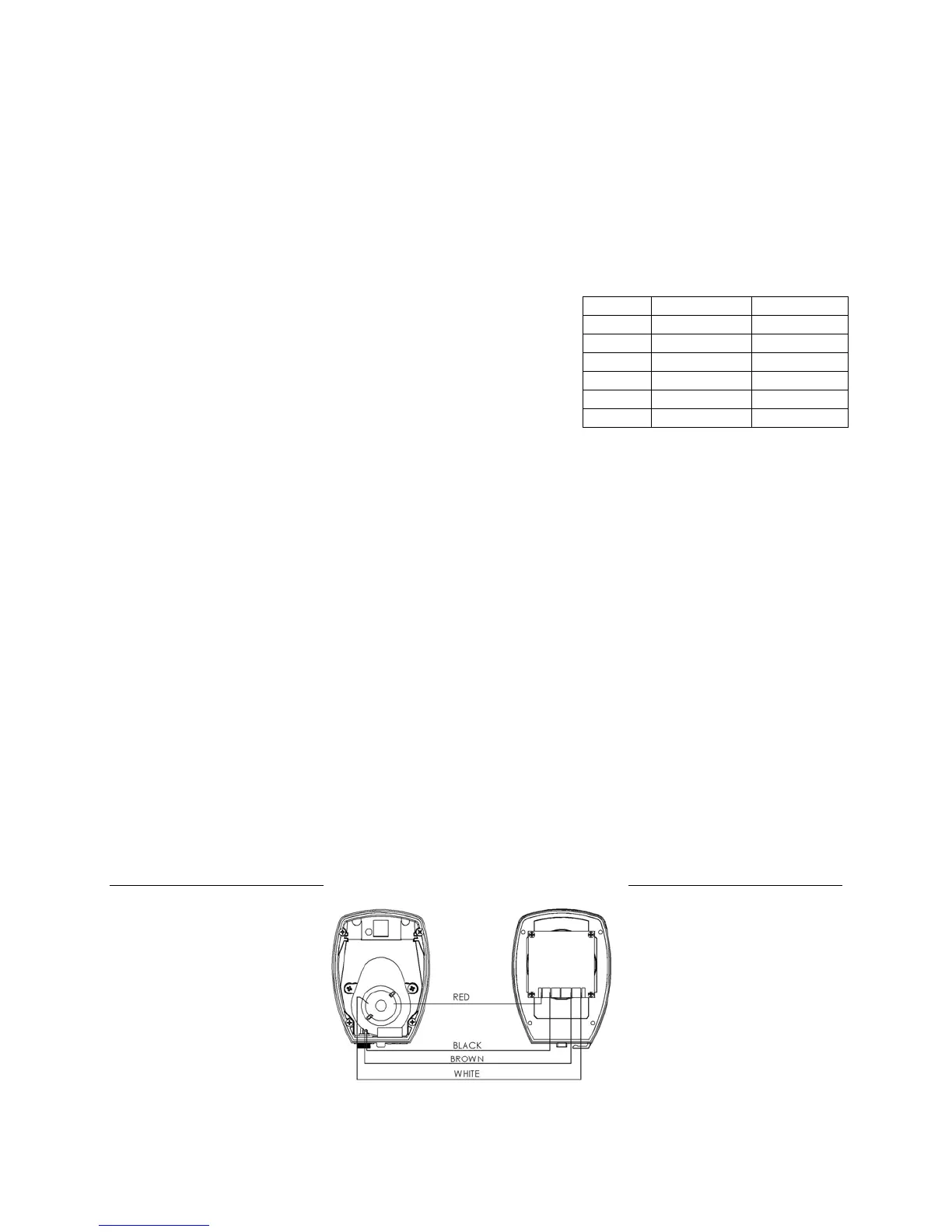
Wiring Diagram
The wires are labeled with the colors and clearly connect to the timer for proper operation.
TIME ml pumped oz pumped
1 min 110 ml 3.5 oz
3 min ~295 ml ~10 oz
5 min 550 ml 17.5 oz
6 min ~590 ml ~20 oz
10 min 1100 ml 35 oz
20 min 2200 ml 70 oz


 To Next Page
 Loading...