19
DISPLAY8
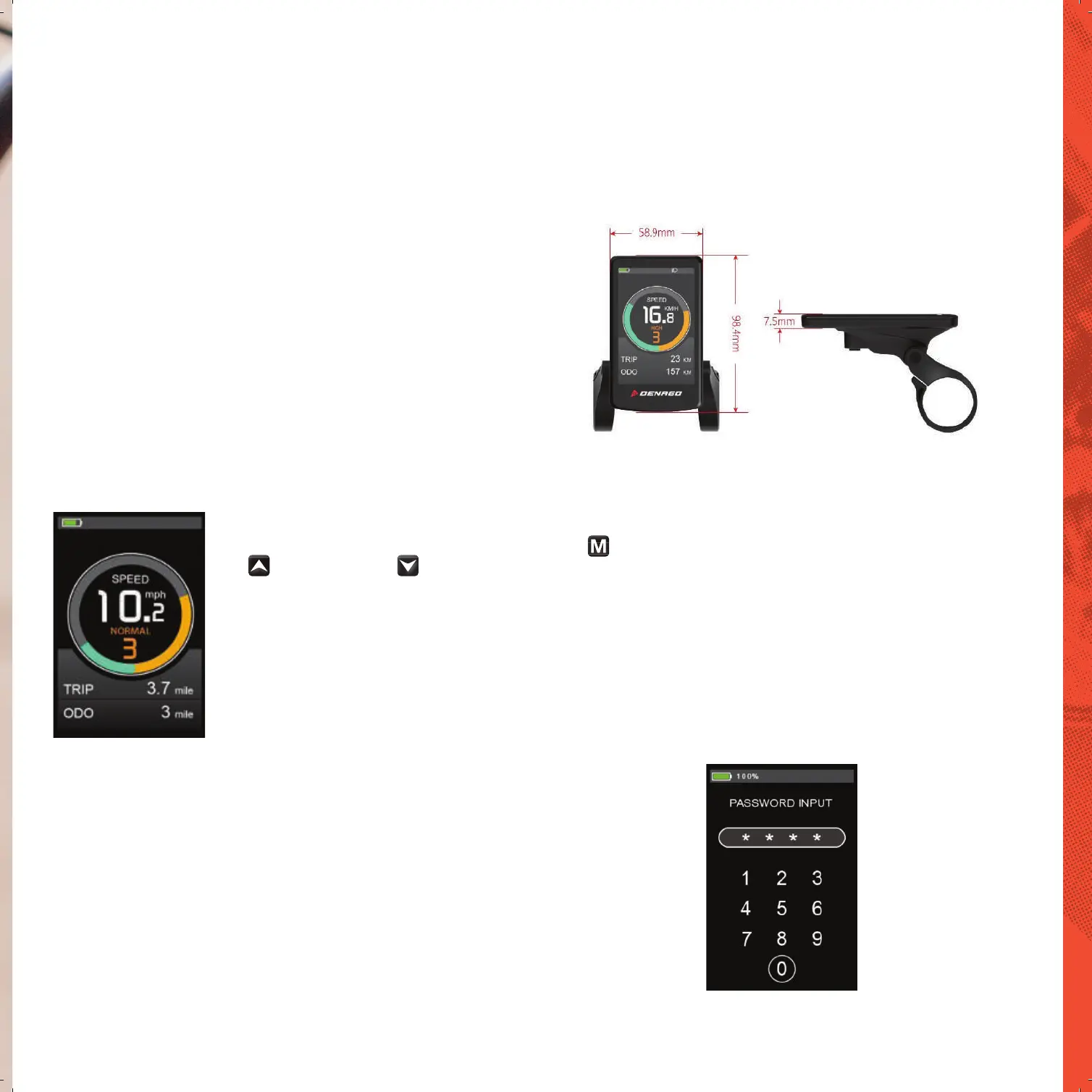
NORMAL DISPLAY CONTENT
The monitor is connected in a number of ways to your eBike. It interfaces with the HMI to adjust your PAS levels, advises if you have a problem with your brakes
and alsotracks a number of great features. Like speed, distance, MAX speed, battery level etc.
The K5274(Bett) provides you with a variety of function modes, to meet your riding needs.
Its functions are as follows
Battery power indication
Motor power indication
Speed indication
Distance (including single trip distance and ODO display)
Calories consumption
CO2 / Fat reduction
Walk assist indication
Backlight setting
Error code indication
Various setting parameters
%XWWRQGHQLWLRQ
There are 3 buttons on K5242, In the following introduction, is named as “MODE”.
is named as “UP” and is named as “DOWN”.
Note for Users
Be care of the safety use. Don’t attempt to release the connector when battery is on power.
Try to avoid hitting.
'RQȇWVSOLWWKHZDWHUSURRIVWLFNHUWRDYRLGDHFWLQJWKHZDWHUSURRISHUIRUPDQFH
Don’t modify system parameters to avoid parameters disorder.
Make the display repaired when error code appears.
Normal display interface
is named as “UP” and is named as “DOWN”.
is named as “UP” and is named as “DOWN”.
There are 3 buttons on K5242, In the following introduction, is named as “MODE”.
2Q2Ί
Long press “MODE” button then the display will work normally, and the controller will power on at the same time.
With the display on, long press “MODEȋEXWWRQWKHGLVSOD\ZLOOVKXWGRZQWKHGLVSOD\ZLOOOHDYHREDWWHU\
WKHOHDNDJHFXUUHQWRIGLVSOD\RQLVOHVVWKDQƉ$
$IWHUSRZHURQWKHGLVSOD\ZLOOȴUVWLQGLFDWHWKHHQWHUSDVVZRUGLQWHUIDFH
$WWKLVWLPHWKHȴQDOXVHUQHHGVWRHQWHUWKHVHWGLJLWSDVVZRUGWRHQWHUWKHV\VWHP
The default password is 0000
,IWKHHELNHLVQRWXVHGIRUPRUHWKDQPLQXWHVWKHGLVSOD\WZLOOSRZHURΊDXWRPDWLFDOO\
The system will shut down automatically if the password is entered incorrectly for 3 times
or if it does not enter normally within 2 minutes.
Password input interface


 To Next Page