COMMUTE 2
USER INTERFACE
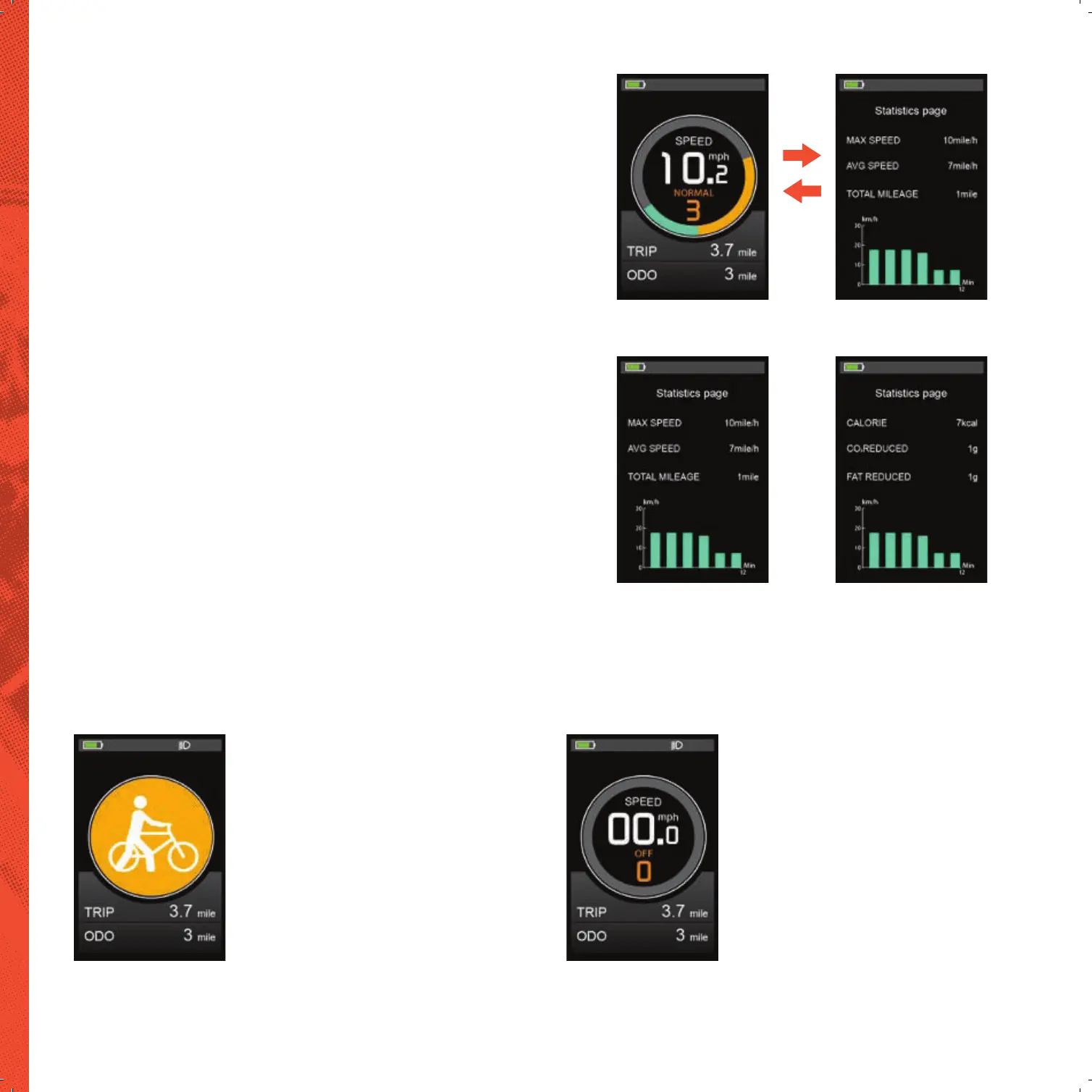
Normal Display Data Statistics
NORMAL DISPLAY INTERFACE
DATA STATISTICS INTERFACE
WALK ASSIST MODE
Walk Assist Mode
HEADLIGHT ON/OFF
Headlight Indicator
There are two display interfaces, including normal display interface and data statistics
interface. Long press “UP” + “MODE” button to switch from normal display interface to
data statistics interface; long press “MODE” button to switch back from data statistics
interface to normal display.
The normal interface can be displayed when the display starts up normally.
The interface can display real-time battery power, real-time speed (SPEED), single trip
distance (TRIP), odometer (ODO) and PAS level (PAS) of the E-bike.
When the speed is 0, long press “UP” + “MODE” button to switch from the normal
display interface to the data statistics interface.
The data statistics interface is used to calculate and display the data of single ride of
E-bike. It includes riding distance, max speed, Avg Speed, Calories consumption, CO2 /
Fat reduction and linear statistical chart of single riding speed.
Short press “MODE” button to switch to next page, long press “MODE” button the data
statistics interface will switch to the normal display interface automatically.
Note: the maximum statistical time range of linear statistical chart is 12 minutes, and it
will be displayed incrementally after more than 12 minutes.
Press and hold the “DOWN” button for 2 seconds to enter the Walk assist mode.
The E-bike will travel at a constant speed of 6km/h.
Walk Assist function can only be used as pushing the e-bike by hands.
Please don’t use this function when riding.
Long press the “UP” button, the backlight will be turned on, and the controller will
be informed to turn on the headlight. Long press the “UP” button for 2 seconds
DJDLQWRWXUQRWKHEDFNOLJKWDQGWXUQRWKHKHDGOLJKW


 To Next Page