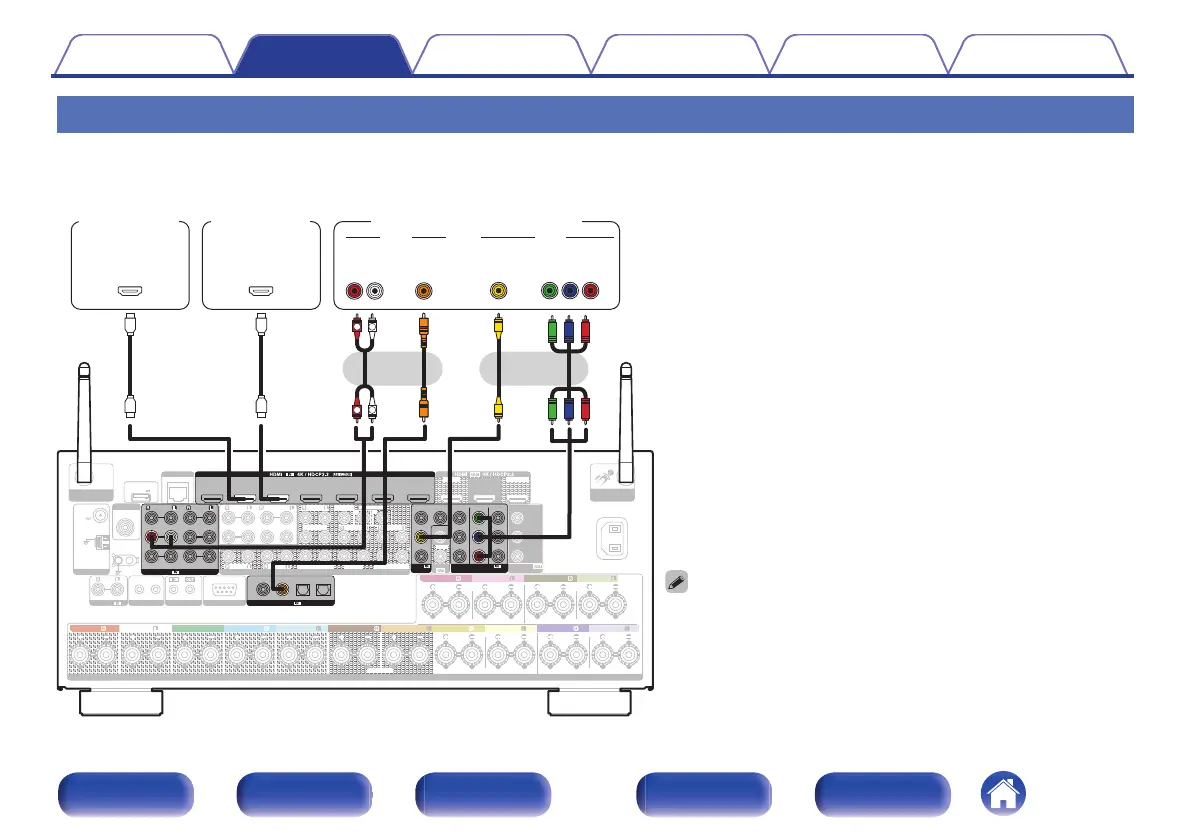
Connecting a DVD player or Blu-ray Disc player
This explanation uses the connection with a DVD player or Blu-ray Disc player as an example.
Select the input connectors on this unit to match the connectors on the device that you want to connect to.
0
When connecting a Blu-ray Disc player that is compatible with Denon Link
HD, see “Connecting a Blu-ray Disc player compatible with the Denon
Link HD function” (v p. 90).
PHONO
12
RS-232C
7.1CH IN
REMOTE CONTROL
TRIGGER OUT
PRE OUT
VIDEO
(ASSIGNABLE)
COMPONENT VIDEO
ARC
MONITOR1
MONITOR
MONITOR/ZONE3
ZONE2
ZONE2
MONITOR2
STRAIGHT CABLE
I
R
DC12V 150mA MAX.
ZONE2 ZONE3
FRONT
FRONT
SURROUND
CENTER
SUBWOOFER
SURROUND BACK
CENTER
SURROUND BACK
SURROUND
HEIGHT2
HEIGHT4/FRONT WIDE
1
SIGNAL
GND
AUDIO
2
ASSIGNABLE ASSIGNABLE
ASSIGNABLE ASSIGNABLE
ASSIGNABLE
Bluetooth
/
Wi-Fi
ANTENNA
Bluetooth
/
Wi-Fi
ANTENNA
AC IN
NETWORK
Y
P
B/
C
B
PR/
C
R
FM
AM
Denon Link HD
ANTENNA
SPEAKERS
SUBWOOFER
HEIGHT1
HEIGHT3
POWER SUPPLY
5V/1.5A
FRONT
HEIGHT4/FRONT WIDE
HEIGHT3 HEIGHT3
FRONT
CENTER
SURROUND SURROUND
SURROUND BACK SURROUND BACK
HEIGHT1 HEIGHT1 HEIGHT2 HEIGHT2
HEIGHT4/FRONT WIDE
2
DVD
1
CBL/SAT
2
CD
1
TV
AUDIO
COAXIAL OPTICAL
DIGITAL AUDIO
(ASSIGNABLE)
1 CBL/SAT
6 CD
2 DVD
3 Blu-ray
5 MEDIA PLAYER
4 GAME
AUDIO
(ASSIGNABLE)
2 DVD
3 Blu-ray 6 AUX2 7 C D4 GAME
5 MEDIA PLAYER
1 CBL/SAT
1
CBL/SAT
2 DVD
4 GAME
(ASSIGNABLE)
VIDEO
3 Blu-ray
1
CBL/SAT
2 DVD 3
Blu-ray
(ASSIGNABLE)
COMPONENT VIDEO
R
L
R
L
OUT
HDMI
OUT
COAXIAL
AUDIO
AUDIO
RL
OUT
OUT
VIDEO
VIDEO
COMPONENT VIDEO
YP
B PR
OUT
OUT
HDMI
(HDMI incompatible device)
DVD player
DVD player
Blu-ray Disc
player
or or
Contents
Connections Playback Settings Tips Appendix
89
Front panel Display Rear panel Remote Index


 To Next Page
 Loading...