Connecting to a home network (LAN)
This unit can connect to a network using a wired LAN or wireless LAN.
You can connect this unit to your home network (LAN) to enable various
types of playback and operations as described below.
0
Playback of network audio such as Internet Radio and from your media
server(s)
0
Playback of streaming music services
0
Using the Apple AirPlay function
0
Operation on this unit via the network
0
Operation with the HEOS wireless multi-room sound system
0
Firmware Update
For connections to the Internet, contact an ISP (Internet Service
Provider) or a computer shop.
Wired LAN
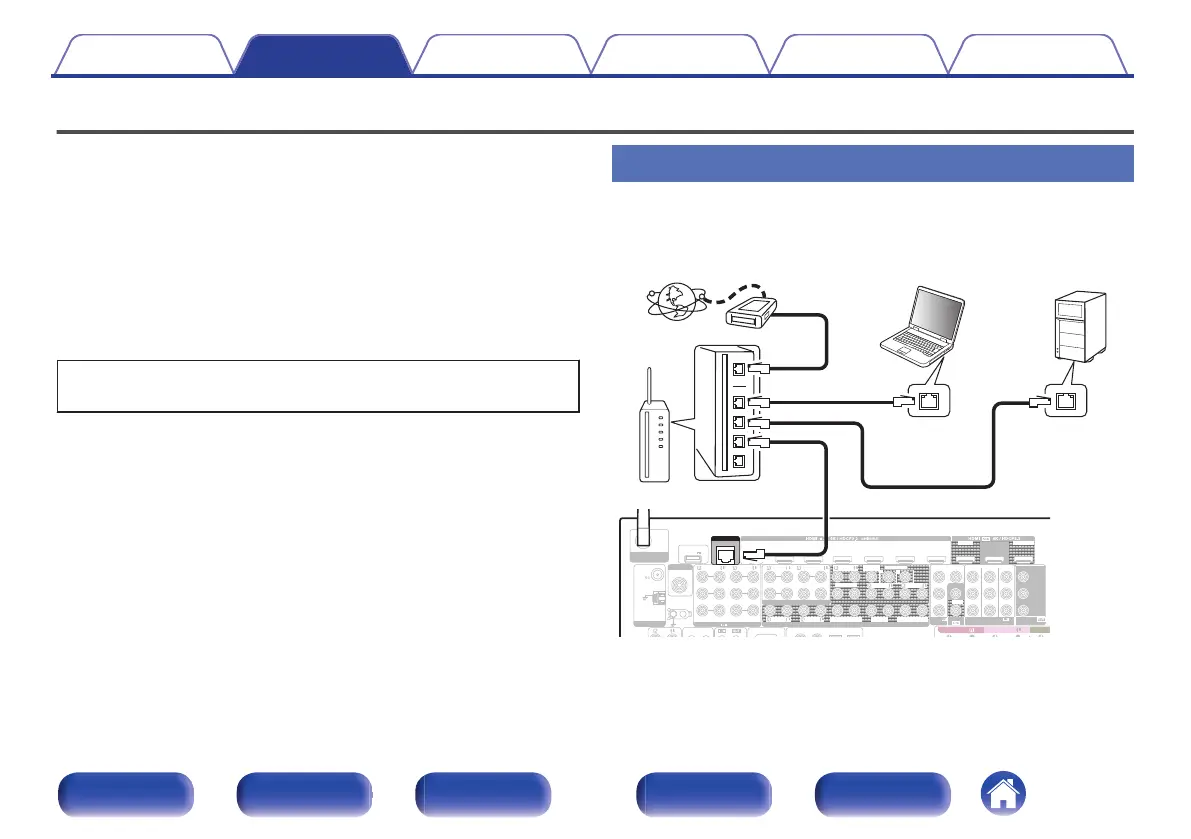
To make connections via wired LAN, use a LAN cable to connect the
router to this unit as shown in the figure below.
.
1 CBL/SAT
2 DVD
2
DVD
1
CBL/SAT
3 Blu-ray 6 AUX2 7 CD
2
CD
1
TV
AUDIO
6 CD
4 GAME
5 MEDIA PLAYER
2 DVD
12
3 Blu-ray
5 MEDIA PLAYER
4 GAME
1
CBL/SAT
1
CBL/SAT
2 DVD
2 DVD 3
Blu-ray
4 GAME
7.1CH IN
PRE OUT
(ASSIGNABLE)
VIDEO
VIDEO
(ASSIGNABLE) (ASSIGNABLE)
COMPONENT VIDEO
COMPONENT VIDEO
ARC
MONITOR1
MONITOR
MONITOR/ZONE3
ZONE2
ZONE2
3 Blu-ray
MONITOR2
STRAIGHT CABLE
DC12V 150mA MAX.
ZONE2 ZONE3
FRONT
FRONT
SURROUND
CENTER
SUBWOOFER
SURROUND BACK
CENTER
SURROUND BACK
SURROUND
HEIGHT2
HEIGHT4/FRONT WIDE
1
SIGNAL
GND
AUDIO
(ASSIGNABLE)
2
1 CBL/SAT
Bluetooth
/
Wi-Fi
ANTENNA
Y
P
B/
C
B
PR/
C
R
FM
AM
Denon Link HD
ANTENNA
SUBWOOFER
HEIGHT1
HEIGHT3
POWER SUPPLY
5V/1.5A
HEIGHT4/F
HEIGHT3 HEIGHT3
NETWORK
Internet
Modem
PC
Router
To WAN side
To LAN port
To LAN port
NAS
(Network Attached
Storage)
LAN port /
Ethernet
connector
LAN port /
Ethernet
connector
Contents
Connections Playback Settings Tips Appendix
97
Front panel Display Rear panel Remote Index


 To Next Page
 Loading...