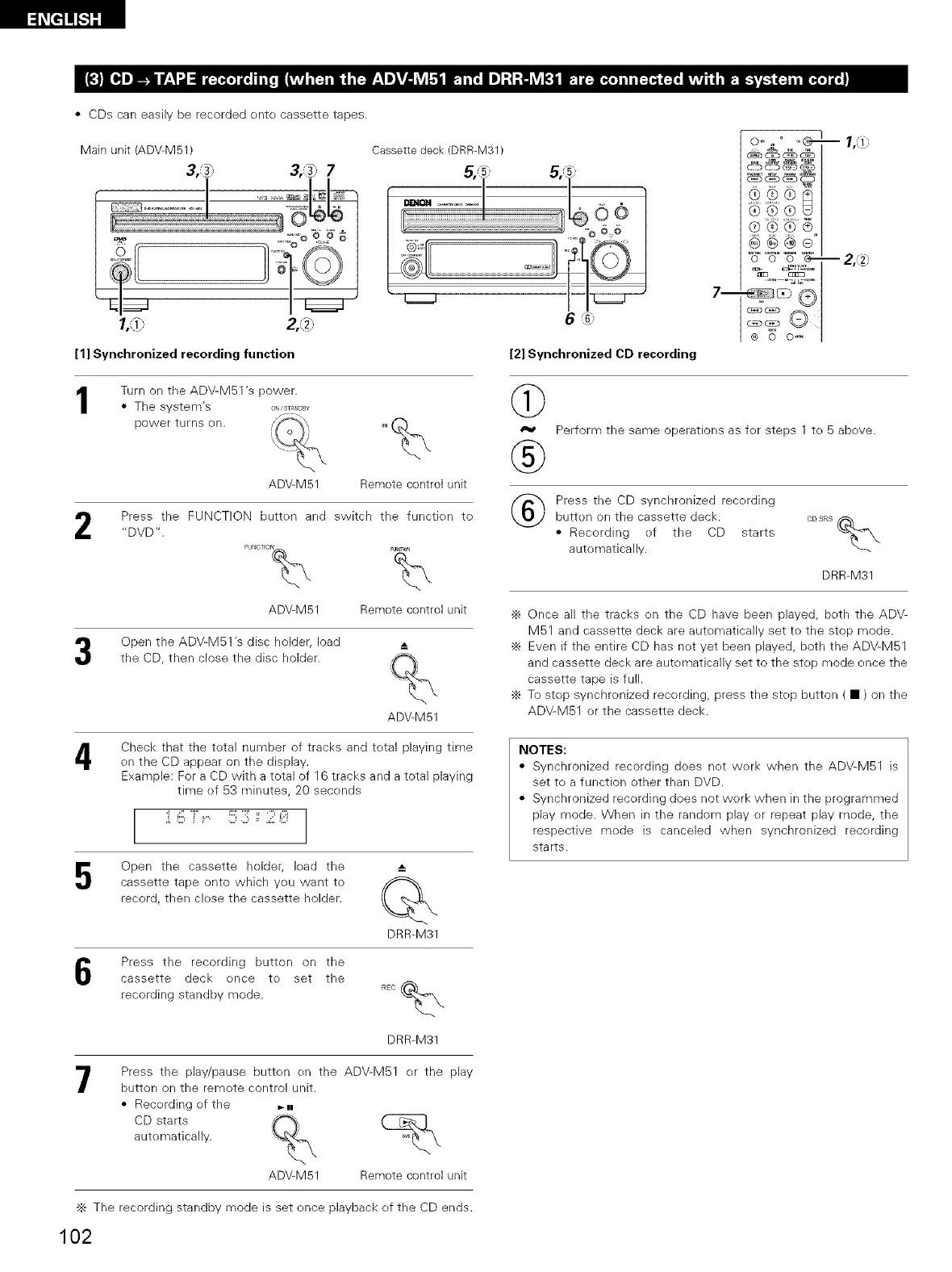
• CDs can easily be recorded ente cassette tapes.
Main unit (ADV M51)
3,,._) 3,,_) 7
1/0 2,,,'_)
[1] Synchronized recording function
Cassette deck (DRR-M31)
6 ,G:
[2] Synchronized CD recording
®®®
®®®®
0 0 0 _
7--
® 0 0 '_
-- IA)
-- 2, _2.-
1
2
Turn on the ADV-M51 's power.
• The system's O._ST_=O=_
power turns en. ,,/,/_'_-_',,} 0.(_\
ADV M51 Remote control unit
Press the FUNCTION butten and switch the functien to
"DVD".
FUNGTFON% FUNCTION
ADV M51 Remote control unit
Open the ADV-M51 's disc holder, load
the CD, then close the disc holder.
ADV M51
@
®
Perform the same operations as fer steps 1 te 5 above.
Press the CD synchronized recording
button on the cassette deck. CDSRS_m,
• Recording ef the CD starts
autematically.
DRR-M31
-_ Once all the tracks en the CD have been played, beth the ADV-
M51 and cassette deck are automatically set to the stop mode.
•_ Even if the entire CD has not vet been played, both the ADV-M51
and cassette deck are automatically set to the st()[) mode ence the
cassette tape is full.
-_ To step synchronized recerding, press the step button ( • ) on the
ADV-M51 er the cassette deck.
4
Check that the total number of tracks and total playing time
on the CD appear on the display.
Example: For a CD with a total of 16 tracks and a total [)laying
time ef 53 minutes, 20 seconds
:i._!!i,T .... !:;;:::!;;; ::;iti;
Open the cassette holder, lead the
cassette tape onto which yeu want to
record, then clese the cassette holder.
DRR-M31
NOTES:
• Synchronized recording does net werk when the ADV-M51 is
set to a function other than DVD.
• Synchronized recording does not werk when in the programmed
play mode. When in the random play or repeat [)lay mode, the
respective mode is canceled when synchronized recording
starts.
Press the recording button on the
cassette deck ence te set the
recording standby mode.
DRR-M31
7
Press the play/pause button en the ADV-M51 er the [)lay
button on the remete control unit.
• Recerding ef the _.
CD starts f-%
autematically. %
ADV M51 Remote control unit
•_ The recording standby mode is set ence playback ef the CD ends.
102



 To Next Page