EasyManua.ls Logo

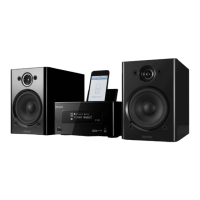
Denon CEOL Piccolo DRA-N5 - User Manual

Denon CEOL Piccolo DRA-N5
60 pages
Print Icon
To Next Page IconTo Next Page
Loading...
DRA-N5
NETWORK RECEIVER
Owners Manual
Preparations
Operations
Information

Table of Contents

Other manuals for Denon CEOL Piccolo DRA-N5

Questions and Answers

  • C
    Christopher CarrAug 18, 2025
    Why won't my Denon CEOL Piccolo DRA-N5 Receiver connect to the network?
    • K
      Kyle SolisAug 18, 2025
      A Denon Receiver might fail to connect to the network for several reasons: * The SSID and network key (WEP) settings might be incorrect. Ensure the network settings match the unit's settings. * The reception could be poor. Shorten the distance from the wireless LAN access point, remove obstacles, and improve visibility. Also, keep it away from microwave ovens and other access points. * Overlapping channels from multiple networks can interfere. Adjust the access point's channel settings or connect with a network cable. * The router might be powered off. Turn on the router.
  • K
    kimberly58Aug 21, 2025
    Why is my Denon CEOL Piccolo DRA-N5 Receiver not lit and producing sound when powered on?
    • E
      Eric WalkerAug 21, 2025
      If your Denon Receiver's display is not lit and no sound is produced when you switch it on, the power cord might not be plugged in securely. Check the connections on the set's rear panel and the connection of the power plug to the power outlet.
  • T
    timothycamposAug 23, 2025
    What to do if my Denon Receiver doesn't work properly when operating the remote control?
    • J
      Joseph WilsonAug 23, 2025
      If your Denon Receiver isn't responding to the remote control, consider these potential causes: * The batteries may be worn out. Replace them with new ones. * You might be operating outside of the specified range. Ensure you are within the operational distance. * There could be an obstacle between the unit and the remote. Remove any obstructions. * The batteries might be inserted incorrectly. Check the polarity marks and reinsert them correctly. * Strong light might be interfering with the remote sensor. Move the unit away from direct sunlight or strong fluorescent light.
  • A
    Adam HubbardAug 26, 2025
    What to do if my Denon CEOL Piccolo DRA-N5 Receiver set does not operate properly?
    • C
      Cassandra OchoaAug 26, 2025
      If your Denon Receiver isn't operating correctly, it could be due to external noise or interference. In this case, try resetting the microprocessor.
  • A
    Amanda StevensAug 27, 2025
    What to do if my Denon CEOL Piccolo DRA-N5 display is off?
    • J
      juansmithAug 27, 2025
      If the display on your Denon Receiver is off, check the Dimmer setting. If it's set to 'Off', change it to something else.
  • T
    Thomas ReeseAug 30, 2025
    What to do if my Denon CEOL Piccolo DRA-N5 displays 'Incorrect Email or Password'?
    • O
      ojonesAug 30, 2025
      If your Denon Receiver displays 'Incorrect Email or Password', it means you entered the wrong credentials for login authentication. Make sure to enter the correct email address and password associated with your account.
  • D
    Dana RuizSep 1, 2025
    Why can't I play Internet radio on my Denon CEOL Piccolo DRA-N5 Receiver?
    • C
      Carlos WeberSep 1, 2025
      If you're unable to play Internet radio on your Denon Receiver, consider the following: * The Ethernet cable may not be properly connected, or the network might be disconnected. Check the connection status. * The program may be broadcast in a non-compatible format. Only MP3 and WMA formats are supported. * The computer's or router's firewall could be activated. Check the firewall settings. * The radio station might not be currently broadcasting. Choose a station that is active. * The IP address could be incorrect. Verify the set's IP address.
  • O
    omorrisonSep 3, 2025
    Why can't I play files stored on a computer with my Denon CEOL Piccolo DRA-N5 Receiver?
    • H
      Hannah LeachSep 3, 2025
      If you're having trouble playing files from a computer on your Denon Receiver, it could be due to the following: * The files might be in a non-compatible format. Ensure they are in a supported format. * The files may be copyright protected. Copyrighted files cannot be played on this device. * The set and computer may be improperly connected via USB. Note that the set's USB port cannot be used for connection to a computer.
  • L
    Luke TaylorSep 5, 2025
    Why can't I play files on a USB memory device with my Denon CEOL Piccolo DRA-N5?
    • J
      Jimmy MercerSep 5, 2025
      If your Denon Receiver is unable to play files from a USB memory device, consider the following: * The USB device might be in a format other than FAT16 or FAT32. Set the format to FAT16 or FAT32. * The USB device might be divided into multiple partitions. Only files in the top partition can be played. * The files could be in a non-compatible format. Record the files in a compatible format. * The files may be copyright protected. These files cannot be played on this device.
  • E
    Erin PaulSep 8, 2025
    Why can’t I log in to Pandora on my Denon CEOL Piccolo DRA-N5?
    • N
      norrisbrendaSep 8, 2025
      If you cannot log in to Pandora on your Denon Receiver and see an 'Email address' or 'Password' message, it means your login information is incorrect. Check that the 'Email address' for Pandora has been properly entered and re-enter the 'Password'.

Summary

Safety Precautions

General Safety Warnings

Warnings about electric shock, fire risk, and hot surfaces during operation.

Important Safety Instructions

Comprehensive safety guidelines for operation, maintenance, and electrical safety.

Usage and Installation Precautions

Getting Started

Main Features

Highlights key capabilities and technologies of the unit.

Connections

Connecting the Speakers

Step-by-step instructions for connecting speaker cables.

Connections

Connecting to a Home Network (LAN)

Guides on connecting the unit to a wired or wireless network.

Wired and Wireless LAN Setup

Steps for establishing wired and wireless network connections.

Connections

Setup

Quick Setup Guide

Steps for initial setup using a wizard-style window.

Setup

Setup

Firmware Update via Web Control

Detailed steps for updating firmware using a web browser interface.

Firmware Upgrade and New Features

Procedure for upgrading firmware and adding new functions.

Network Settings - Wired LAN Connection

Steps for configuring wired LAN settings and DHCP.

Network Settings - Wireless LAN Auto-Scan

Steps for automatically connecting to a wireless network.

Network Settings - WPS Push-button Method

Simplified wireless setup using the WPS button.

Network Settings - Manual Configuration

Detailed manual steps for setting up wireless network parameters.

Operations Overview

Core Operations and Playback

Explains playback, network audio, iPod, USB, and AUX functions.

Operations

Network Audio Playback

Listening to Internet Radio

Procedure for tuning into and playing internet radio stations.

Playing Files from PC and NAS

Steps to play music files stored on computers or NAS devices.

Pandora Internet Radio Service

Instructions for accessing and enjoying Pandora radio service.

SiriusXM Internet Radio Service

Guide to accessing and playing SiriusXM radio channels.

Network Audio Playback

Favorite Function

iPod Playback

Connecting an iPod

Guides on connecting iPod devices via the dock or USB port.

Playing Music from iPod

Instructions for playing music files stored on an iPod.

iPod Playback

USB Memory Device Playback

Playing and Removing USB Files

Steps to play and safely remove files from a USB memory device.

USB Memory Device Playback

AirPlay Function

Playing iTunes Music via AirPlay

Guides on streaming music from iTunes to the unit using AirPlay.

AirPlay Function

Remote Play Function

Device Settings and Roles for Remote Play

Required settings on devices and their roles in remote playback.

Web Control Function

Accessing the Web Control Screen

Guide to accessing the unit's control interface via a web browser.

Other Functions

Information

iPod and USB Memory Device Information

USB Memory Device Playback Details

Guidelines for playing music files from USB memory devices.

Network Audio Information

Troubleshooting

General Troubleshooting Steps

Initial checks for common issues like connections and power.

Network and Media Playback Issues

Solutions for problems with internet radio, servers, iPod, USB, and SiriusXM.

Troubleshooting

Pandora Service Troubleshooting

Solutions for login, account, and playback issues with Pandora.

Wireless LAN, AirPlay, and Remote Control Issues

Solutions for issues with network connectivity, AirPlay, and remote control.

Specifications and Dimensions

Denon CEOL Piccolo DRA-N5 Specifications

General IconGeneral
TypeNetwork Receiver
Network ConnectivityWi-Fi, Ethernet
Wi-FiYes
EthernetYes
AirPlayYes
DLNA CertifiedYes
Spotify ConnectYes
Total Harmonic Distortion (THD)0.1 % (1 kHz, 1 W)
Streaming ServicesAirPlay, DLNA, Internet Radio
ConnectivityWi-Fi, Ethernet, USB
File FormatsMP3, WMA, AAC, FLAC, ALAC, WAV
DAC24-bit/192kHz
Speaker Impedance6 ohms
USBYes
InputsOptical, Analog
Weight2.9 kg

Related product manuals