[1] Using the Top Menu
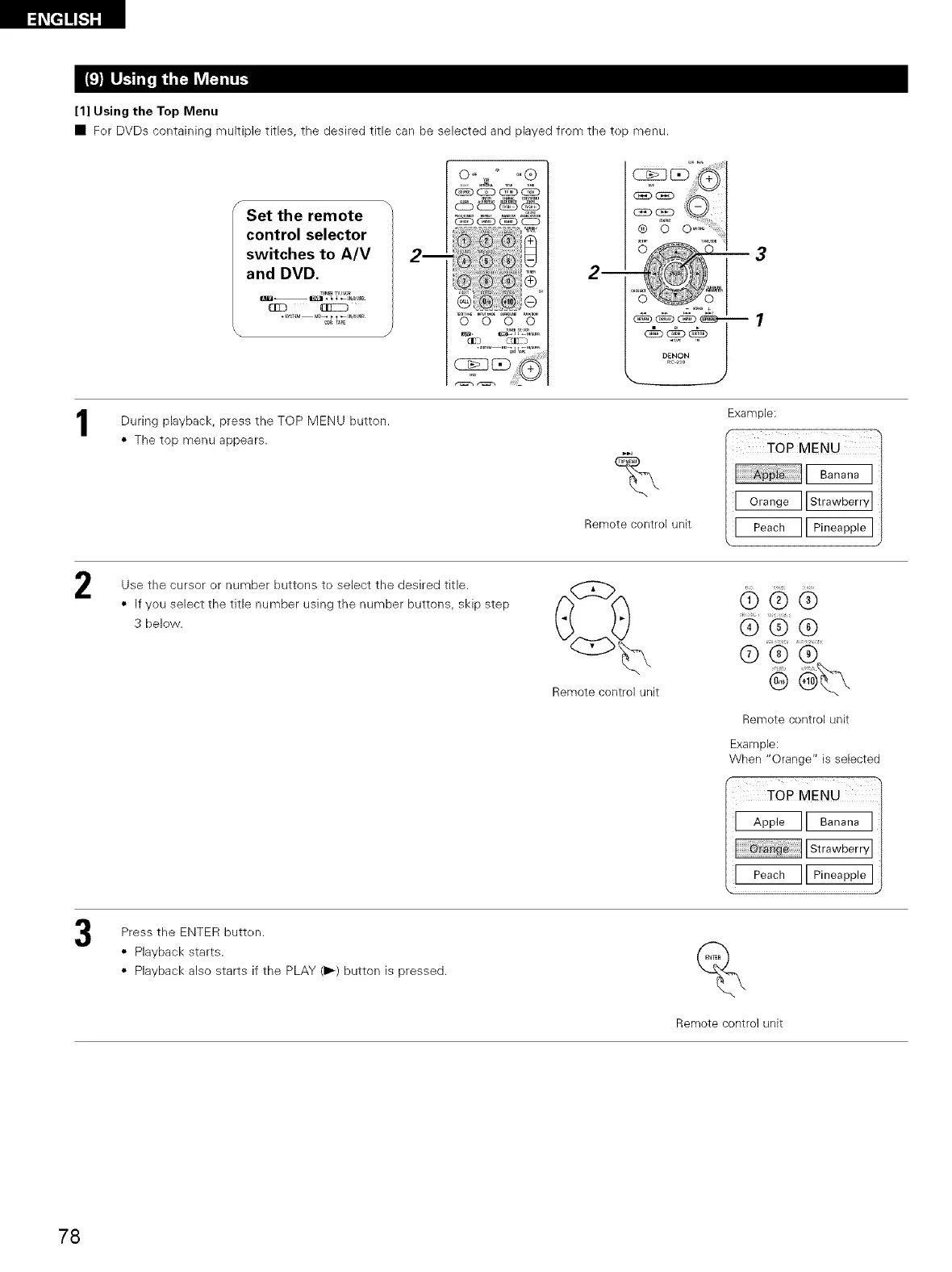
• Fer DVDs containing multiple titles, the desired title can be selected and played from the tep menu.
f
Set the remote
control selector
switches to A/V
and DVD.
l+TJ_l-- ,IJ_l • + + _Jm_sJm+
Q20
•SYSTEM m_ t t _IN_SU_
0 O 0 0
During playback, the TOP MENU button.
press
• The top menu appears.
2
%
Remote control unit
Example:
1
I _ ]l_]j
Use the cursor or number buttons to select the desired title.
• If you select the title number using the number buttons, skip step
3 below.
Remote control unit
@dO@
st
dO
®
Remote control unit
Example:
When "Orange" is selected
MENU )
Press the ENTER butten.
• Playback starts.
• Playback also starts if the PLAY (1_) button is pressed.
Remote control unit
78


 To Next Page
 Loading...