15
Connections Connections
ENGLISH
ENGLISH
Introduction Connections Playback Function Setup Others
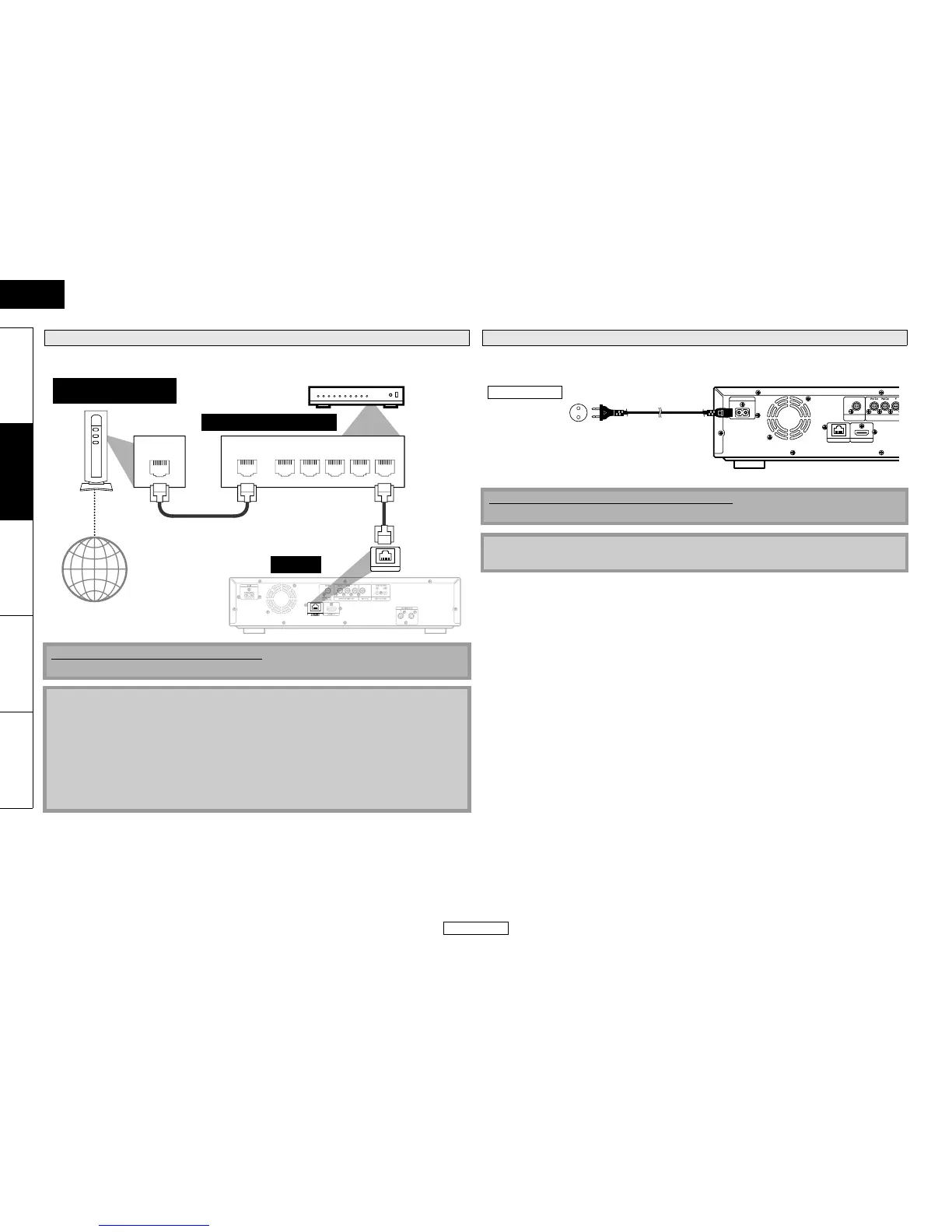
• You can use a disc which offers BD-Live function by connecting the unit to the Internet.
(For BD-Live information, please refer to page 28.)
After you made all necessary connections, connect the AC cord to the AC IN. Then connect the AC
cord to the AC outlet.
Network Connection with LAN
No supplied cables are used in this connection:
Please purchase the necessary cables at your local store.
Note
• After connecting to the Internet, set up necessary network settings.
• Do not insert any cable other than a LAN cable to the ETHERNET terminal to avoid damaging the
unit.
• If your telecommunications equipment (modem, etc.) does not have broadband router
functions, connect a broadband router.
• If your telecommunications equipment (modem, etc.) has broadband router functions but there
is no vacant port, use a hub.
• For a broadband router, use a router which supports 10BASE-T/100BASE-TX.
• Do not connect your PC directly to the ETHERNET terminal of this unit.
LAN
WAN LAN
12345
ETHERNET
Tele co mm un ic at io ns
equipment (modem, etc.)
Hub or broadband router
LAN cable
LAN cable
this unit
Internet
Connecting the AC cord
Supplied cables used in this connection are as follows:
• AC cord x 1
Note
• Insert the plugs securely. Incomplete connections will result in the generation of noise.
HDMI OUT
ETHERNET
AC IN
COAXIAL
COMPONENT VIDEO OUT
DIGITAL OUT
( PCM / BITSTREAM )
AC outlet
110-240V, 50/60 Hz
AC cord


 To Next Page