EasyManua.ls Logo

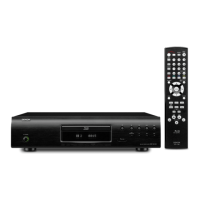
Denon DBP-2012UDCI - User Manual

Denon DBP-2012UDCI
74 pages
Print Icon
To Next Page IconTo Next Page
Loading...
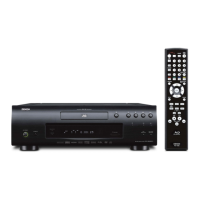
UNIVERSAL AUDIO/VIDEO PLAYER
DBP-2012UDCI
Owners Manual
Manuel de l’Utilisateur
Manual del usuario
Simple
version
Version simplifiée
Versión sencilla
v
4
Basic
version
Version basique
Versión básica
v
9
Advanced
version
Version avancée
Versión avanzada
v
28
Information
“Part names and functions”
(vpage44)
v
43
Informations
“Nomenclature et fonctions“
(vpage 44)
Información
“Nombres y funciones de las
piezas“ (vpágina 44)

Table of Contents

Other manuals for Denon DBP-2012UDCI

Questions and Answers

  • M
    Mario WheelerSep 15, 2025
    Why can't I play files that begin with a period on my Denon Blu-ray Player?
    • J
      johnmcdonaldSep 15, 2025
      When content created by Mac OS X is copied into a USB memory device, hidden files are also copied. These hidden files, which begin with a period, cannot be played.
  • R
    rodneyriveraAug 25, 2025
    What to do if no picture appears on my Denon DBP-2012UDCI?
    • C
      Cynthia WilliamsAug 25, 2025
      First, make sure your TV's input setting is switched to the external input connected to the player. Also, check if the Pure Direct function is set to “Pure Direct 1” or “Pure Direct 2” and set it to “Off”. Verify the video cable connection, and ensure the HDMI OUT connector isn't connected to a DVI IN connector, as DVI connections do not support HDCP. Confirm that the resolution setting matches the connected device's resolution, and that the video cable is securely connected. Also, if “24p Output On” is set by pressing HDMI MODE, video signals may not output from the video and component video terminals during playback of certain discs.
  • K
    Kevin RamseyAug 26, 2025
    Why does my Denon DBP-2012UDCI Blu-ray Player not start playback?
    • M
      mckenzie06Aug 26, 2025
      This issue can occur due to several reasons. Condensation inside the player or on the disc could be the cause; in that case, let the player sit for 1 to 2 hours with the power off. Alternatively, the disc might be scratched or have fingerprints, requiring you to clean or replace it. Ensure the disc is loaded correctly, with the side to be played face down. Finally, check if the disc is unplayable or if no disc is inserted; insert a playable disc if necessary.
  • W
    williamsdannyAug 26, 2025
    How to fix Denon Blu-ray Player when video and audio are not output via the HDMI connection?
    • D
      dorseyjamesAug 26, 2025
      First, check the connection of the HDMI cable and ensure the “HDMI” indicator on the unit's display is lit. Make sure the Pure Direct function is set to “Off.” Verify that the connected display device supports HDCP and that the HDMI video resolution setting supports the resolution of the connected device.
  • M
    Mathew EllisSep 16, 2025
    Why does the media player not respond on my Denon Blu-ray Player?
    • D
      Dr. Edward GordonSep 16, 2025
      This can occur if there is a large number of files in the list, which takes time to process, or if multiple servers are starting or updating information. If the media player no longer responds, press dlna search on the media player menu.
  • R
    rabbottSep 23, 2025
    Why does playback break up on my Denon DBP-2012UDCI Blu-ray Player?
    • T
      Tyler Parker MDSep 23, 2025
      The file bit rate may be too high.
  • J
    Joseph BradleySep 8, 2025
    Why is multi-channel audio not output from my Denon DBP-2012UDCI?
    • J
      jacqueline47Sep 8, 2025
      Ensure multi-channel audio is selected by pressing AUDIO on the remote control to switch from audio supported by a disc to multi-channel audio. Verify the unit is connected to the multi-channel audio input terminal of the AV receiver. If connected, configure the speaker settings using the “Speaker Setting” – “Configuration” on the GUI menu to match the connected speakers.
  • S
    Scott HansonSep 8, 2025
    What to do if Denon DBP-2012UDCI does not return to start-up screen?
    • J
      Jeffrey CarrSep 9, 2025
      There may be an internal error. Set the power to standby, wait awhile, then turn the power back on.
  • P
    Patrick SalinasSep 2, 2025
    Why are subtitles not showing on my Denon DBP-2012UDCI?
    • M
      Michael WhiteSep 2, 2025
      Subtitles may not be available for BD-Video, DVD-Video, or DivX® files that do not contain them. Check if the subtitle setting is “Off” and use the disc menu or SUBTITLE button to set the subtitles to display.
  • L
    Lori SpencerAug 31, 2025
    What to do if my USB memory device cannot be read by Denon DBP-2012UDCI?
    • L
      Lisa BrownAug 31, 2025
      Ensure the playback media mode is set to “USB MODE” by selecting “USB” with SOURCE. The format of the USB memory device might not be compatible, or the device itself may not be compatible.

Summary

Safety Precautions

Important Safety Instructions

Core safety guidelines for product operation and maintenance.

FCC Information

Compliance details for US customers regarding FCC rules.

Laser Safety Classification

Identifies the product's laser safety classification.

Notes on Use and Installation

General Warnings

Important usage warnings related to temperature, handling, and environment.

Installation Precautions

Guidelines for safe installation, focusing on ventilation and heat.

Getting Started: Simple Setup

Simple Setup Guide Overview

Step-by-step guide for initial connection and playback setup.

Connecting the Unit

Instructions for connecting the unit to a TV or AV receiver.

Powering On

Procedures for turning on the unit and connected devices.

Product Features

Handling Cautions

General Handling Precautions

Guidelines for safe operation, maintenance, and moving the unit.

3 D Video Viewing Cautions

Specific safety advice for viewing 3D content to prevent discomfort or injury.

Basic Version Overview

Basic Connections Overview

Information on connecting various media and external devices.

Basic Playback Operation

How to play discs and navigate playback information screens.

Basic Settings Overview

Configuration options for display, audio, HDMI, video, and modes.

Basic Connections Details

Connecting to an AV Receiver

Detailed instructions for connecting via analog and digital audio inputs.

Connecting to a TV

Guide for direct connection to a television via HDMI or component video.

Connecting Audio Devices

Instructions for connecting to 2-channel audio amps and digital recorders.

Playback Operations

Playback Information Display

Understanding the information bar and media player display during playback.

BD and DVD-Video Playback

Detailed steps for playing Blu-ray and DVD-Video discs.

Basic Playback Controls

Functions like pausing, stopping, skipping, and fast-forwarding during playback.

Search and Navigation Features

Using search modes and marker functions for efficient playback.

Advanced Playback Features

Repeat and Frame-by-Frame Playback

Options for repeat playback, A-B repeat, and frame-by-frame viewing.

Audio, Subtitle, and Angle Switching

How to change audio tracks, subtitles, and camera angles.

Random and Programmed Playback

Features for playing tracks in custom or random order.

Basic Settings: Display and HDMI

Display Brightness Control

Adjusting display brightness.

Pure Direct Audio Function

Enabling high-quality audio by stopping video output.

HDMI Control Functions

Configuring HDMI control for connected devices.

Video and HDMI Settings

Video Resolution

Setting video output resolution for the connected TV.

HDMI Output Settings

Configuring HDMI output signals, including deep color.

Picture Quality and Mode Settings

Adjusting Picture Quality

Fine-tuning picture settings like contrast, brightness, and sharpness.

Mode Setting

Advanced Version: Network and USB

Advanced Connections

Connecting to USB memory devices and network servers.

Network Connection Setup

Configuring network settings and performing connection tests.

Playback (Advanced Operation)

Using the Home menu, Media Player, YouTube, and Netflix.

Detailed Settings Menu

GUI Menu Operation

Navigating the graphical user interface for settings.

General System Settings

Configuring system, language, parental lock, and network settings.

Language, Ratings, and Network Settings

Setting display languages, parental controls, and network parameters.

Other Settings

Configuring miscellaneous functions like closed caption and remote ID.

Component Identification

Front Panel Layout

Identification of buttons and indicators on the front panel.

Display Indicators

Explanation of various playback mode and information indicators.

Rear Panel Connections

Identification of input/output terminals on the rear panel.

Remote Control Usage

Remote Control Layout

Diagram and description of all remote control buttons.

Battery Installation and Operation

How to insert batteries and understand remote operation range.

Media Compatibility

Playable Discs and Files

Lists supported disc types, file formats, and specifications.

USB Memory Device Guidelines

Guidelines for using USB memory devices, including supported file systems and limits.

Usage Cautions

Disc Handling and Cleaning

Proper methods for handling discs to prevent damage and ensure playback.

USB Memory Device Handling

Precautions for inserting, removing, and handling USB memory devices.

Additional Information

Digital Audio Output Signals

Details on converting and outputting audio signals based on device compatibility.

Trademark Information

Lists trademarks and technologies used in the product.

Explanation of Terms

Glossary of technical terms and concepts used in the manual.

Troubleshooting

Video and Audio Issues

Solutions for common problems like no picture, distorted video, or sound issues.

Playback and Media Errors

Troubleshooting steps for playback failures, disc read errors, and network issues.

Product Specifications

Audio Performance

Technical specifications for audio output formats and characteristics.

General and Remote Specifications

Power requirements, dimensions, weight, and remote control specifications.

Software Licenses

GNU General Public License (GPL)

Legal terms governing the use and distribution of free software.

GNU Lesser General Public License (LGPL)

Terms for using and distributing free software libraries.

Denon DBP-2012UDCI Specifications

General IconGeneral
BrandDenon
ModelDBP-2012UDCI
CategoryBlu-ray Player
LanguageEnglish

Related product manuals