EasyManua.ls Logo

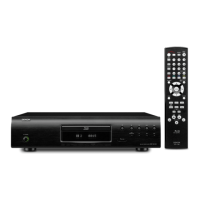
Denon DBP-2012UDCI - User Manual

Denon DBP-2012UDCI
74 pages
Print Icon
To Next Page IconTo Next Page
Loading...
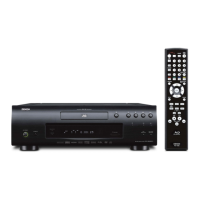
UNIVERSAL AUDIO/VIDEO PLAYER
DBP-2012UDCI
Owners Manual
Manuel de l’Utilisateur
Manual del usuario
Simple
version
Version simplifiée
Versión sencilla
v
4
Basic
version
Version basique
Versión básica
v
9
Advanced
version
Version avancée
Versión avanzada
v
28
Information
“Part names and functions”
(vpage44)
v
43
Informations
“Nomenclature et fonctions“
(vpage 44)
Información
“Nombres y funciones de las
piezas“ (vpágina 44)

Table of Contents

Other manuals for Denon DBP-2012UDCI

Questions and Answers

  • B
    beckeraudreySep 4, 2025
    How to fix Denon Blu-ray Player when cannot connect to the network?
    • J
      jessica12Sep 4, 2025
      Ensure the LAN cable is properly connected and correct any incorrect network connections. Verify that the IP address is correct in the network settings. If a firewall is blocking the connection, allow communication with the unit.
  • L
    laurabakerSep 3, 2025
    How to get HD audio output from Denon DBP-2012UDCI Blu-ray Player?
    • M
      mendezmelissaSep 3, 2025
      Set “BD Audio Mode” to “HD Audio Output” in the settings menu.
  • P
    Patrick SalinasSep 2, 2025
    Why are subtitles not showing on my Denon DBP-2012UDCI?
    • M
      Michael WhiteSep 2, 2025
      Subtitles may not be available for BD-Video, DVD-Video, or DivX® files that do not contain them. Check if the subtitle setting is “Off” and use the disc menu or SUBTITLE button to set the subtitles to display.
  • D
    danielscottSep 1, 2025
    How to fix Denon Blu-ray Player when unable to play BD-LIVE?
    • T
      thomaschristinaSep 1, 2025
      Ensure the USB memory device has more than 1 GB of available space and has been initialized by the unit. Insert the USB memory device while the unit is in standby status. Also, check that the “BD-LIVE Connection” setting in the “Network” menu is set to “Permitted.”
  • L
    Lori SpencerAug 31, 2025
    What to do if my USB memory device cannot be read by Denon DBP-2012UDCI?
    • L
      Lisa BrownAug 31, 2025
      Ensure the playback media mode is set to “USB MODE” by selecting “USB” with SOURCE. The format of the USB memory device might not be compatible, or the device itself may not be compatible.
  • P
    Patrick RodriguezAug 30, 2025
    How do I reset the rating level password on my Denon DBP-2012UDCI?
    • C
      cody67Aug 30, 2025
      You can reset the password by performing the “System” – “Initialize” procedure on the GUI menu.
  • S
    samantha07Aug 29, 2025
    How to fix Denon Blu-ray Player when picture is disrupted?
    • T
      Thomas EdwardsAug 30, 2025
      A slightly disturbed picture right after fast-forwarding or reversing is normal and not a malfunction. Ensure the unit's video/component video output is connected either directly to the TV or via the AV receiver. Also, check if the disc is compatible with the player and has the correct region number.
  • J
    joycekentAug 29, 2025
    Why is my Denon DBP-2012UDCI Blu-ray Player freezing during playback?
    • C
      Cameron CollinsAug 29, 2025
      This issue can be caused by a scratched or fingerprint-contaminated disc; clean the disc or replace it. Alternatively, there may be a problem with the data recorded on the disc itself.
  • S
    Stephanie DanielsAug 28, 2025
    What to do if Denon Blu-ray Player buttons do not work?
    • J
      Jennifer RuizAug 28, 2025
      The disc may not permit certain operations; refer to the disc's instructions. Alternatively, the safety protection device might be activated. In this case, unplug the power cord, wait 5-10 seconds, and then plug it back in.
  • M
    Michael RileyAug 27, 2025
    How to troubleshoot no sound on Denon DBP-2012UDCI?
    • A
      Ashley PriceAug 27, 2025
      Check the audio connections of the connected devices and speakers. Ensure the power is on for the audio devices and that the correct input is selected. Also, verify that the audio output is properly selected.

Summary

Safety Precautions

Important Safety Instructions

Core safety guidelines for product operation and maintenance.

FCC Information

Compliance details for US customers regarding FCC rules.

Laser Safety Classification

Identifies the product's laser safety classification.

Notes on Use and Installation

General Warnings

Important usage warnings related to temperature, handling, and environment.

Installation Precautions

Guidelines for safe installation, focusing on ventilation and heat.

Getting Started: Simple Setup

Simple Setup Guide Overview

Step-by-step guide for initial connection and playback setup.

Connecting the Unit

Instructions for connecting the unit to a TV or AV receiver.

Powering On

Procedures for turning on the unit and connected devices.

Product Features

Handling Cautions

General Handling Precautions

Guidelines for safe operation, maintenance, and moving the unit.

3 D Video Viewing Cautions

Specific safety advice for viewing 3D content to prevent discomfort or injury.

Basic Version Overview

Basic Connections Overview

Information on connecting various media and external devices.

Basic Playback Operation

How to play discs and navigate playback information screens.

Basic Settings Overview

Configuration options for display, audio, HDMI, video, and modes.

Basic Connections Details

Connecting to an AV Receiver

Detailed instructions for connecting via analog and digital audio inputs.

Connecting to a TV

Guide for direct connection to a television via HDMI or component video.

Connecting Audio Devices

Instructions for connecting to 2-channel audio amps and digital recorders.

Playback Operations

Playback Information Display

Understanding the information bar and media player display during playback.

BD and DVD-Video Playback

Detailed steps for playing Blu-ray and DVD-Video discs.

Basic Playback Controls

Functions like pausing, stopping, skipping, and fast-forwarding during playback.

Search and Navigation Features

Using search modes and marker functions for efficient playback.

Advanced Playback Features

Repeat and Frame-by-Frame Playback

Options for repeat playback, A-B repeat, and frame-by-frame viewing.

Audio, Subtitle, and Angle Switching

How to change audio tracks, subtitles, and camera angles.

Random and Programmed Playback

Features for playing tracks in custom or random order.

Basic Settings: Display and HDMI

Display Brightness Control

Adjusting display brightness.

Pure Direct Audio Function

Enabling high-quality audio by stopping video output.

HDMI Control Functions

Configuring HDMI control for connected devices.

Video and HDMI Settings

Video Resolution

Setting video output resolution for the connected TV.

HDMI Output Settings

Configuring HDMI output signals, including deep color.

Picture Quality and Mode Settings

Adjusting Picture Quality

Fine-tuning picture settings like contrast, brightness, and sharpness.

Mode Setting

Advanced Version: Network and USB

Advanced Connections

Connecting to USB memory devices and network servers.

Network Connection Setup

Configuring network settings and performing connection tests.

Playback (Advanced Operation)

Using the Home menu, Media Player, YouTube, and Netflix.

Detailed Settings Menu

GUI Menu Operation

Navigating the graphical user interface for settings.

General System Settings

Configuring system, language, parental lock, and network settings.

Language, Ratings, and Network Settings

Setting display languages, parental controls, and network parameters.

Other Settings

Configuring miscellaneous functions like closed caption and remote ID.

Component Identification

Front Panel Layout

Identification of buttons and indicators on the front panel.

Display Indicators

Explanation of various playback mode and information indicators.

Rear Panel Connections

Identification of input/output terminals on the rear panel.

Remote Control Usage

Remote Control Layout

Diagram and description of all remote control buttons.

Battery Installation and Operation

How to insert batteries and understand remote operation range.

Media Compatibility

Playable Discs and Files

Lists supported disc types, file formats, and specifications.

USB Memory Device Guidelines

Guidelines for using USB memory devices, including supported file systems and limits.

Usage Cautions

Disc Handling and Cleaning

Proper methods for handling discs to prevent damage and ensure playback.

USB Memory Device Handling

Precautions for inserting, removing, and handling USB memory devices.

Additional Information

Digital Audio Output Signals

Details on converting and outputting audio signals based on device compatibility.

Trademark Information

Lists trademarks and technologies used in the product.

Explanation of Terms

Glossary of technical terms and concepts used in the manual.

Troubleshooting

Video and Audio Issues

Solutions for common problems like no picture, distorted video, or sound issues.

Playback and Media Errors

Troubleshooting steps for playback failures, disc read errors, and network issues.

Product Specifications

Audio Performance

Technical specifications for audio output formats and characteristics.

General and Remote Specifications

Power requirements, dimensions, weight, and remote control specifications.

Software Licenses

GNU General Public License (GPL)

Legal terms governing the use and distribution of free software.

GNU Lesser General Public License (LGPL)

Terms for using and distributing free software libraries.

Denon DBP-2012UDCI Specifications

General IconGeneral
BrandDenon
ModelDBP-2012UDCI
CategoryBlu-ray Player
LanguageEnglish

Related product manuals