EasyManua.ls Logo

Denon DCD-425 - Adjustment Procedures with Disc

Denon DCD-425
32 pages
Print Icon
To Next Page IconTo Next Page
To Previous Page IconTo Previous Page
Loading...
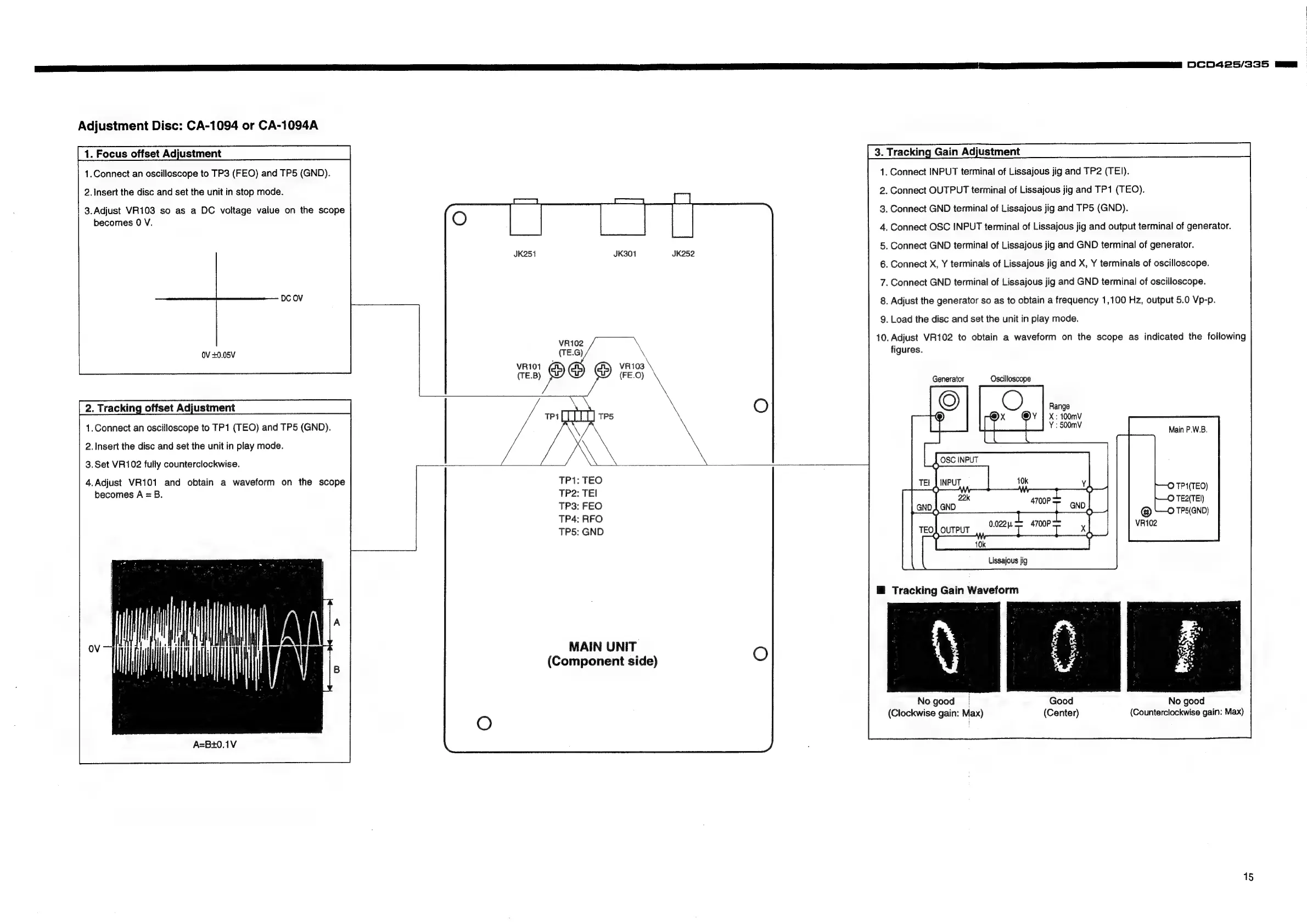
Adjustment
Disc:
CA-1094
or
CA-1094A
1.Connect
an
oscilloscope
to
TP3
(FEO)
and
TPS
(GND).
2.
insert
the
disc
and
set
the
unit
in
stop
mode.
3.Adjust
VR103
so
as
a
DC
voltage
value
on
the
scope
becomes
0
V.
OV
+0.05V
1.Connect
an
oscilloscope
to
TP1
(TEO)
and
TPS
(GND).
2.
Insert
the
disc
and
set
the
unit
in
play
mode.
3.Set
VR102
fully
counterclockwise.
4.Adjust
VR101
and
obtain
a
waveform
on
the
scope
becomes
A
=
B.
A=B+0.1V
JK301
VR102
(TE.G)
\
VR101
¢
VR103
(TE.B)
@)
mS
/
x
Cj
TPALT
LLL]
Tes
TP1:
TEO
TP2:
TEI
TP3:
FEO
TP4:
RFO
TP5:
GND
MAIN
UNIT
(Component
side)
1.
Connect
INPUT
terminal
of
Lissajous
jig
and
TP2
(TE]).
2.
Connect
OUTPUT
terminal
of
Lissajous
jig
and
TP1
(TEO).
3.
Connect
GND
terminal
of
Lissajous
jig
and
TP5
(GND).
4.
Connect
OSC
INPUT
terminal
of
Lissajous
jig
and
output
terminal
of
generator.
5.
Connect
GND
terminal
of
Lissajous
jig
and
GND
terminal
of
generator.
6.
Connect
X,
Y
terminals
of
Lissajous
jig
and
X,
Y
terminals
of
oscilloscope.
7.
Connect
GND
terminal
of
Lissajous
jig
and
GND
terminal
of
oscilloscope.
8.
Adjust
the
generator
so
as
to
obtain
a
frequency
1,100
Hz,
output
5.0
Vp-p.
9.
Load
the
disc
and
set
the
unit
in
play
mode.
10.
Adjust
VR102
to
obtain
a
waveform
on
the
scope
as
indicated
the
following
figures.
Generator
Oscilloscope
Main
P.W.B.
Y
40k
()
()
ao
PT
wy)
ea
ee
GND
4700P—=
np
|
[|
)
x
4
J
ourPut
cai
SERA
X
10k
Lissajous
jig
HM
Tracking
Gain
Waveform
Good
No
good
(Center)
(Counterclockwise
gain:
Max)
O
TP1(TEO)
|
No
good
|
(Clockwise
gain:
Max)
15
DCDN425/335
m7
:

Related product manuals