EasyManua.ls Logo

Denon DCD-620 - Playback Using the Remote Control Unit

Denon DCD-620
59 pages
Print Icon
To Next Page IconTo Next Page
To Previous Page IconTo Previous Page
Loading...
ENGLISH
PLAYBACK
USING
THE
REMOTE
CONTROL
UNIT
The
accessory
RC-207
remote
control
unit
can
be
used
to
control
the
CD
player
from
a
convenient
distance.
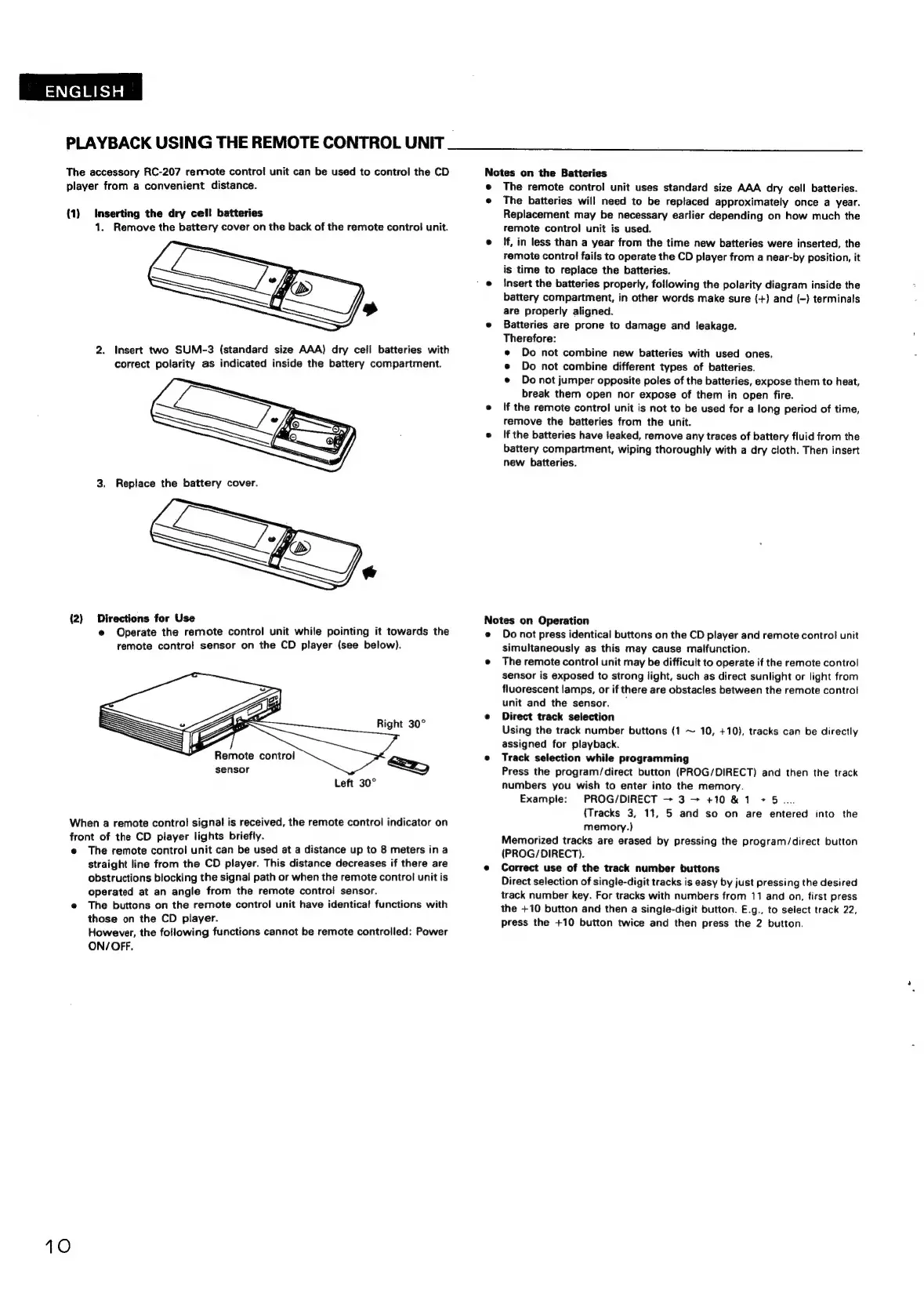
(1)
Inserting
the
dry
cell
batteries
1.
Remove
the
battery
cover
on
the
back
of
the
remote
control
unit.
2.
Insert
two
SUM-3
(standard
size
AAA)
dry
cell
batteries
with
correct
polarity
as
indicated
inside
the
battery
compartment.
3.
Replace
the
battery
cover.
(2)
Directions
for
Use
@
Operate
the
remote
control
unit
while
pointing
it
towards
the
remote
control
sensor
on
the
CD
player
(see
below).
a
3——
Right
30°
a
<2)
Remote
control
sensor
Left
30°
When
a
remote
control
signal
is
received,
the
remote
control
indicator
on
front
of
the
CD
player
lights
briefly.
e@
The
remote
control
unit
can
be
used
at
a
distance
up
to
8
meters
ina
straight
line
from
the
CD
player.
This
distance
decreases
if
there
are
obstructions
blocking
the
signal
path
or
when
the
remote
control
unit
is
operated
at
an
angle
from
the
remote
contro!
sensor.
e
The
buttons
on
the
remote
control
unit
have
identical
functions
with
those
on
the
CD
player.
However,
the
fotiowing
functions
cannot
be
remote
controlled:
Power
ON/OFF.
10
Notes
on
the
Batteries
©
The
remote
control
unit
uses
standard
size
AAA
dry
cell
batteries.
e
The
batteries
will
need
to
be
replaced
approximately
once
a
year.
Replacement
may
be
necessary
earlier
depending
on
how
much
the
femote
control
unit
is
used.
e
f,
in
less
than
a
year
from
the
time
new
batteries
were
inserted,
the
remote
contro!
fails
to
operate
the
CD
player
from
a
near-by
position,
it
is
time
to
replace
the
batteries.
e
Insert
the
batteries
properly,
following
the
polarity
diagram
inside
the
battery
compartment,
in
other
words
make
sure
(+)
and
(-)
terminals
are
properly
aligned.
e
Batteries
are
prone
to
damage
and
leakage.
Therefore:
e
Do
not
combine
new
batteries
with
used
ones.
e
Do
not
combine
different
types
of
batteries.
e
Do
not
jumper
opposite
poles
of
the
batteries,
expose
them
to
heat,
break
them
open
nor
expose
of
them
in
open
fire.
e
If
the
remote
control
unit
is
not
to
be
used
for
a
long
period
of
time,
remove
the
batteries
from
the
unit.
e
Ifthe
batteries
have
leaked,
remove
any
traces
of
battery
fluid
from
the
battery
compartment,
wiping
thoroughly
with
a
dry
cloth.
Then
insert
new
batteries.
Notes
on
Operation
e
Do
not
press
identical
buttons
on
the
CD
player
and
remote
control
unit
simultaneously
as
this
may
cause
malfunction.
e
The
remote
control
unit
may
be
difficult
to
operate
if
the
remote
control
sensor
is
exposed
to
strong
light,
such
as
direct
sunlight
or
light
from
fluorescent
lamps,
or
if
there
are
obstacles
between
the
remote
control
unit
and
the
sensor.
e
Direct
track
selection
Using
the
track
number
buttons
(1
~
10,
+10),
tracks
can
be
directly
assigned
for
playback.
e
Track
selection
while
programming
Press
the
program/direct
button
(PROG/DIRECT)
and
then
the
track
numbers
you
wish
to
enter
into
the
memory.
Example:
PROG/DIRECT
+
3
+
+10&1
+5...
{Tracks
3,
11,
5
and
so
on
are
entered
into
the
memory.)
Memorized
tracks
are
erased
by
pressing
the
program/direct
button
(PROG/DIRECT).
e
Correct
use
of
the
track
number
buttons
Direct
selection
of
single-digit
tracks
is
easy
by
just
pressing
the
desired
track
number
key.
For
tracks
with
numbers
from
11
and
on,
first
press
the
+10
button
and
then
a
single-digit
button.
E.g.,
to
select
track
22,
Press
the
+10
button
twice
and
then
press
the
2
button.

Related product manuals