EasyManua.ls Logo

Denon DCD-660 - Page 10

Denon DCD-660
42 pages
Print Icon
To Next Page IconTo Next Page
To Previous Page IconTo Previous Page
Loading...
@)
When
there
are
no
tracks
that
can
be
picked
in
the
blank
portion
of
side
A
{side
B),
cance!
the
last
track
of
side
A
(side
B),
increase
the
blank
portion,
and
pick
an
available
track
in
the
new
blank
portion.
At
this
time
the
tracks
cancelled
from
side
A
are
automatically
fixed
on
side
B.
“|
When
there
are
no
tracks
that
can
be
picked
even
though
the
last
track
of
side
A
(side
B)
has
been
cancelled,
the
setting
will
remain
the
same
even
if
the
cancellation
is
suspended.
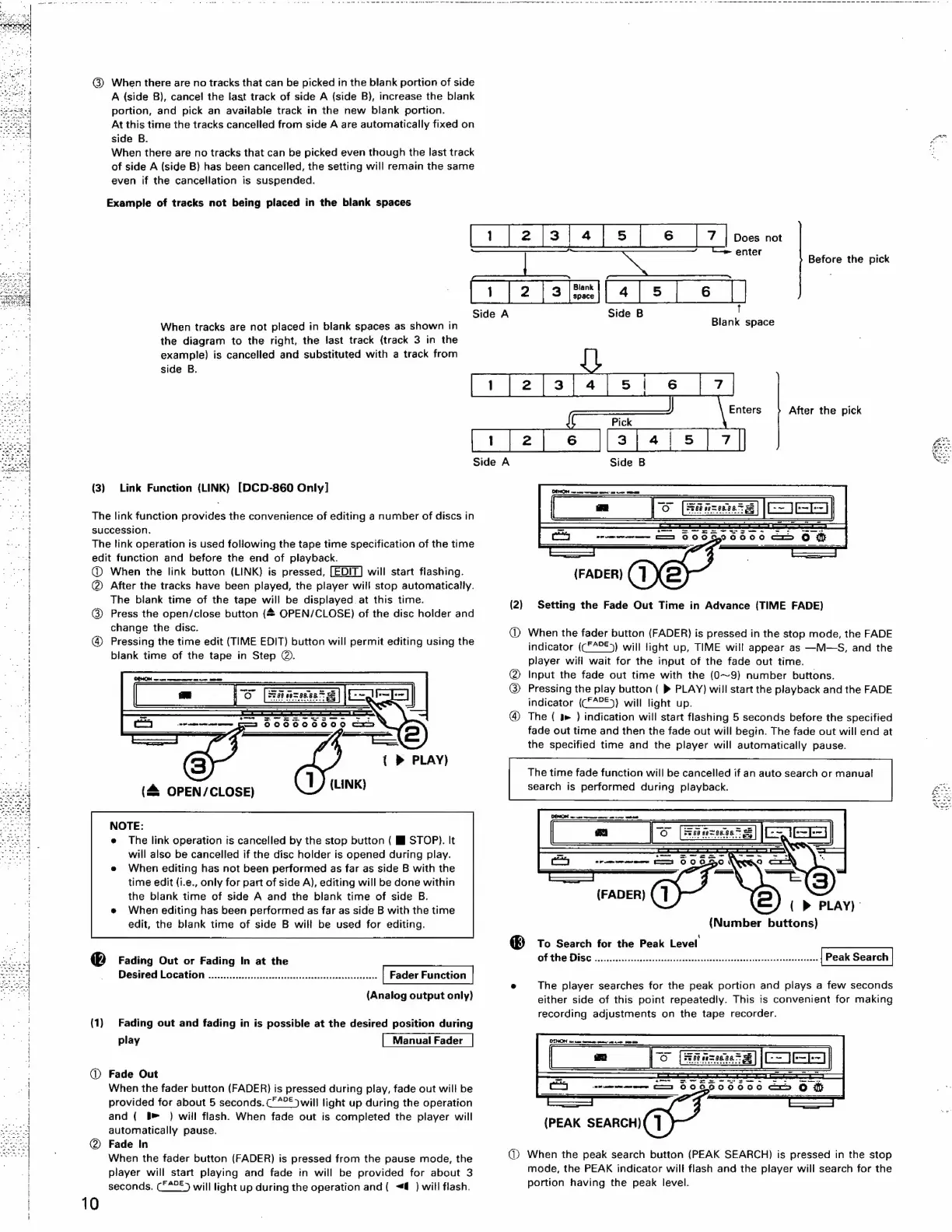
Example
of
tracks
not
being
placed
in
the
blank
spaces
When
tracks
are
not
placed
in
blank
spaces
as
shown
in
the
diagram
to
the
right,
the
last
track
(track
3
in
the
example)
is
cancelled
and
substituted
with
a
track
from
side
B.
(3)
Link
Function
(LINK)
[DCD-860
Only]
The
link
function
provides
the
convenience
of
editing
a
number
of
discs
in
succession.
The
link
operation
is
used
following
the
tape
time
specification
of
the
time
edit
function
and
before
the
end
of
playback.
@
When
the
link
button
(LINK)
is
pressed,
will
start
flashing.
@
After
the
tracks
have
been
played,
the
player
will
stop
automatically.
The
blank
time
of
the
tape
will
be
displayed
at
this
time.
@
Press
the
open/close
button
(#
OPEN/CLOSE)
of
the
disc
holder
and
change
the
disc.
@
Pressing
the
time
edit
(TIME
EDIT)
button
will
permit
editing
using
the
blank
time
of
the
tape
in
Step
@.
{(
PLAY)
(LINK)
(4
OPEN/CLOSE)
NOTE:
e
The
link
operation
is
cancelled
by
the
stop
button
(
HJ
STOP).
It
will
also
be
cancelled
if
the
disc
holder
is
opened
during
play.
When
editing
has
not
been
performed
as
far
as
side
B
with
the
time
edit
{i.e.,
only
for
part
of
side
A),
editing
will
be
done
within
the
blank
time
of
side
A
and
the
blank
time
of
side
B.
When
editing
has
been
performed
as
far
as
side
B
with
the
time
edit,
the
blank
time
of
side
B
will
be
used
for
editing.
Fading
Out
or
Fading
In
at
the
Desired
Location
.......0.......:cccccccsssssssssccessssnceessseasesane
(Analog
output
only)
(1)
Fading
out
and
fading
in is
possible
at
the
desired
position
during
play
Manual
Fader
:
@
Fade
Out
:
|
When
the
fader
button
(FADER)
is
pressed
during
play,
fade
out
will
be
provided
for
about
5
seconds.
C°“°©)
will
light
up
during
the
operation
|
and
(
§»
)
will
flash.
When
fade
out
is
completed
the
player
will
“I
automatically
pause.
@
Fade
In
When
the
fader
button
(FADER)
is
pressed
from
the
pause
mode,
the
player
will
start
playing
and
fade
in
will
be
provided
for
about
3
seconds.
(£*°)
will
light
up
during
the
operation
and
{
<@
)
will
flash.
10
tf
2
ja}
4
|
5
|
6
|
7
|
pees
no
I
i
enter
:
Before
the
pick
Enters
After
the
pick
(FADER)
(2)
Setting
the
Fade
Out
Time
in
Advance
(TIME
FADE)
@
When
the
fader
button
(FADER)
is
pressed
in
the
stop
mode,
the
FADE
indicator
(CF4°£)
will
light
up,
TIME
will
appear
as
—M—S,
and
the
player
will
wait
for
the
input
of
the
fade
out
time.
Input
the
fade
out
time
with
the
(0~9)
number
buttons.
Pressing
the
play
button
(
®
PLAY)
will
start
the
playback
and
the
FADE
indicator
(CF°£))
will
light
up.
@
The
(
&
)
indication
will
start
flashing
5
seconds
before
the
specified
fade
out
time
and
then
the
fade
out
will
begin.
The
fade
out
will
end
at
the
specified
time
and
the
player
will
automatically
pause.
KS)
The
time
fade
function
will
be
cancelled
if
an
auto
search
or
manual
search
is
performed
during
playback.
(FADER)
{
»
PLAY)”
(Number
buttons)
®
To
Search
for
the
Peak
Level
Of
the
DISC
..icc
Aen
dinn
iin
biases
een
kaalave
Peak
Search
°
The
player
searches
for
the
peak
portion
and
plays
a
few
seconds
either
side
of
this
point
repeatedly.
This
is
convenient
for
making
recording
adjustments
on
the
tape
recorder.
(PEAK
SEARCH)
1)
When
the
peak
search
button
(PEAK
SEARCH)
is
pressed
in
the
stop
mode,
the
PEAK
indicator
will
flash
and
the
player
will
search
for
the
portion
having
the
peak
level.

Related product manuals