EasyManua.ls Logo

Denon DCD-660 - Remote Control Operation; Battery Installation and General Use

Denon DCD-660
42 pages
Print Icon
To Next Page IconTo Next Page
To Previous Page IconTo Previous Page
Loading...
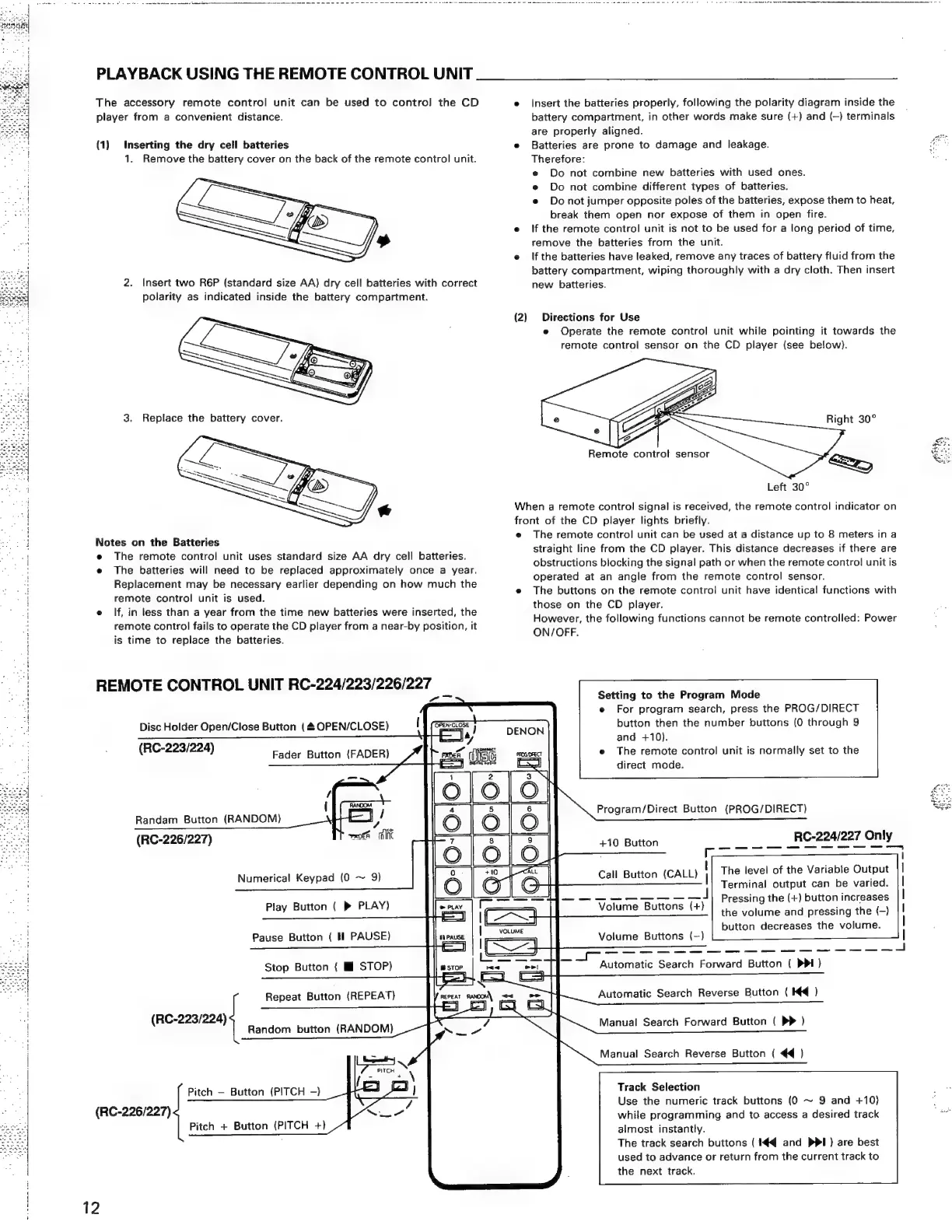
PLAYBACK
USING
THE
REMOTE
CONTROL
UNIT
The
accessory
remote
control
unit
can
be
used
to
contro!
the
CD
e
Insert
the
batteries
properly,
following
the
polarity
diagram
inside
the
player
from
a
convenient
distance.
battery
compartment,
in
other
words
make
sure
(+)
and
(—)
terminals
are
properly
aligned.
4
(1)
Inserting
the
dry
cell
batteries
e
Batteries
are
prone
to
damage
and
leakage.
ie
1.
Remove
the
battery
cover
on
the
back
of
the
remote
control
unit.
Therefore:
;
e
Do
not
combine
new
batteries
with
used
ones.
e
Do
not
combine
different
types
of
batteries.
e
Donot
jumper
opposite
poles
of
the
batteries,
expose
them
to
heat,
break
them
open
nor
expose
of
them
in
open
fire.
e
If
the
remote
control
unit
is
not
to
be
used
for
a
long
period
of
time,
remove
the
batteries
from
the
unit.
e
Ifthe
batteries
have
leaked,
remove
any
traces
of
battery
fluid
from
the
battery
compartment,
wiping
thoroughly
with
a
dry
cloth.
Then
insert
2.
Insert
two
R6P
(standard
size
AA)
dry
cell
batteries
with
correct
new
batteries.
polarity
as
indicated
inside
the
battery
compartment.
(2)
Directions
for
Use
e
Operate
the
remote
control
unit
while
pointing
it
towards
the
remote
control
sensor
on
the
CD
player
(see
below).
3.
Replace
the
battery
cover.
Right
30°
Remote
control
sensor
Left
30°
When
a
remote
control
signal
is
received,
the
remote
control
indicator
on
front
of
the
CD
player
lights
briefly.
e
The
remote
control
unit
can
be
used
at
a
distance
up
to
8
meters
ina
:
:
:
straight
line
from
the
CD
player.
This
distance
d
a
if
th
e
The
remote
control
unit
uses
standard
size
AA
dry
cell
batteries.
pent
:
bey
iS
Slstance
decrnases
IF
Inele:ale
.
: :
:
obstructions
blocking
the
signal
path
or
when
the
remote
control
unit
is
e
The
batteries
will
need
to
be
replaced
approximately
once
a
year.
|
Replacement
may
be
necessary
earlier
depending
on
how
much
the
Depleted
cet.
aa
sangle:
Ion
ane
remere
cone)
Serer
Ya
p
ete
Mi
P
g
e
The
buttons
on
the
remote
control
unit
have
identical
functions
with
a
remote
control
unit
is
used.
those
on
the
CD
player.
e
If,
in
tess
than
a
year
from
the
time
new
batteries
were
inserted,
th
; t
y
eenenors
.
However,
the
following
functions
cannot
be
remote
controlled:
Power
"
remote
control
fails
to
operate
the
CD
player
from
a
near-by
position,
it
1
gue
;
ON/OFF.
is
time
to
replace
the
batteries.
Notes
on
the
Batteries
REMOTE
CONTROL
UNIT
RC-224/223/226/227
_
7
Setting
to
the
Program
Mode
e
For
program
search,
press
the
PROG/DIRECT
button
then
the
number
buttons
(0
through
9
Disc
Holder
Open/Close
Button
(4
OPEN/CLOSE)
I
(RC-223/224)
and
+10).
The
remote
control
unit
is
normally
set
to
the
direct
mode.
Fader
Button
(FADER)
Program/Direct
Button
(PROG/DIRECT)
Randam
Button
(RANDOM)
7
(RC-226/227)
wmoth
flit
+10
Button
RC-224/227
Only
Call
Button
(CALL)
|
The
level
of
the
Variable
Output
Terminal
output
can
be
varied.
(SS
oe
pee
Te
J
Pressing
the
(+)
button
increases
Volume
Curens-tt)
the
volume
and
pressing
the
(—)
button
decreases
the
volume.
Numerical
Keypad
(0
~
9)
Play
Button
(
»®
PLAY)
Pause
Button
(
Hl
PAUSE)
Volume
Buttons
(-)
Stop
Button
(
HI
STOP)
Automatic
Search
Forward
Button
(
PPI)
Repeat
Button
(REPEAT)
Automatic
Search
Reverse
Button
(
Kd
)
(RC-223/224)
Manual
Search
Forward
Button
(
D>
)
Random
button
(RANDOM)
Manual
Search
Reverse
Button
{
44
)
Track
Selection
Use
the
numeric
track
buttons
(0
~
9
and
+10)
while
programming
and
to
access
a
desired
track
Pitch
Button
(PITCH
-)
(RC-226/227)
almost
instantly.
The
track
search
buttons
(
#4
and
PPI)
are
best
used
to
advance
or
return
from
the
current
track
to
the
next
track.
Pitch
+
Button
(PITCH
+)
12

Related product manuals