EasyManua.ls Logo

Denon DCD-660 - Component Identification and Controls; Front Panel Controls and Displays

Denon DCD-660
42 pages
Print Icon
To Next Page IconTo Next Page
To Previous Page IconTo Previous Page
Loading...
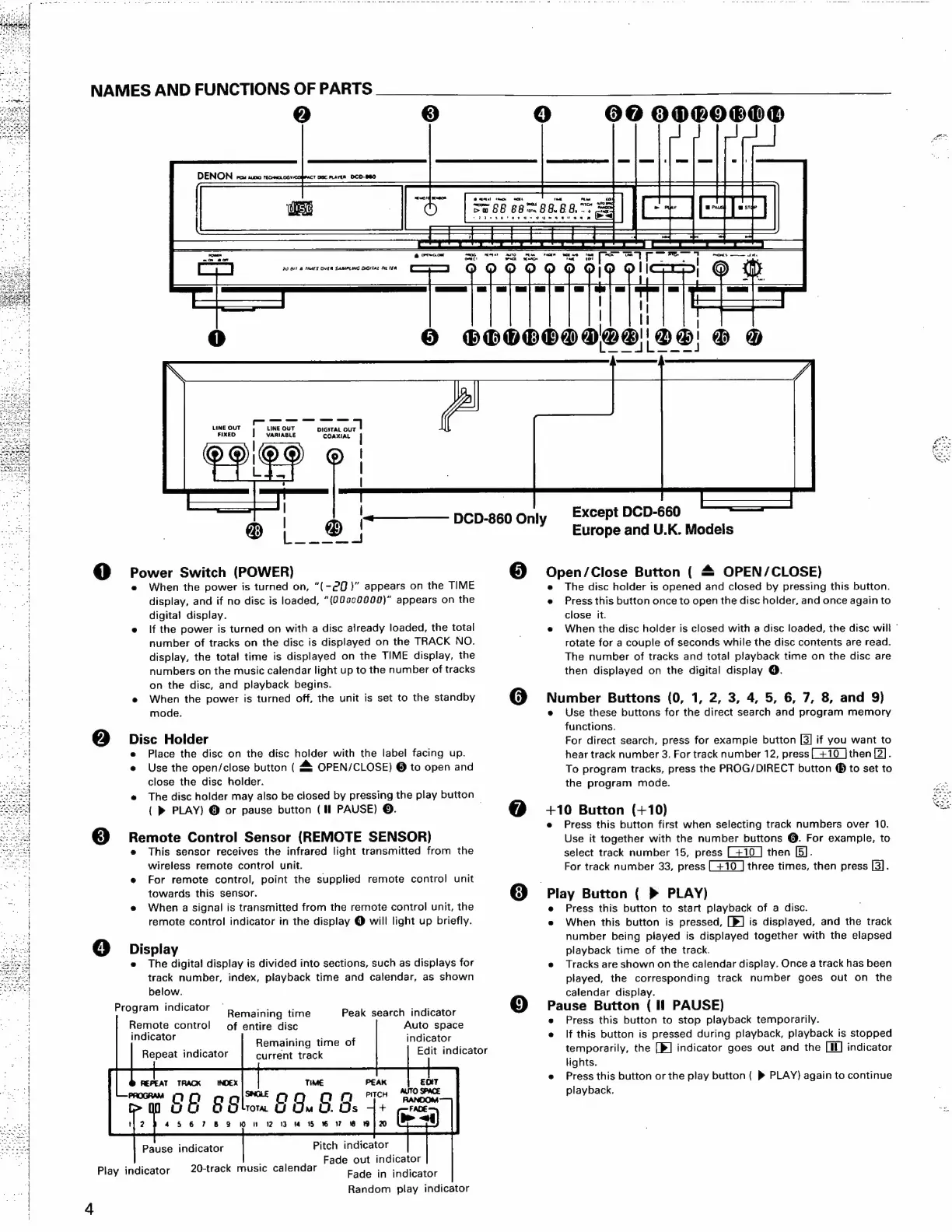
NAMES
AND
FUNCTIONS
OF
PARTS
2)
3)
DENON
PCM
AUD
TCH
OG
¥CO
TOMC
PLAYER
DCD-860
4)
606
ODGO8O®
i"
6
OncoF
a,
omact
-—-—-——-4
LINE
OUT
LINE
OUT
DIGITAL
OUT
FIXED
|
variaste
COAXIAL
|
@ODi@®D
,
|
@
|
|
=)
@
Power
Switch
(POWER)
e
When
the
power
is
turned
on,
“(-20)”
appears
on
the
TIME
display,
and
if
no
disc
is
loaded,
“(009c0000)”
appears
on
the
digital
display.
e
If
the
power
is
turned
on
with
a
disc
already
loaded,
the
total
number
of
tracks
on
the
disc
is
displayed
on
the
TRACK
NO.
display,
the
total
time
is
displayed
on
the
TIME
display,
the
numbers
on
the
music
calendar
light
up
to
the
number
of
tracks
on the
disc,
and
playback
begins.
e
When
the
power
is
turned
off,
the
unit
is
set
to
the
standby
mode.
Qa
Disc
Holder
e
Place
the
disc
on
the
disc
holder
with
the
label
facing
up.
e
Use
the
open/close
button
(
44
OPEN/CLOSE)
@
to
open
and
close
the
disc
holder.
e
The
disc
holder
may
also
be
closed
by
pressing
the
play
button
{
»
PLAY)
@
or
pause
button
(Il
PAUSE)
©.
,
3)
Homers
Control
Sensor
(REMOTE
SENSOR)
This
sensor
receives
the
infrared
light
transmitted
from
the
wireless
remote
control
unit.
e
For
remote
control,
point
the
supplied
remote
control
unit
towards
this
sensor.
e
When
a
signal
is
transmitted
from
the
remote
control
unit,
the
remote
control
indicator
in
the
display
@
will
light
up
briefly.
@
Display
e
The
digita!
display
is
divided
into
sections,
such
as
displays
for
track
number,
index,
playback
time
and
calendar,
as
shown
below.
Program
indicator
Remaining
time
Peak
search
indicator
Remote
control
of
entire
disc
Auto
space
indicator
indicator
Remaining
time
of
See
Edit
indicator
Repeat
indicator
current
track
Pause
indicator
Pitch
indicator
Fade
out
indicator
Fade
in
indicator
Random
play
indicator
Play
indicator
20-track
music
calendar
Eee
oot
we
AH
5
rome
ek
we
Tat
<—
oe
|
aaa
oes
tor
wits
20
GIF
&
FARES
OVER
SAMPLING
ONGITAL
Fi
TEA
C7;
@
@
@O
QoQ
W@W
|
wy GW
|
|
on
ar
()
(nd
5)
SHOLOSING!
GOO!
®
@
———_——
DCD-860
Only
Except
DCD-660
Europe
and
U.K.
Models
Open/Close
Button
(
&
OPEN/CLOSE)
e
The
disc
holder
is
opened
and
closed
by
pressing
this
button.
e
Press
this
button
once
to
open
the
disc
holder,
and once
again
to
close
it.
e
When
the
disc
holder
is
closed
with
a
disc
loaded,
the
disc
will
rotate
for
a
couple
of
seconds
while
the
disc
contents
are
read.
The
number
of
tracks
and
total
playback
time
on
the
disc
are
then
displayed
on
the
digital
display
@.
Number
Buttons
(0,
1,
2,
3, 4,
5,
6,
7,
8,
and
9)
e
Use
these
buttons
for
the
direct
search
and
program
memory
functions.
For
direct
search,
press
for
example
button
if
you
want
to
hear
track
number
3.
For
track
number
12,
press
[+10
|
then
[2].
To
program
tracks,
press
the
PROG/DIRECT
button
®
to
set
to
the
program
mode.
+10
Button
(+10)
e
Press
this
button
first
when
selecting
track
numbers
over
10.
Use
it
together
with
the
number
buttons
@.
For
example,
to
select
track
number
15,
press
then
[5].
For
track
number
33,
press
three
times,
then
press
[3].
Play
Button
(
>
PLAY)
e
Press
this
button
to
start
playback
of
a
disc.
e
When
this
button
is
pressed,
[>]
is
displayed,
and
the
track
number
being
played
is
displayed
together
with
the
elapsed
playback
time
of
the
track.
e@
Tracks
are
shown
on
the
calendar
display.
Once
a
track
has
been
played,
the
corresponding
track
number
goes
out
on
the
calendar
display.
Pause
Button
(
Il
PAUSE)
e
Press
this
button
to
stop
playback
temporarily.
e
lf
this
button
is
pressed
during
playback,
playback
is
stopped
temporarily,
the
[}]
indicator
goes
out
and
the
[Mf]
indicator
lights.
e
Press
this
button
or
the
play
button
(
»
PLAY}
again
to
continue
playback.

Related product manuals