EasyManua.ls Logo

Denon DCD-660 - Timer-Controlled Playback; The Compact Disc

Denon DCD-660
42 pages
Print Icon
To Next Page IconTo Next Page
To Previous Page IconTo Previous Page
Loading...
®
®
®
After
the
search,
the
PEAK
indicator
lights
up
and
a
few
seconds
either
side
of
the
peak
level
point
are
played
back
repeatedly.
This
is
convenient
for
making
recording
adjustments
on
the
tape
recorder.
To
cancel
the
peak
search,
press
the
stop
{
MJ
STOP)
button.
When
the
play
button
(
®
PLAY)
or
the
pause
button
(
If
PAUSE)
is
pressed
during
peak
search
or
while
playing
the
peak
portion
back
repeatedly,
the
player
will
go
to
the
beginning
of
the
first
track
(the
first
track
of
the
program
for
program
playback,
or
the
track
that
was
first
selected
in
the
time
edit)
and
begin
playback
from
here
if
the
play
button
was
pressed
or
enter
the
pause
mode
if
the
pause
button
was
pressed.
NOTE:
e
The
peak
search
function
reads
the
level
of
the
disc
from
the
beginning
of
the
disc
to
the
end
at
a
fixed
interval
and
regards
the
maximum
value
that
was
read
as
the
peak.
Peak
search
takes
a
little
time
for
this
reason.
The
peak
portion
may
change
each
time
the
disc
is
read
and
there
may
be
a
slight
difference
in
the
actual
peak
level,
but
since
this
difference
ever
so
slight
there
will
be
no
adverse
affects
on
the
adjustment
of
the
recording
level.
The
time
fade
function
is
cancelled
when
the
peak
search
operation
is
performed.
To
use
the
time
fade
function,
set
to
the
stop
mode
then
reset
the
function.
Buttons
other
than
the
open/close
button
(44
OPEN/CLOSE),
play
button
(
»
PLAY),
pause
button
(
If
PAUSE),
and
stop
(Hi
STOP)
button
will
not
function
during
peak
search
or
repeat
play
of
the
peak
portion.
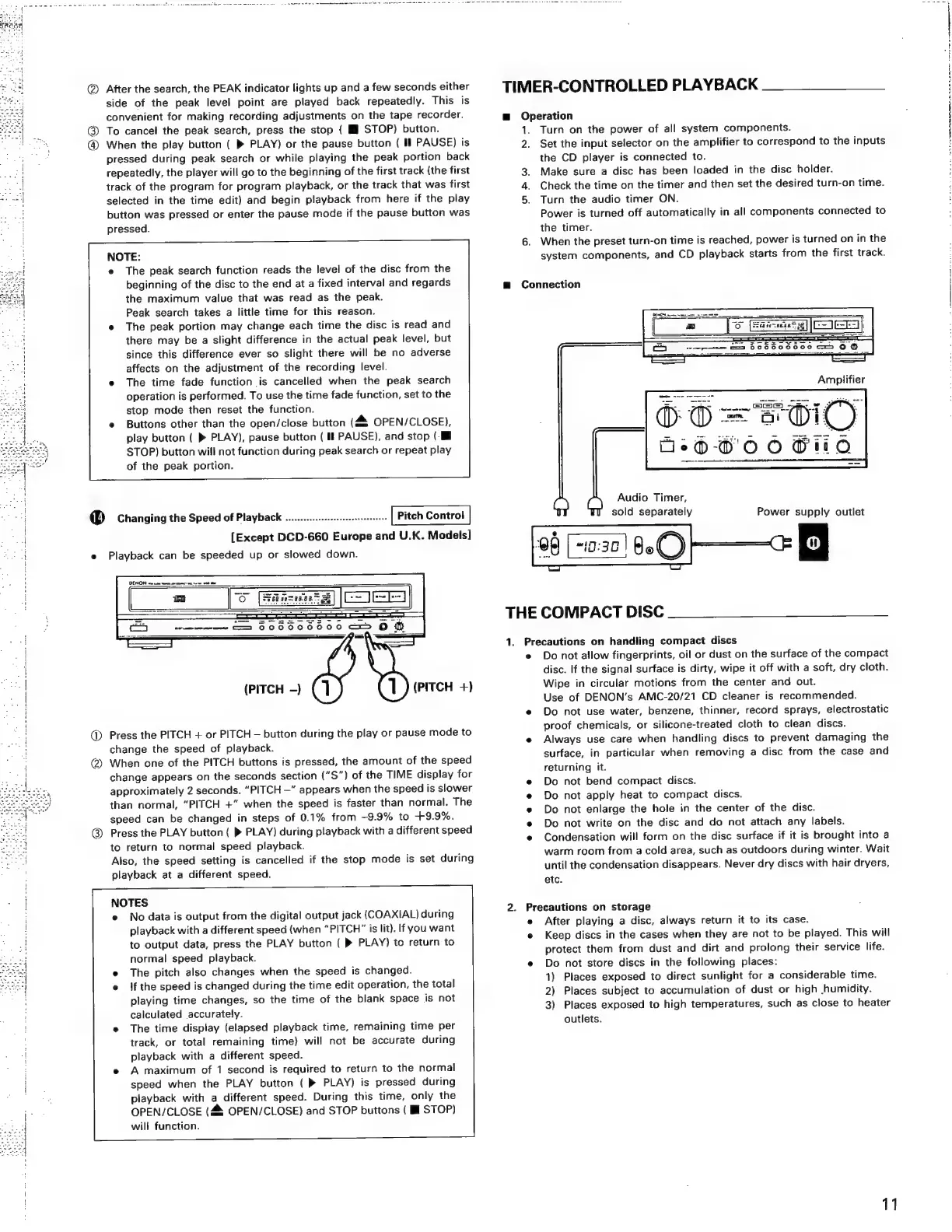
@®
Changing
the
Speed
of
Playback
.............::--:seessseseseees
Pitch
Control
0)
@
[Except
DCD-660
Europe
and
U.K.
Models]
Playback
can
be
speeded
up
or
slowed
down.
(PITCH
-)
(PITCH
+)
Press
the
PITCH
+
or
PITCH
—
button
during
the
play
or
pause
mode
to
change
the
speed
of
playback.
When
one
of
the
PITCH
buttons
is
pressed,
the
amount
of
the
speed
change
appears
on
the
seconds
section
(“S")
of
the
TIME
display
for
approximately
2
seconds.
“PITCH
—”
appears
when
the
speed
is
slower
than
normal,
“PITCH
+”
when
the
speed
is
faster
than
normal.
The
speed
can
be
changed
in
steps
of
0.1%
from
9.9%
to
+9.9%.
Press
the
PLAY
button
(
»
PLAY)
during
playback
with
a
different
speed
to
return
to
normal
speed
playback.
Also,
the
speed
setting
is
cancelled
if
the
stop
mode
is
set
during
playback
at
a
different
speed.
NOTES
e
No
data
is
output
from
the
digital
output
jack
(COAXIAL)
during
playback
with
a
different
speed
(when
“PITCH”
is
lit).
If
you
want
to
output
data,
press
the
PLAY
button
(
®
PLAY)
to
return
to
normal
speed
playback.
The
pitch
also
changes
when
the
speed
is
changed.
if
the
speed
is
changed
during
the
time
edit
operation,
the
total
playing
time
changes,
so
the
time
of
the
blank
space
is
not
calculated
accurately.
The
time
display
(elapsed
playback
time,
remaining
time
per
track,
or
total
remaining
time)
will
not
be
accurate
during
playback
with
a
different
speed.
A
maximum
of
1
second
is
required
to
return
to
the
normal
speed
when
the
PLAY
button
(
®
PLAY)
is
pressed
during
playback
with
a
different
speed.
During
this
time,
only
the
OPEN/CLOSE
(4
OPEN/CLOSE)
and
STOP
buttons
(
ll
STOP)
will
function.
TIMER-CONTROLLED
PLAYBACK
@
Operation
1.
2.
3.
Turn
on
the
power
of
all
system
components.
Set
the
input
selector
on
the
amplifier
to
correspond
to
the
inputs
the
CD
player
is
connected
to.
Make
sure
a
disc
has
been
loaded
in
the
disc
holder.
Check
the
time
on the
timer
and
then
set
the
desired
turn-on
time.
Turn
the
audio
timer
ON.
Power
is
turned
off
automatically
in
all
components
connected
to
the
timer.
When
the
preset
turn-on
time
is
reached,
power
is
turned
on
in
the
system
components,
and
CD
playback
starts
from
the
first
track.
mg
Connection
THE
COMPACT
DISC
Audio
Timer,
sold
separately
1.
Precautions
on
handling
compact
discs
Do
not
allow
fingerprints,
oil
or
dust
on
the
surface
of
the
compact
disc.
If
the
signal
surface
is
dirty,
wipe
it
off
with
a
soft,
dry
cloth.
Wipe
in
circular
motions
from
the
center
and
out.
Use
of
DENON’s
AMC-20/21
CD
cleaner
is
recommended.
Do
not
use
water,
benzene,
thinner,
record
sprays,
electrostatic
proof
chemicals,
or
silicone-treated
cloth
to
clean
discs.
Always
use
care
when
handling
discs
to
prevent
damaging
the
surface,
in
particular
when
removing
a
disc
from
the
case
and
returning
it.
Do
not
bend
compact
discs.
Do
not
apply
heat
to
compact
discs.
Do
not
enlarge
the
hole
in
the
center
of
the
disc.
Do
not
write
on
the
disc
and
do
not
attach
any
labels.
Condensation
will
form
on
the
disc
surface
if
it
is
brought
into
a
warm
room
from
a
cold
area,
such
as
outdoors
during
winter.
Wait
until
the
condensation
disappears.
Never
dry
discs
with
hair
dryers,
etc.
2.
Precautions
on
storage
After
playing
a
disc,
always
return
it
to
its
case.
Keep
discs
in
the
cases
when
they
are
not
to
be
played.
This
will
protect
them
from
dust
and
dirt
and
prolong
their
service
life.
Do
not
store
discs
in
the
following
places:
1)
Places
exposed
to
direct
sunlight
for
a
considerable
time.
2)
Places
subject
to
accumulation
of
dust
or
high
-humidity.
3)
Places
exposed
to
high
temperatures,
such
as
close
to
heater
outlets.
11
eee
ee
eee

Related product manuals