EasyManua.ls Logo

Denon DCD-660 - Servo System Adjustments; Tracking Gain and Offset Check

Denon DCD-660
42 pages
Print Icon
To Next Page IconTo Next Page
To Previous Page IconTo Previous Page
Loading...
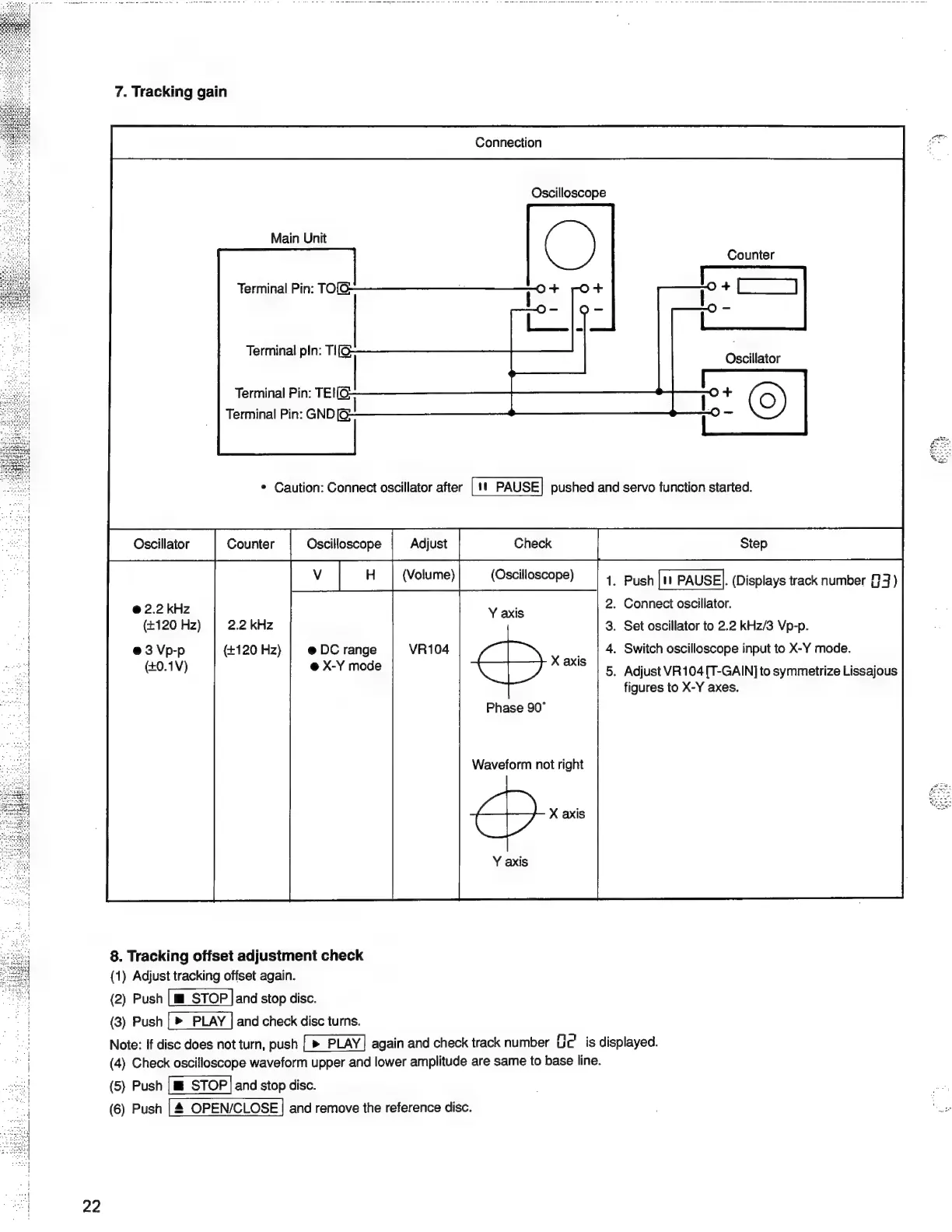
7.
Tracking
gain
Connection
Oscilloscope
Main
Unit
Counter
Terminal
Pin:
TO
Terminal
pIn:
TI[S
Terminal
Pin:
TE!
Terminal
Pin:
GND
*
Caution:
Connect
oscillator
after
|
1!
PAUSE]
pushed
and
servo
function
started.
(Volume)
(Oscilloscope)
.
Push
|tt
PAUSE].
(Displays
track
number
94)
.
Connect
oscillator.
(4120
Hz)
|
2.2
kHz
.
Set
oscillator
to
2.2
kHz/3
Vp-p.
@3
Vp-p
(+120
Hz)
@
DC
range
.
Switch
oscilloscope
input
to
X-Y
mode.
(+0.1V)
@
X-Y
mode
_
Adjust
VR104
[T-GAIN]
to
symmetrize
Lissajous
figures
to
X-Y
axes.
@
2.2
kHz
Phase
90°
Waveform
not
right
X
axis
8.
Tracking
offset
adjustment
check
(1)
Adjust
tracking
offset
again.
(2)
Push
[m
STOP
and
stop
disc.
(3)
Push
and
check
disc
turns.
Note:
if
disc
does
not
turn,
push
again
and
check
track
number
Uc’
is
displayed.
(4)
Check
oscilloscope
waveform
upper
and
lower
amplitude
are
same
to
base
line.
(5)
Push
and
stop
disc.
a
(6)
Push
and
remove
the
reference
disc.
rads

Related product manuals