EasyManua.ls Logo

Denon DCD-660 - Page 8

Denon DCD-660
42 pages
Print Icon
To Next Page IconTo Next Page
To Previous Page IconTo Previous Page
Loading...
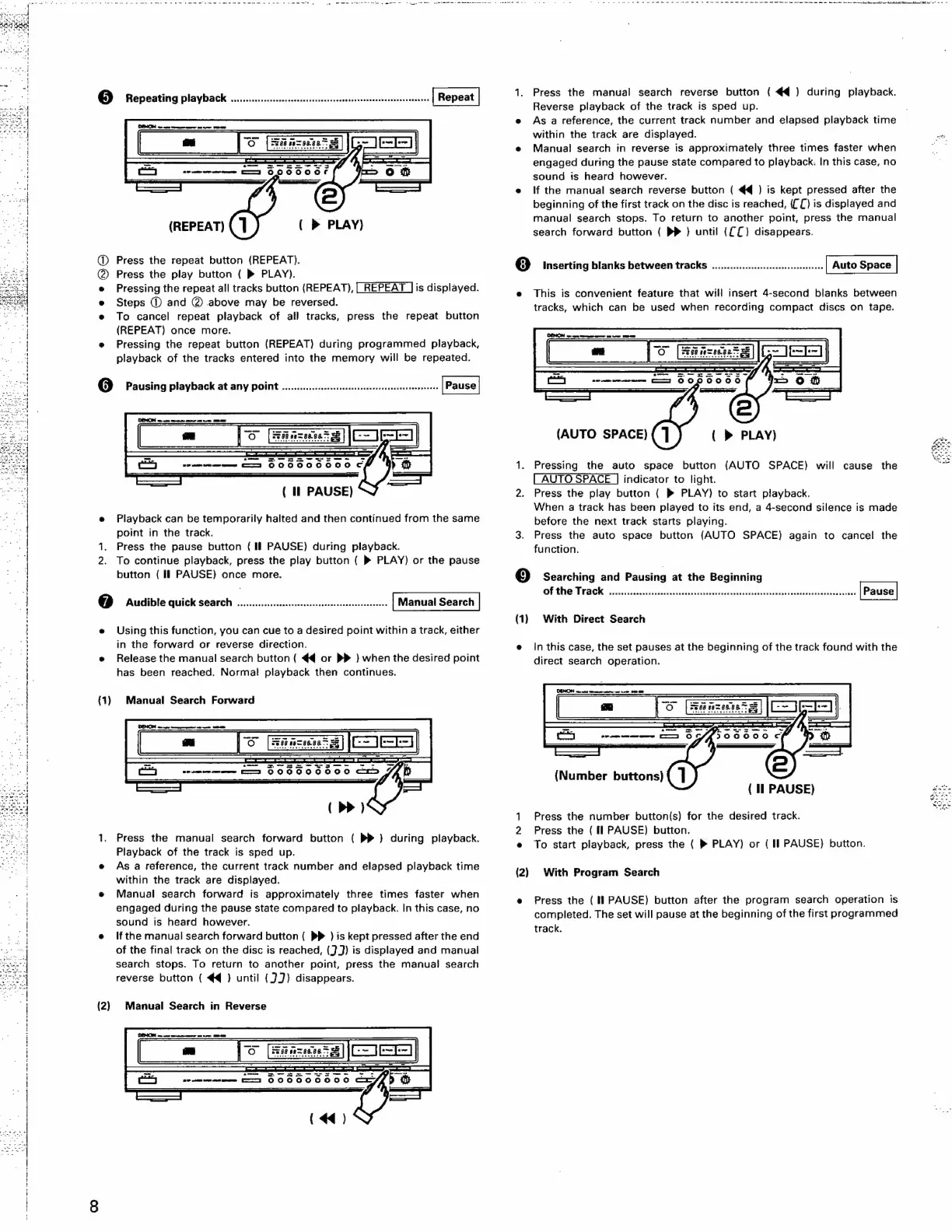
(REPEAT)
(
PLAY)
@
Press
the
repeat
button
(REPEAT).
Press
the
play
button
(
»®
PLAY).
e
Pressing
the
repeat
all
tracks
button
(REPEAT),
is
displayed.
e
Steps
©
and
@
above
may
be
reversed.
e
To
cancel
repeat
playback
of
all
tracks,
press
the
repeat
button
(REPEAT)
once
more.
e
Pressing
the
repeat
button
(REPEAT)
during
programmed
playback,
playback
of
the
tracks
entered
into
the
memory
will
be
repeated.
6]
Pausing
playback
at
amy
POINt
.............:cccesesesecneeevennenseasosenennees
(
Il
PAUSE)
e
Playback
can
be
temporarily
halted
and
then
continued
from
the
same
point
in
the
track.
1.
Press
the
pause
button
(If
PAUSE)
during
playback.
To
continue
playback,
press
the
play
button
{
»
PLAY)
or
the
pause
button
(Il
PAUSE}
once
more.
@
Audible
quick
Search
.........cccccscsssessscsseesereesseenseetecees
Manual
Search
e
Using
this
function,
you
can
cue
to
a
desired
point
within
a
track,
either
in
the
forward
or
reverse
direction.
e
Release
the
manual
search
button
(
€q
or
}
when
the
desired
point
has
been
reached.
Normal
playback
then
continues.
(1)
Manual
Search
Forward
1.
Press
the
manual
search
forward
button
(
PP
)
during
playback.
Playback
of
the
track
is
sped
up.
e
As
a
reference,
the
current
track
number
and
elapsed
playback
time
within
the
track
are
displayed.
e
Manual
search
forward
is
approximately
three
times
faster
when
engaged
during
the
pause
state
compared
to
playback.
In
this
case,
no
sound
is
heard
however.
e
Ifthe
manual
search
forward
button
(
PP
)
is
kept
pressed
after
the
end
of
the
final
track
on
the
disc
is
reached,
(3)
is
displayed
and
manual
search
stops.
To
return
to
another
point,
press
the
manual!
search
reverse
button
(
€4@
}
until
{3J)
disappears.
(2)
Manual
Search
in
Reverse
a
a
a
ti
kk
Ka
lk
RL
Si
a
Re
Ma
I
1.
Press
the
manual
search
reverse
button
(
€q@}
during
playback.
Reverse
playback
of
the
track
is
sped
up.
e
Asa
reference,
the
current
track
number
and
elapsed
playback
time
within
the
track
are
displayed.
.
e
Manual
search
in
reverse
is
approximately
three
times
faster
when
engaged
during
the
pause
state
compared
to
playback:
In
this
case,
no
sound
is
heard
however.
e
lf
the
manual
search
reverse
button
(
44
)
is
kept
pressed
after
the
beginning
of
the
first
track
on
the
disc
is
reached,
{{[)
is
displayed
and
manual
search
stops.
To
return
to
another
point,
press
the
manual
search
forward
button
(
DP
)
until
({£)
disappears.
8)
Inserting
blanks
between
tracks
.............ccccccssseseoesnetees
e
This
is
convenient
feature
that
will
insert
4-second
blanks
between
tracks,
which
can
be
used
when
recording
compact
discs
on
tape.
(AUTO
SPACE)
(
»
PLAY)
1.
Pressing
the
auto
space
button
{AUTO
SPACE)
will
cause
the
indicator
to
light.
2.
Press
the
play
button
{
»
PLAY)
to
start
playback.
When
a
track
has
been
played
to
its
end,
a
4-second
silence
is
made
before
the
next
track
starts
playing.
3.
Press
the
auto
space
button
(AUTO
SPACE)
again
to
cancel
the
function.
©
Searching
and
Pausing
at
the
Beginning
Of
the
Track.
iic:c2002.82stesseviesirklisdlanec
vere
ee
alaereede
hasan
senses
(1)
With
Direct
Search
e
inthis
case,
the
set
pauses
at
the
beginning
of
the
track
found
with
the
direct
search
operation.
(Number
buttons)
ae
le
(
Il
PAUSE)
1
Press
the
number
button(s)
for
the
desired
track.
2
Press
the
(fl
PAUSE)
button.
e
To
start
playback,
press
the
(
®
PLAY)
or
(I
PAUSE)
button.
(2)
With
Program
Search
e
Press
the
(If
PAUSE)
button
after
the
program
search
operation
is
completed.
The
set
will
pause
at
the
beginning
of
the
first
programmed
track.

Related product manuals