10
ENGLISH
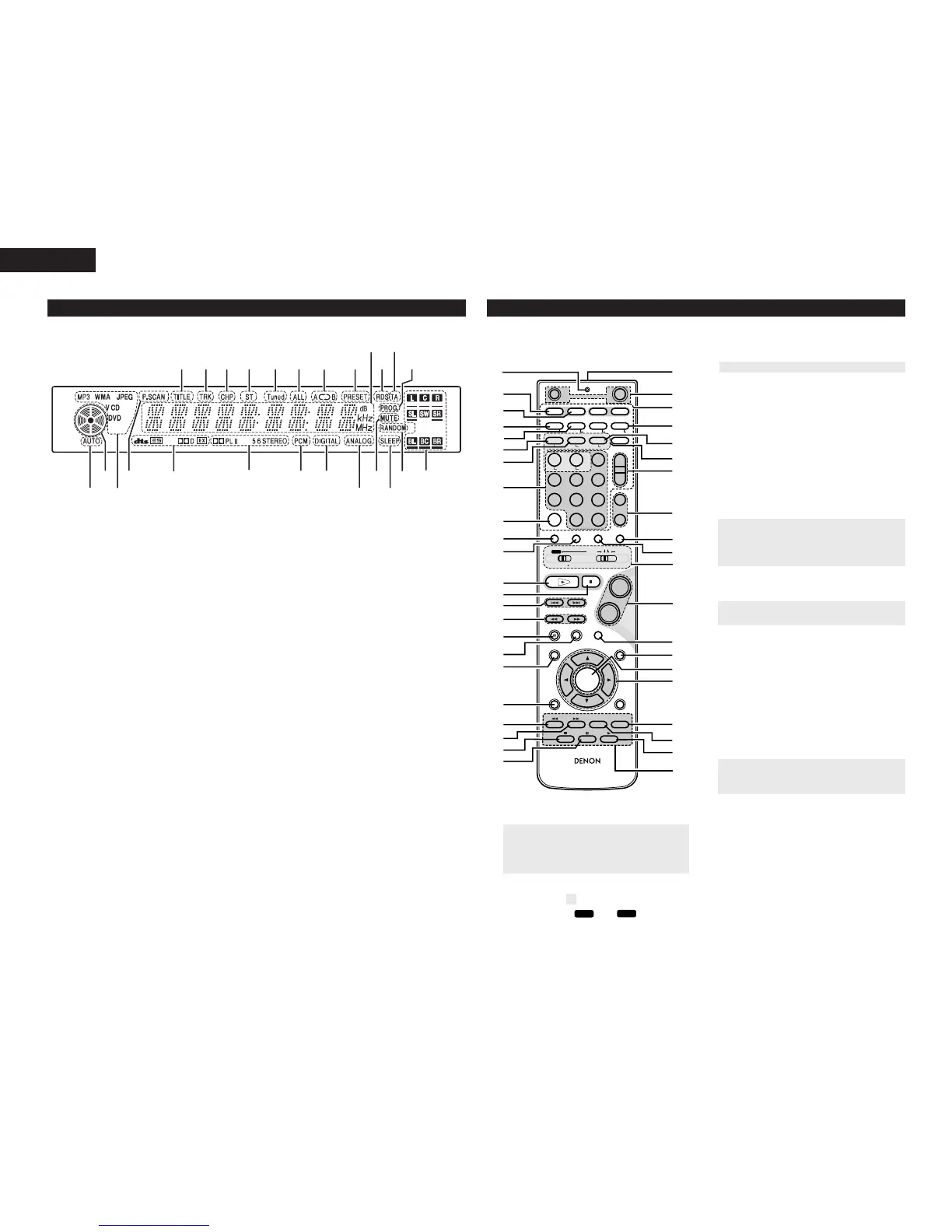
(2) Display
q Indicates current title number.
w Indicates current track number.
e Indicates current chapter number.
r STEREO indicates in the tuner mode.
t lluminates when a station is tuned.
y lluminates during all track repeat playback.
u lluminates during repeat playback.
i Iluminates when PRESET mode is selected.
o Displays current status or time.
!0 RDS MODE Indicators.
!1 TA indicates Traffic Anauncement is received in
RDS MODE.
!2 PROG indicates programmed playback is active.
!3 Speaker icons.
!4 Iluminates during shuffle playback.
!5 Iluminates when SLEEP TIMER is set.
!6 Iluminates during mute.
!7 Iluminates when an analog source is selected.
!8 Iluminates when a digital source is selected.
!9 type of disc loaded
@0 surround mode
@1 indicates encoding format of the current disc.
@2 Iluminates when Progressive video signals are
being output from only component terminals.
@3 indicates Current disc format.
@4 operating status indicator
@5 AUTO indicates auto decode mode is active.
(3) Remote control unit
q
Transmission indicator
w
SLEEP timer button.......................................(22)
e
NTSC/PAL button...........................................(30)
r
CLEAR button................................................(29)
t
A-B REPEAT button .......................................(28)
y
PROG/DIRECT button....................................(29)
• For details on the functions of these parts, refer to the pages given in parentheses ( ).
• Some of the buttons on the remote control unit have some functions.
The functions are switched using the remote control mode selector switches.
u
REPEAT button................................................(28)
i
Number buttons (0~9, +10)................(13, 15, 26)
o CALL button ....................................................(29)
!0
TEST TONE button....................................(19, 20)
!1
INPUT MODE selector button ........................(21)
!2
DVD PLAY button .........................(24, 25, 28, 29)
!3
DVD STOP button.....................................(24, 25)
!4
DVD SKIP buttons.....................................(24, 25)
!5
DVD SEARCH buttons ..............................(25, 26)
!6
DVD PAUSE button...................................(24, 26)
!7
STATUS button..........................................(24, 31)
!8
SETUP button .....................................(16~20, 30)
!9
CH SELECT button....................................(19, 20)
@0
RETURN button...............................................(24)
@1
DISPLAY button ..............................................(26)
@2
ANGLE button.................................................(27)
@3
AUDIO selector button .............................(27, 30)
@4
Remote control signal transmission window..(12)
@5
POWER button .........................................(13, 21)
@6
* SYSTEM buttons....................................(11, 12)
@7
ZOOM button..................................................(27)
@8
RANDOM button.............................................(28)
@9
INPUT SOURCE select buttons ......................(11)
#0
TUNER TUNING +/– buttons ....................(32, 33)
#1
TUNER PRESET CH +/– buttons ....................(33)
#2
FUNCTION selector button.............................(21)
#3
SURROUND mode selector button ..........(23, 24)
#4
Mode selector switches ..........(11, 14, 15, 22,32)
#5
Main volume control buttons..........................(21)
#6
MUTING button...............................................(22)
#7
TONE/DIMMER button ...................................(21)
#8
ENTER button .................................................(16)
#9
CURSOR button..............................................(16)
$0
TOP MENU button..........................................(24)
$1
MENU button..................................................(24)
$2
SUBTITLE button ......................................(27, 30)
$3
SYSTEM buttons.......................................(11, 15)



 To Next Page