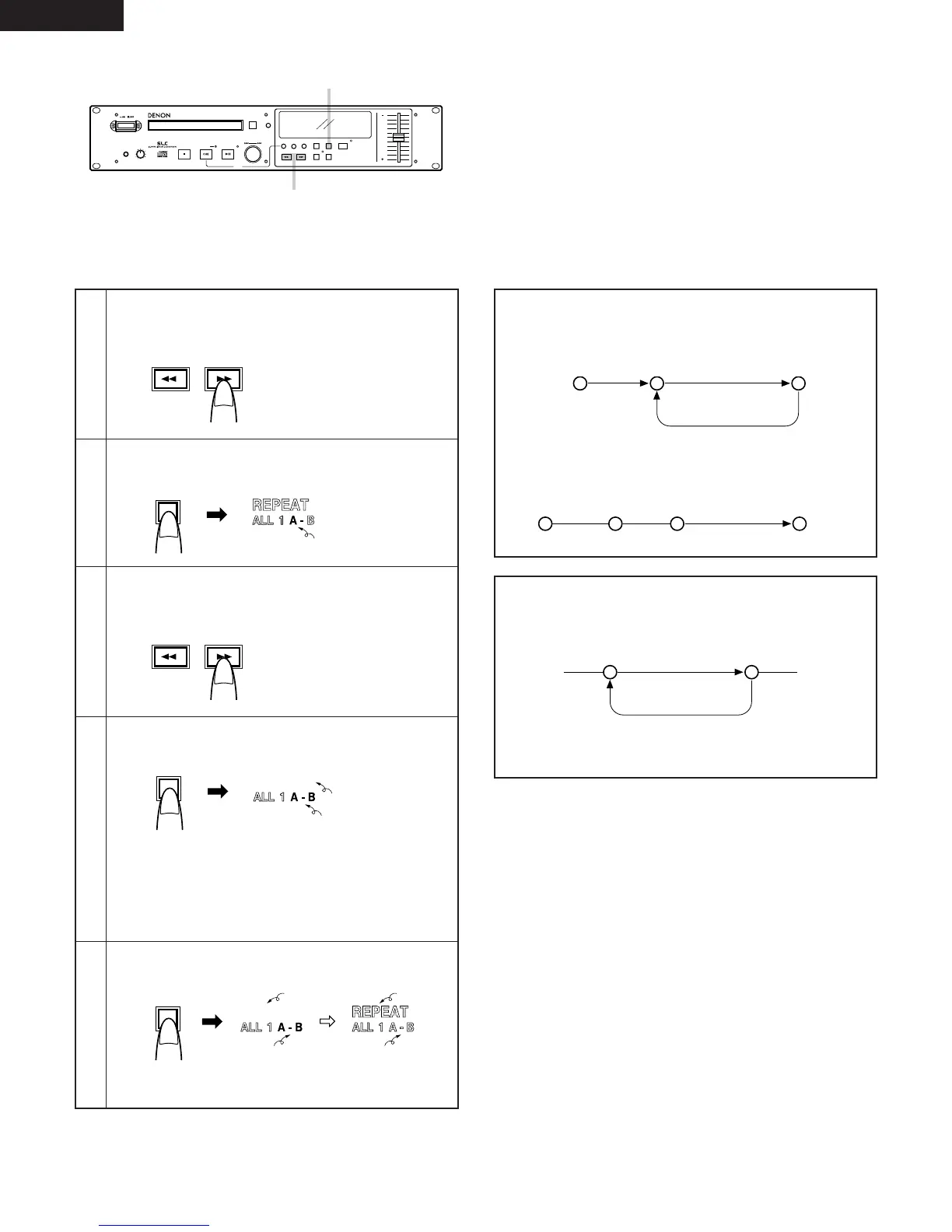
Find the play start position (A point).
• Press the SEARCH button(s) to find the desired play
start position.
1
Set the A point.
Press the A-B button.
2
Find the play end position (B point).
• Press the SEARCH button(s) to find the desired play
end position.
3
Set the B point.
Press the A-B button.
The A-B repeat mode is set.
When the B point is set during playback, the A point is
searched for and repeat playback of the A-B section
begins.
If the B point is set in any mode other than the play mode,
the A point is searched for and the standby mode is set.
4
Canceling the A-B repeat mode during playback.
Press the A-B button.
The normal play mode resumes and playback continues to
the play end point.
5
Flashing
Lit
Lit
Lit Off
OffLit
A-B repeat play
If playback is started before the A point, playback
continues to the B point, then returns to the A point for
repeat playback.
NOTE:
• When the B point is before the A point, the section from
the B point to the A point is played repeatedly.
• The end monitor function does not work in the A-B
repeat mode.
If playback is started after the B point, playback continues
to the end of that track and nothing is repeated.
Play start point A point B point
A point B point
A pointB point
Play start point End of track
Section played
Section played repeatedly
Section played repeatedly


 To Next Page