21
ENGLISH
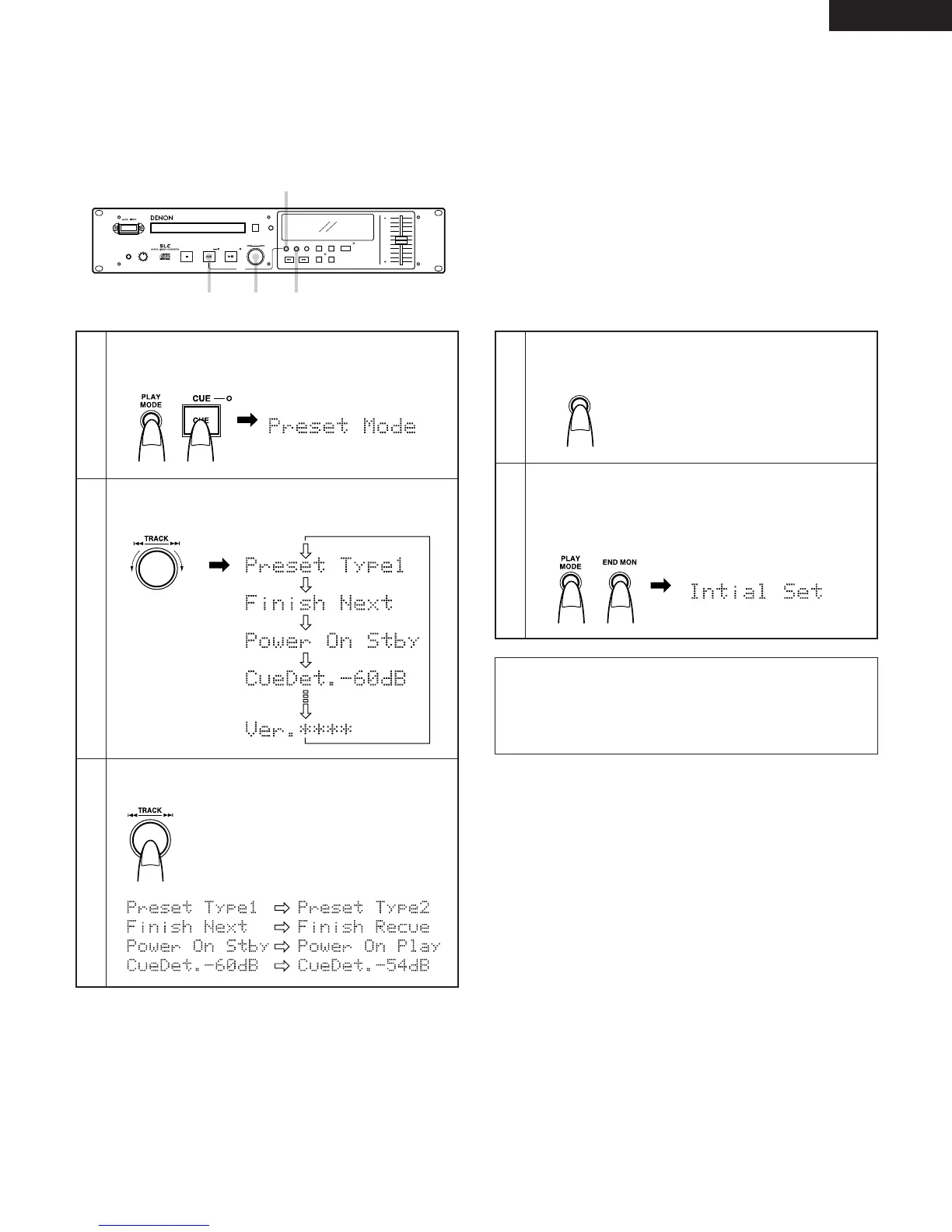
(2) Presetting Procedure
• Functions can be press using the buttons on the front
panel.
• Make the presettings with no disc loaded, in the stop or
standby mode.
The preset mode is canceled and the set
returns to the previous mode.
The character display changes as
shown below.
Enter the preset mode.
Press the CUE button while pressing the PLAY MODE
button.
1
Select the preset item.
Turn the select knob (
8 – 9).
2
Change the preset values.
Press the select knob.
3
NOTE:
If the message shown below appears, there is a problem
with the preset memory. Contact a serviceperson.
Exit the preset mode.
Press the PLAY MODE button.
4
To set the presettings back to the initial settings (the
settings set upon shipment from the factory), turn the
power on the while holding in both the PLAY MODE and
the END MON buttons. For the initial settings, refer to “(1)
List of preset functions”.
5
Character display
Character display
Turn the knob
clockwise to move in
the direction of the
arrows,
counterclockwise to
move in the opposite
direction.
The character display changes
as shown below.
Before change After change
Initial Error


 To Next Page