18
ENGLISH
6
Trim B point
u Turn Scratch Disc to move
the B point 1 frame at a
time.
• Range for trimming B point is limited as
follows.
B point for Loop:
Between 5 frames after A point and
disc end.
B point for Splice:
±30 frames from the original B point.
(However, when the B point was loaded
from the standby mode, the B point
cannot be moved backwards. So, use
A/B Move function)
B point for Sampler:
Between 5 frames after A point and
Sampler end.
A/B move
8
Select A and B points
o Select or the A/B Move and
push the A button for the A
point you want to move. The
standby mode is set at the A
point and the A button
illumination flashes.
!0 To select the B point, push
the B button after selecting
the A point.
• The B LED flashes. The Selected B point
is used for the A1 or A2 point that was
first selected.
11
Cancel the A-B Trim or A/B Move
!3 Push the A/B TRIM button
to cancel the mode.
10
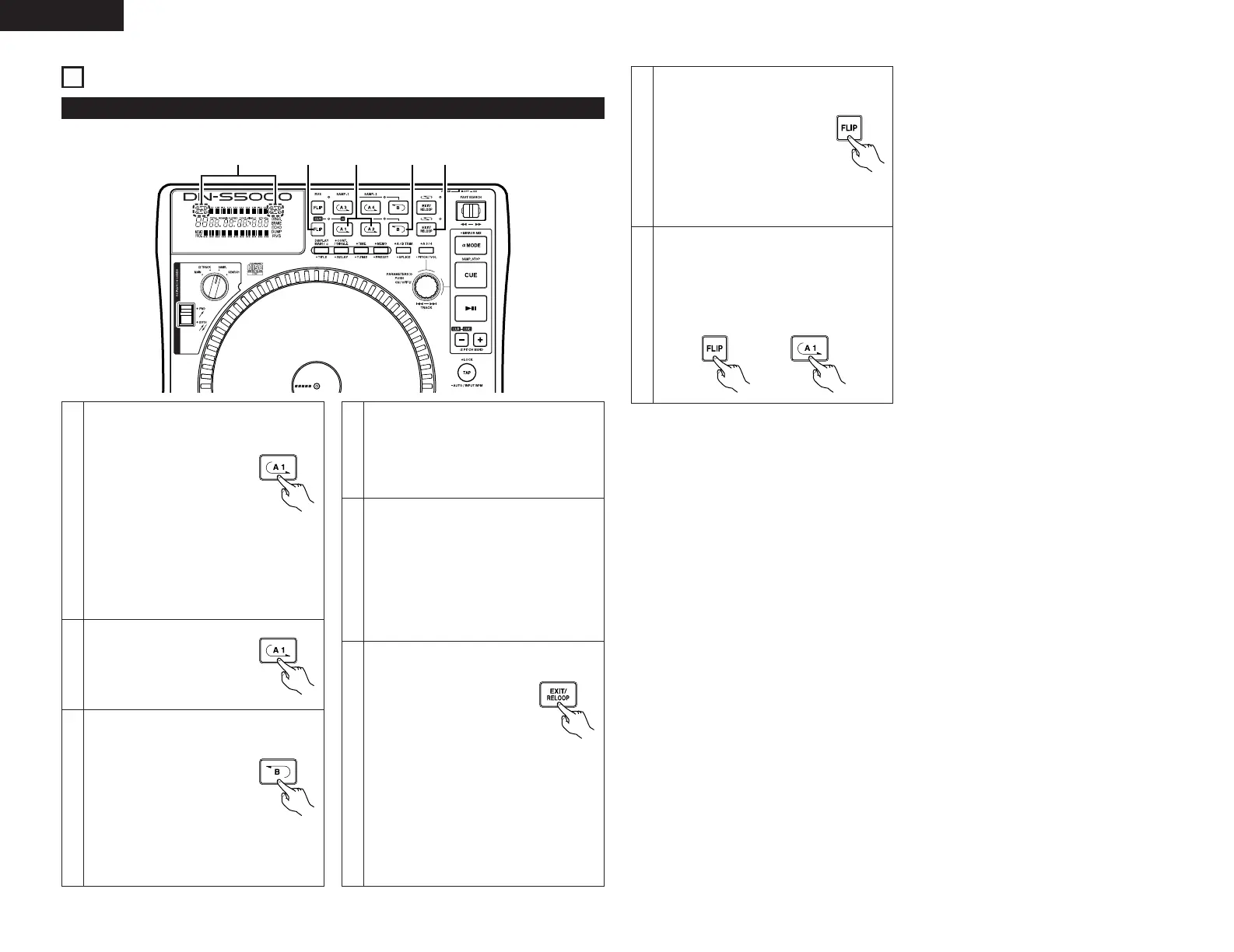
A/B TRIM
q, !3r, u, !1
e, t,
o, !2
y, i,
!0, !2
w
1
Select A-B trim mode
First select whether to adjust the A and B
points using the A-B trim mode or the A/B
move mode.
q Push the A/B TRIM button
to set the A and B point
position adjustment mode.
w Now turn the
PARAMETERS knob to
select the A-B Trim or
the A/B Move.
3
Trim A point
r Turn the Scratch Disc to
move the A point 1 frame at
a time.
• Range for trimming A point is limited as
follows.
A point for Loop:
±30 frames from the original A point.
(However, when the A point was
loaded from the standby mode, the A
point cannot be moved backwards.
So, use A/B Move function)
A point for Splice:
Between the beginning of the disc and
5 frames before B point.
A point for Sampler:
Between the original A point and 5
frames before B point.
2
Select A point (in A-B Trim)
e Select the A-B Trim and push
the corresponding A button
for the loop to be trimmed.
The A button illumination
flashes and loop playback
starts.
• In the splice trim mode, total 6 seconds
of spliced section (started from 2
seconds before A point to 4 seconds
after the B point) is played.
5
Select B point (in A-B Trim)
y Select the A-B Trim mode
and to select the B point,
push the B button after
selecting the A point.
Then push the B button. The B LED flashes
and the B point trim become enable.
• The Seamless Loop, Sampler loop and splice A and B points can be fine-adjusted using Scratch Disc.
• There are two ways for doing this.
A-B Trim: Trim the points during loop playback as a rehearsal.
A/B Move: Move the points using the fast search or manual search. A/B Move can not be used with
Sampler loop.
A/B Trim
4
Save the A point
t Push the A button again to
save new A point, and the
unit automatically exit from
the A-B Trim mode.
7
Save the B point
i Push the B button again to
save new B point, and the
unit automatically exit from
finish the A-B Trim mode.
9
Move A or B points
!1 Turn the Scratch Disc to
move the selected point
using the manual search
function.
• Range for moving A point is limited as
follows.
A point for Loop:
Between the beginning of the disc and
5 frames before B point.
A point for Splice:
Between the beginning of the disc and
5 frames before B point
• Range for moving B point is limited as
follows.
B point for Loop:
Between 5 frames after A point and
disc end
B point for Splice:
Between 5 frames after A point and
disc end
10
Save the A or B points
!2 Push the A1/A2 or B button
again. The LED stops
flashing and the A1/A2 or B
point is saved, and the unit
automatically exit from the
A/B Move mode.



 To Next Page