EasyManua.ls Logo

Denon DP-23F - Stylus Force Adjustment; Balancing the Tonearm; Setting Stylus Force; Connections and Wiring

Denon DP-23F
13 pages
Print Icon
To Next Page IconTo Next Page
To Previous Page IconTo Previous Page
Loading...
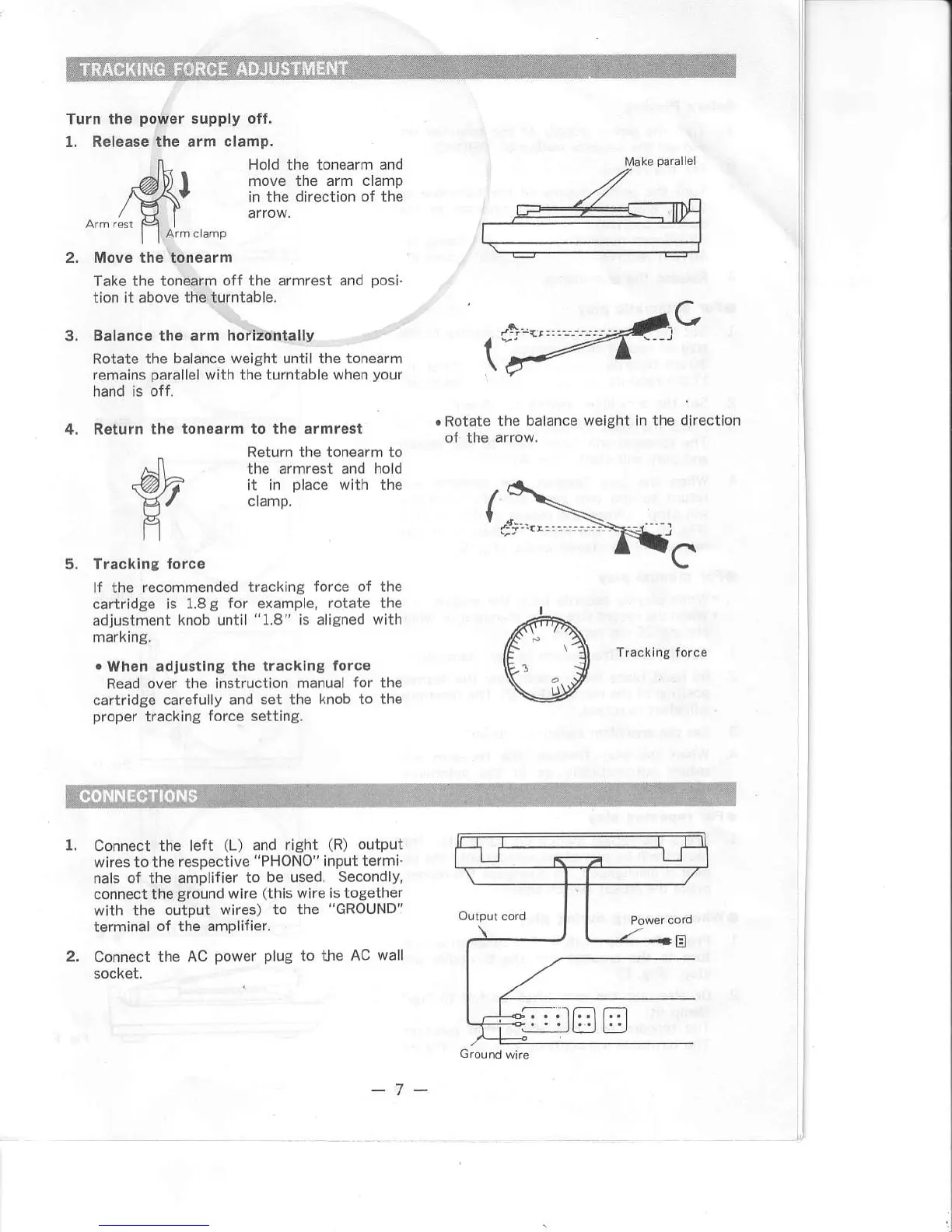
Turn the
po$rEr
1. R€lease the
supply oft.
arm ctamp.
2.
n-
Hold
the tonearm
and
A\) |
move the arm clamp
/^g\t
in the direction
of the
/ \J I arrow.
| |
&m crame
Move th6 tonearm
Take the tonoarm
off the armrest and
posi.
tion it above
the turntable.
Balance the arm
hdlitontally
Rotate the
balance woight until the ton€arm
remains
parallelwith
the turntable when
your
hand is off.
4. R€tutn the
ton€armto ih6 ermrogt
Return the tonearm to
the armrest and
hold
it
in
place
with the
clamp,
5. Tracklng
fotcs
lf the recommended
tracking force of the
cartrid8e is 1.8g
for oxample, rotate the
adjustment
knob
until
"1.8"
is alignod
with
markrng.
.
WhEn adjustlna
tho tracklng forc€
.Rotate the balance
weight il tho dir6ction
Read
over th6 instruction manual
for
cartidge
car€fully and set the
knob to
proper
tracklng
force setting.
the
the
1. Connect the left
(L)
and
right
(R)
output
wires
to the resp€ctive
"PHONO"
input
termi'
nals
o{
the amplifier
to be used.
Secondly,
conn€ctthe
ground
wire
(this
wire is together
with the
output wires) to the
"GRouND"
terminal
of the amplifier.
2. Connect the AC
power
plug
to the
AC wall
I
l
-7 -

Other manuals for Denon DP-23F

Related product manuals