EasyManua.ls Logo

Denon DP-75 - Service Hints; Magnetic Head Servicing; Regulator Voltage Check; Speed Adjustment (KU-351)

Denon DP-75
9 pages
Print Icon
To Next Page IconTo Next Page
To Previous Page IconTo Previous Page
Loading...
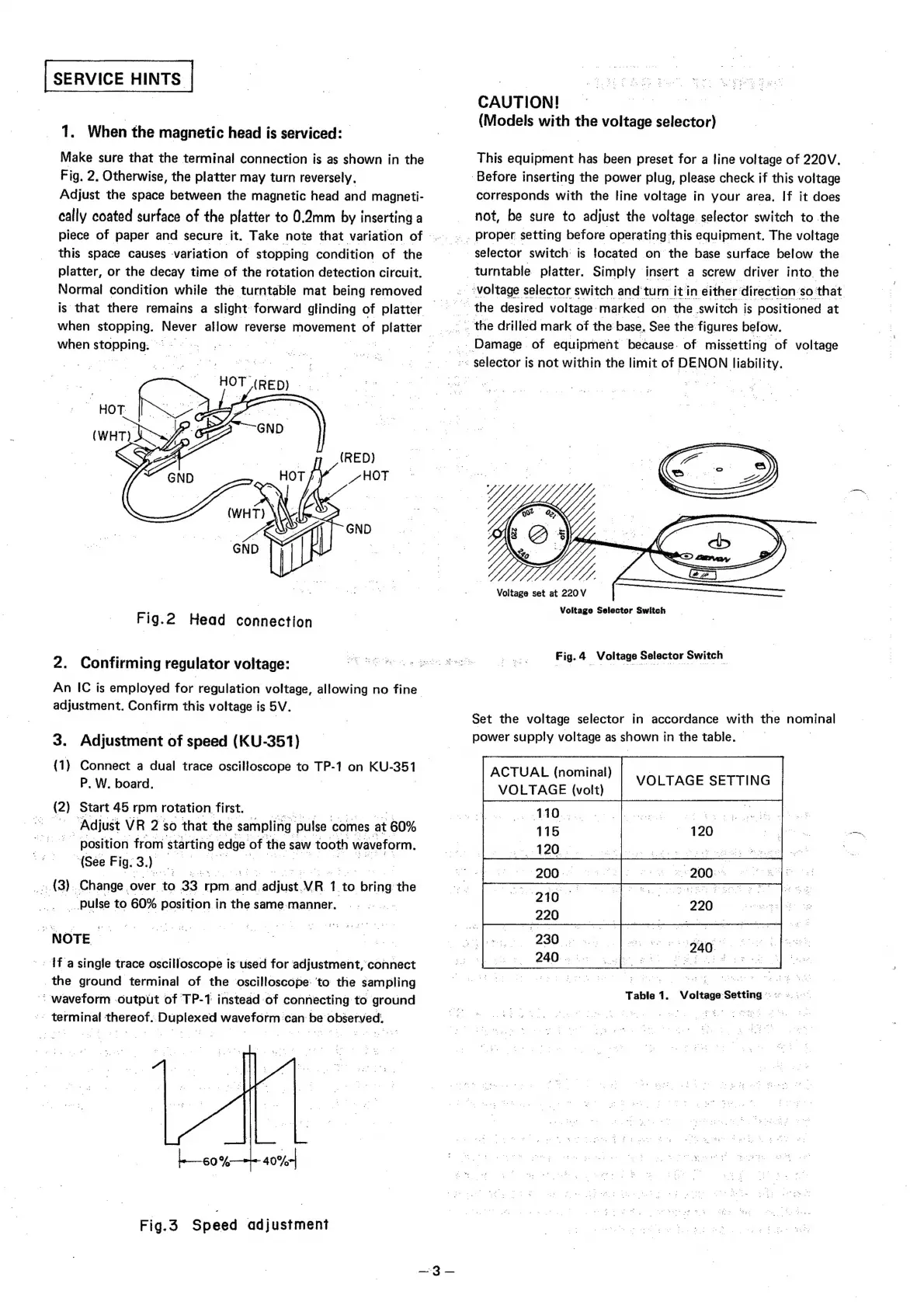
SERVICE
HINTS
1.
When
the
magnetic
head
is
serviced:
Make
sure
that
the
terminal
connection
is
as
shown
in
the
Fig.
2,
Otherwise,
the
platter
may
turn
reversely,
Adjust
the
space
between
the
magnetic
head
and
magneti-
cally
coated
surface
of
the
platter
to
0.2mm
by
inserting
a
piece
of
paper
and
secure
it.
Take
note
that
variation
of
.
.
this
space
causes
variation
of
stopping
condition
of
the
platter,
or
the
decay
time
of
the
rotation
detection
circuit.
Normal
condition
while
the
turntable
mat
being
removed
is
that
there
remains
a
slight
forward
glinding
of
platter
.
when
ea
ever
allow
reverse
movement
of
P
Piette
_
pee
:
_.
Damage
of
equipment
because.
of
missetting
of
voltage
when
stopping:
©
HOT
(Rea)
<.
Fig.2
Head
connection
2.
Confirming
regulator
voltage:
An
IC
is
employed
for
regulation
voltage,
allowing
no
fine”
adjustment.
Confirm
this
voltage
is
SV.
3.
Adjustment
of
speed
(KU-351)
(1)
Connect
a
dual
trace
oscilloscope
to
i
1
on
KU
al
P.
W.
board,
(2)
Start
45
rpm
rotation
first.
|
Adjust
VR
2:
sO
that
the
sampling
pulse
comes
at
60%
position
from
starting
edge
of
the
s
saw
tooth
waveform.
(See
Fig.
3.
a
| |
_
(3).
Change.
over
to
33
rpm.
and
adlude
VR
1
to
sta
the
__pulse
to
60%
position
in
the
same-manner,
NOTE
~-
{f
a
single
trace
oscilloscope
is
used
for
adjustment,
connect
the
ground
terminal
of
the
oscilloscope:
‘to
the
sampling
<
waveform
output
of
TP-1
instead
of
connecting
to
ground
terminal
thereof.
Duplexed
waveform
can
be
observed:
Fig.3
Speed
adjustment
CAUTION!
(Models
with
the
voltage
selector)
This
equipment
has
been
preset
for
a
line
voltage
of
220V.
Before
inserting
the
power
plug,
please
check
if
this
voltage
corresponds
with
the
line
voltage
in
your
area.
If
it
does
not,
be
sure
to
adjust
the
voltage.
selector
switch
to
the
..
Proper
setting
before
operating
this
equipment.
The
voltage
selector
switch
is
focated
on
the
base
surface
below
the
turntable.
platter.
Simply.
insert
a
screw
driver
into.
the
.
“voltage
selector
switch
and
‘turn
it
in
either:
direction:
so.
that
the
desired
voltage
marked
on
the
switch
is
positioned
at
.
the
drilled
mark
of
the
base.
See
the
figures
below.
~~
selector
is
not
within
the
limit
of
DENON
liability.
Voltage
set
at
220
V
Voltage
Selector
Switch
Fig.
4
Voltage
Selector
Switch
Set
the
voltage
selector
in
accordance
with
the
nominal
power
supply
voltage
as
shown
in
the
table.
ACTUAL
(nominal)
}
LTAGE
SETTING
VOLTAGE
(volt)
Voltage
Setting
©:
«°
»..-.
Table
1.

Related product manuals