EasyManua.ls Logo

Denon DR-M07 - Page 9

Denon DR-M07
22 pages
Print Icon
To Next Page IconTo Next Page
To Previous Page IconTo Previous Page
Loading...
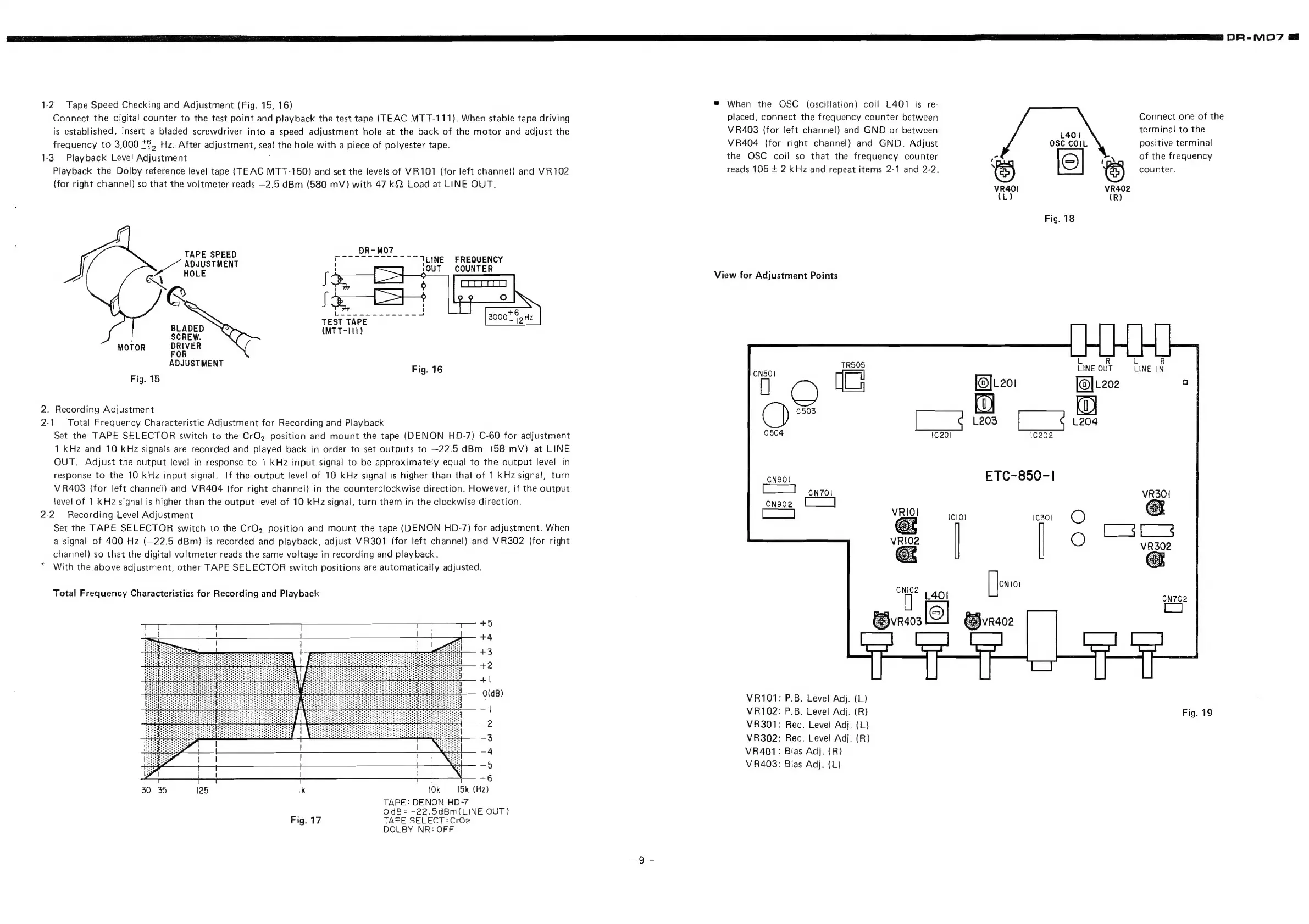
1-2.
Tape
Speed
Checking
and
Adjustment
(Fig.
15,
16)
Connect
the
digital
counter
to
the
test
point
and
playback
the
test
tape
(TEAC
MTT-111).
When
stable
tape
driving
is
established,
insert
a
bladed
screwdriver
into
a
speed
adjustment
hole
at
the
back
of
the
motor
and
adjust
the
frequency
to
3,000
28S
Hz.
After
adjustment,
seal
the
hole
with
a
piece
of
polyester
tape.
1-3.
Playback
Level
Adjustment
:
Playback
the
Dolby
reference
level
tape
(TEAC
MTT-150)
and
set
the
levels
of
VR101
(for
left
channel!)
and
VR102
(for
right
channel)
so
that
the
voltmeter
reads
—~2.5
dBm
(580
mV)
with
47
k{2
Load
at
LINE
OUT.
DR-MO7
TAPE
SPEED
ieee
iia
aes
TLINE
FREQUENCY
ADJUSTMENT
7
{OUT
COUNTER
eA
HOLE
f
S
°
7@
i
ge
a
ee
+6
sane
TEST
TAPE
ae
a
BLADEL
(MTT-111)
MOTOR
DRIVER
FOR
DJUSTMENT
Fig.
16
Fig.
15
2.
Recording
Adjustment
2-1.
Total
Frequency
Characteristic
Adjustment
for
Recording
and
Playback
Set
the
TAPE
SELECTOR
switch
to
the
CrO,
position
and
mount
the
tape
(DENON
HD-7)
C-60
for
adjustment
1
kHz
and
10
kHz
signals
are
recorded
and
played
back
in
order
to
set
outputs
to
—22.5
dBm
(58
mV)
at
LINE
OUT.
Adjust
the
output
level
in
response
to
1
kHz
input
signal
to
be
approximately
equal
to
the
output
level
in
response
to
the
10
kHz
input
signal.
If
the
output
level
of
10
kHz
signal
is
higher
than
that
of
1
KHz
signal,
turn
VR403
(for
left
channel)
and
VR404
(for
right
channel)
in
the
counterclockwise
direction.
However,
if
the
output
level
of
1
KHz
signal
is
higher
than
the
output
level
of
10
kHz
signal,
turn
them
in
the
clockwise
direction.
2-2
Recording
Level!
Adjustment
Set
the
TAPE
SELECTOR
switch
to
the
CrQ,
position
and
mount
the
tape
(DENON
HD-7)
for
adjustment.
When
a
signal
of
400
Hz
(—22.5
dBm)
is
recorded
and
playback,
adjust
VR301
(for
left
channel)
and
VR302
(for
right
channel)
so
that
the
digital
voltmeter
reads
the
same
voltage
in
recording
and
playback.
*
With
the
above
adjustment,
other
TAPE
SELECTOR
switch
positions
are
automatically
adjusted.
Total
Frequency
Characteristics
for
Recording
and
Playback
j
30
36
125
\k
10k
[5k
(Hz)
TAPE:
DENON
HD-7
OdB
=
-22.5dBm(LINE
OUT}
Fig.
17
TAPE
SELECT:
CrOe
DOLBY
NR:
OFF
@
When
the
OSC
(oscillation)
coil
L401
is
re-
placed,
connect
the
frequency
counter
between
VR403
(for
left
channel)
and
GND
or
between
VR404
(for
right
channel)
and
GND.
Adjust
the
OSC
coil
so
that
the
frequency
counter
reads
105
+
2
kHz
and
repeat
items
2-1
and
2-2.
View
for
Adjustment
Points
VR101:
P.B.
Level
Adj.
(L)
VR102:
P.B.
Level
Adj.
(R)
VR301:
Rec.
Level
Adj.
(L)
VR302:
Rec.
Level
Adj.
(R)
VR401:
Bias
Adj.
(R)
V
R403:
Bias
Adj.
(L)
L401
OSC
COIL
io
BS
VR40I
VR402
L)
(R)
Fig.
18
DR-MO7
@
Connect
one
of
the
terminal
to
the
positive
termina!
of
the
frequency
counter.
[@]L201
L203
ETC-850-1
R
N
INE
|
Fig.
19

Related product manuals