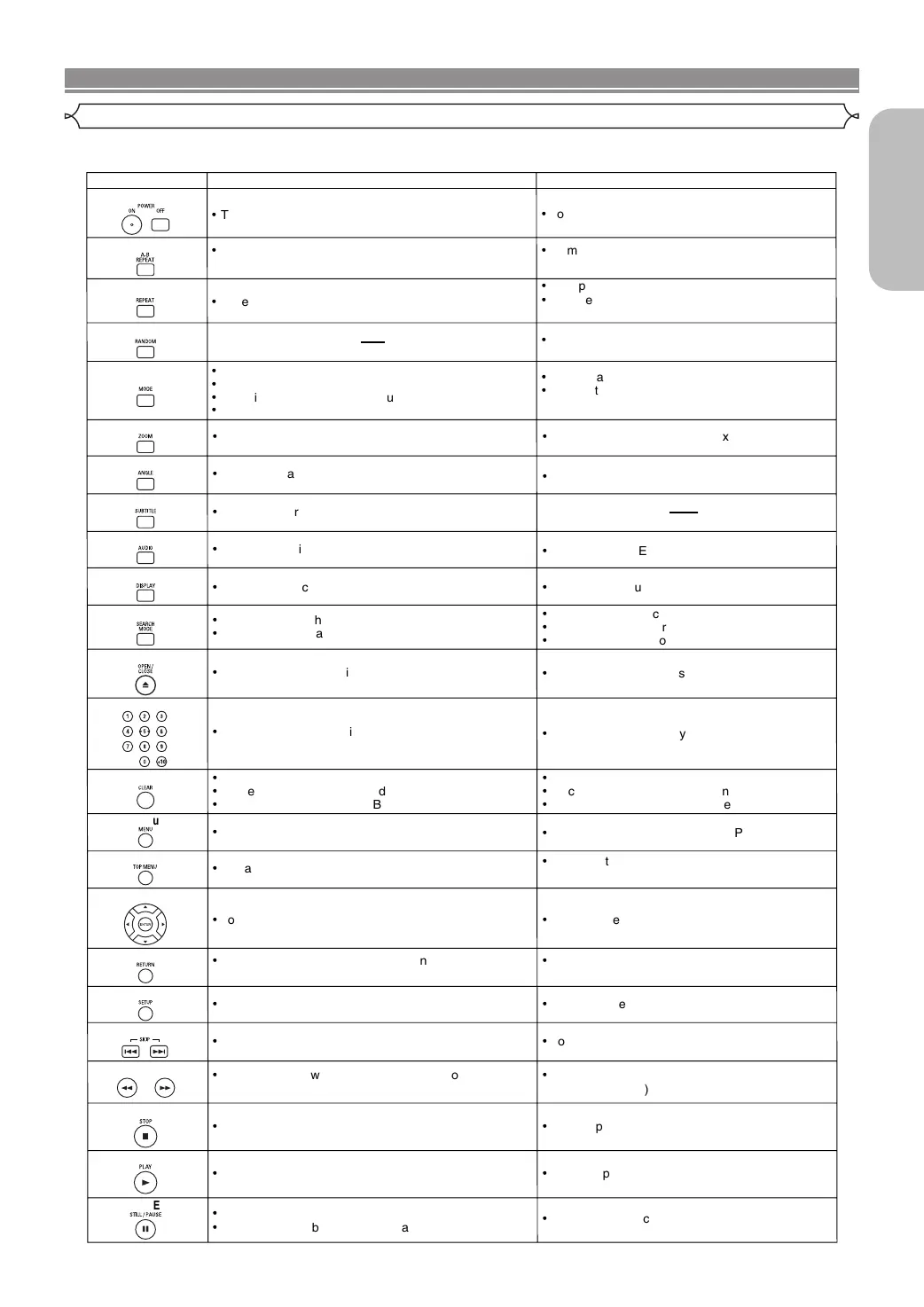
POWER Buttons
A-B REPEAT Button
REPEAT Button
MODE Button
SUBTITLE Button
DVD
·
To switch the power between on and standby.
·
To switch the power between on and standby.
·
To mark a segment between A and B for repeated
playback.
·
To mark a segment between A and B for repeated
playback. (CD)
·
To repeat playback of a title or chapter.
·
To repeat playback of a track or disc. (CD)
·
To repeat playback of a track, group or
disc. (MP3, JPEG, WMA)
RANDOM Button
·
To play back tracks in random order.
ZOOM Button
·
To program a specific playback order.
·
To activate the 3D sound (Virtual surround system).
(CD, MP3, WMA)
·
To magnify part of the picture (x2/x4).
ANGLE Button
·
To access various camera angles on the disc.
·
To access various subtitles on the disc.
AUDIO Button
DISPLAY Button
·
To access various audio functions on the disc.
·
To select STEREO, L-ch or R-ch. (CD)
·
To display the current disc or HDMI mode.
·
To display the current disc or HDMI mode.
·
To search for a chapter, title, time or marker.
·
To return to a location on the disc rapidly.
OPEN/CLOSE Button
·
To search for a track.
·
To search for time or a marker. (CD)
·
To return to a location on the disc rapidly.
SEARCH MODE Button
Numeric Buttons
CLEAR Button
·
To open or close the disc tray.
·
To open or close the disc tray.
·
To select a chapter or title directly.
·
To select a track directly.
·
To clear the markers.
·
To clear the numbers entered incorrectly.
·
To cancel the A point for A-B Repeat.
·
To clear the markers. (CD)
·
To clear the numbers entered incorrectly.
·
To cancel the A point for A-B Repeat. (CD)
CD/MP3/JPEG/WMA
·
To magnify part of the picture (x2). (JPEG)
·
To rotate a picture. (JPEG)
MENU Button
TOP MENU Button
ENTER, Cursor Buttons
RETURN Button
SEARCH Buttons
·
To call up the menu on a disc.
·
To call up the top menu on a disc.
·
To move the cursor and determine its position.
SETUP Button
·
To return to the previous operation in the setup
menu.
·
To return to the previous operation in the setup
menu.
·
To call up the setup menu.
·
To call up the setup menu.
SKIP Buttons
·
To skip chapters/titles.
·
To begin fast forward/reverse search or slow forward/
slow reverse.
STOP Button
PLAY Button
·
To stop playback.
·
To begin playback.
·
To stop playback.
·
To begin playback.
STILL/PAUSE Button
·
To move the cursor and determine its position.
·
To skip tracks.
·
To pause playback.
·
To advance playback frame by frame.
·
To pause playback.
·
To call up the FILE LIST. (MP3, JPEG, WMA)
·
To return to the first item in the highest hierarchy
of the FILE LIST. (MP3, JPEG, WMA)
·
To begin fast forward/reverse search.
(CD, MP3, WMA)
·
To set Picture Control.
·
To set Black Level on/off.
·
To activate the 3D sound (Virtual surround system).
·
To set Dialog Speed.



 To Next Page