ENGLISH
12
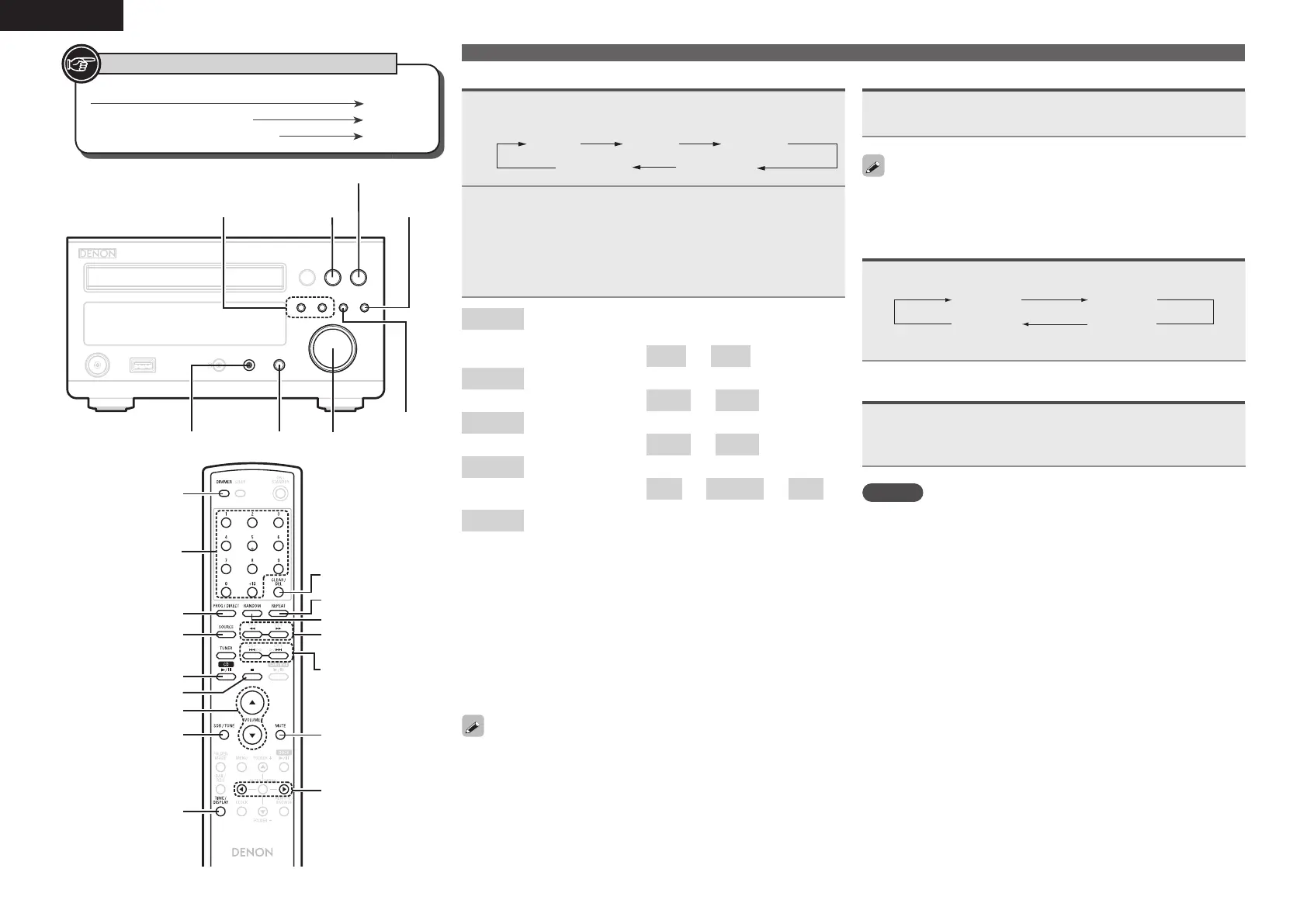
<1/3>
<BAND/2>
<8/
-
, +/9>
<VOLUME>
<PHONES>
SDB/TONE
SOURCE
<SOURCE
DIRECT>
[RANDOM]
SOURCE
[CD 1/3]
[NUMBER]
[PROG/DIRECT]
[CLEAR/DEL]
[2]
[REPEAT]
[6, 7]
[8, 9]
[TIME/DISPLAY]
[DIMMER]
[VOLUME df]
SDB/TONE
[MUTE]
[
o
p
]
Button located on both the main unit and the remote control
BUTTON
Button only on the main unit
<BUTTON>
Button only on the remote control
[BUTTON]
Symbols used to indicate buttons in this manual
Adjusting the tone
1
Use SDB/TONE to select the tone parameter to be
adjusted.
SDB BASS
BALANCES. DIRECT
TREBLE
2
Adjust the volume with <8/–, +/9>, [8,
9] or [o p].
• To make other tone adjustments at this time, press SDB/
TONE
.
• If no operation is performed for 5 seconds, the adjustment is
retained and the normal display reappears.
SDB
Emphasizes the bass sound when the Super Dynamic
Bass (SDB) function is set to ON.
[Selectable modes]
ON
–
OFF
BASS
Adjusts the bass sound.
[Variable range]
–10dB
–
+10dB
TREBLE
Adjusts the treble sound.
[Variable range]
–10dB
–
+10dB
BALANCE
Adjusts the left/right volume balance.
[Variable range]
L06
–
CENTER
–
R06
S.DIRECT
Plays back a disc using the SOURCE DIRECT mode.
During the SOURCE DIRECT mode, the audio signals
bypass the tone control circuits (SDB/BASS/TREBLE/
BALANCE), the music reproduction is more faithful to
the original sound.
Settings made upon purchase:
• SDB .......................................OFF
• BASS ..................................... 0dB
• TREBLE ................................. 0dB
• BALANCE .......................CENTER
• S.DIRECT ..............................OFF
• When “SDB” is ON, you can adjust “BASS”.
• This can also be set using <SOURCE DIRECT>.
Operations possible during playback
Muting the sound
Press [MUTE].
“MUTE ON” is displayed.
To cancel, press [MUTE] again.
(The mute mode is also canceled when the <VOLUME> control is
turned or a [VOLUME df] is pressed.)
Switching the display’s brightness
Press [DIMMER].
100 % 70 %
40 %Off
• The display’s brightness switches each time the button is pressed.
Listening with headphones
Plug the headphones (sold separately) into the
<PHONES>.
• The sound from the speakers is automatically cut off.
NOTE
To prevent hearing loss, do not raise the volume level excessively
when using headphones.
1.RCDM38E3ENG0041st.indd121.RCDM38E3ENG0041st.indd12 2010/05/1714:17:062010/05/1714:17:06


 To Next Page