6
e-Gard Interface
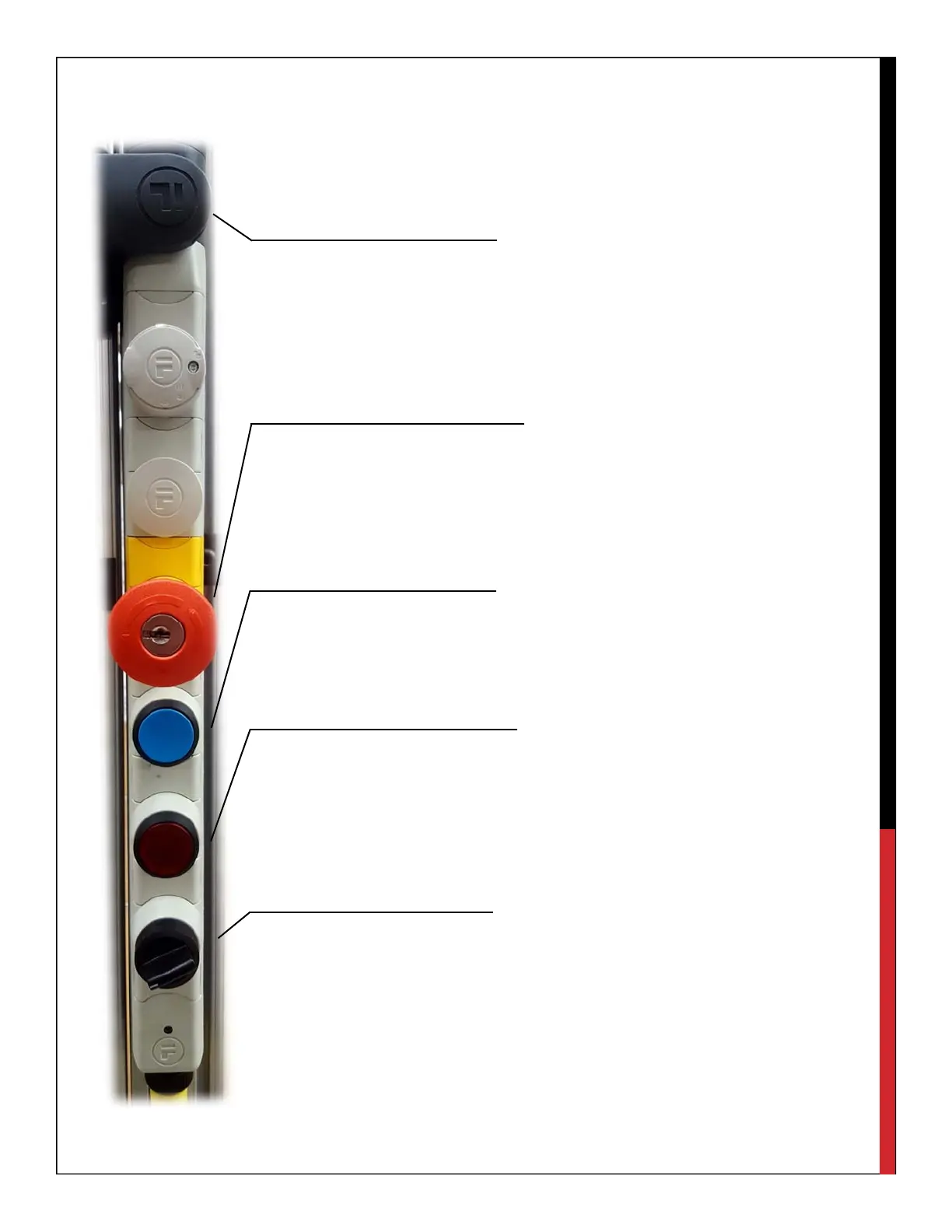
This device acts as an alternative interface to the controller along with providing
extra safety precautions. The e-Gard system is connected to both the mini and
safety I/O allowing for slight monitoring and external control of the robot.
Solenoid Lock
The features at the top of the e-Gard act as a door lock. It is equipped with a
solenoid locking system for the front of the enclosure along with a built in safety
relay, which detects when the door is open, instantly cutting power to the robot.
E-Stop
The emergency stop has a key reset adding extra security. This ensures that
when non-authorized users try getting into the enclosure they cannot do so
without a key.
Start/Re-Start
This feature is connected to the program start input of the mini I/O. With the first
touch of the button the program is re-started and the second push starts the
program.
Step Stop
When the stop button is pushed the robot will continue to the next coded in
position allowing for a gentle stop. This button is also illuminated when power
is being supplied to the robot. This is done by connecting the robot running
indicator off of the mini I/O.
Selector Switch
This gives the ability to choose between two different programs pre-loaded on
the controller. This is connected to data bit 0. The selector switch will be able
to select between two programs determined on the controller by their
designated name. To operate a program using the selector switch, the program
file names must be pro0 and pro1. Only these file names will work with the
selector switch.
E-GARD LOCKOUT



 To Next Page