Remote control:
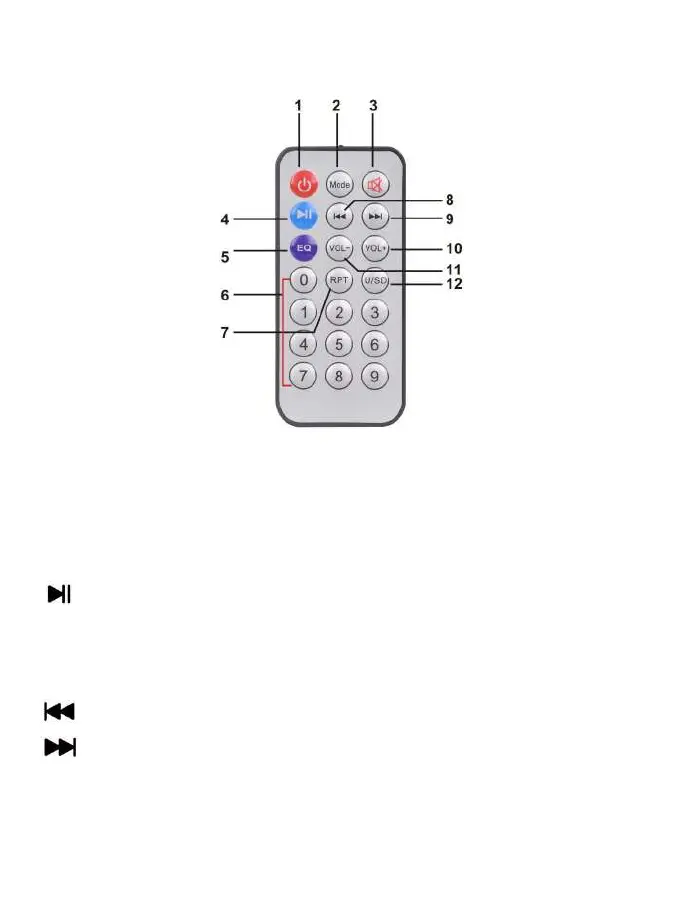
1. On/Off Switch;
2. MODE: Press and hold to switch between operating modes: BT mode, MicroSD card
mode, U disk mode, AUX mode. Short press to switch between volume control of
microphone, Treble, Bass, Echo.
3. MUTE: to mute;
4. : Short press to play/pause music; press and hold to connect TWS
5. EQ: to set equalizer variants;
6. 0-9: to select a song directly;
7. RPT: to repeat the song;
8. to select the previous song from USB / MicroSD/ BT;
9. to select the next song from USB/MicroSD / BT;
10. VOL+: to increase volume;
11. VOL-: to reduce volume;
12. Switch between USB and MicroSD card.;


 To Next Page