-3-
MENU Tree as below:
Mode Mode
DAB
DAB Menu
Full Scan
Manual Tune
Prune
System
FM
Menu Menu
System Menu
Time
Sleep
Backlight
Factory Reset
SW version
Backlight Menu
Backlight Low/ Medium/ High
Time Menu
Set Time/Date hh:mm/DD-MM-YYYY
Auto Update Update from Any/Update from DAB/Update from FM/ No Update
Set 12/24 hour 12/24
Set Date Format DD-MM-YYYY/MM-DD-YYYY
Sleep Menu
Sleep Off /10/20/30/60s/70/80/90minutes
FM Menu
Scan Setting All station/Strong stations only
Audio Setting Stereo Allowed/Forced mono
System
SETTING THE CLOCK
The clock in this radio is equipped to receive a DAB radio frequency time signal. After the unit has
been turned on, it will automatically tune into a DAB radio station and update the clock. It may be
necessary to wait for 1-2 minutes to allow the unit to receive the time signal. If the area will only
receive an FM signal it will be necessary to manually set the clock. To manually set the clock
Set the clock in STANDBY mode
1. Insert the adaptor cord into the power socket at the rear of the radio. Plug the adaptor into the
mains supply socket.
2. The display backlight will illuminate for a few seconds, a welcome message (F1) will appear in
the display briefly and the clock will display “00:00:00 Time is not set”.
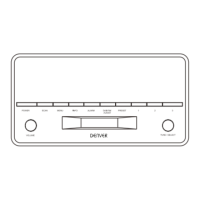
3. In standby mode, press the ALARM/SNOONZE button, the hour digits will flash in the display,
press ▼/▲ buttons to set the correct hour, then press the SELECT button to confirm.
4. The minute digits will now flash, press ▼/▲ buttons to set the correct minute.
5. Later you will enter to “Set date 1-1-2014”. Press ▼/▲ buttons to set date and press SELECT
button to confirm again.
Set the clock in working mode
1. Connect the radio to AC mains (via AC/DC adaptor), then press STANDBY to turn the radio on.
2. Press and hold MENU/INFO button, and then press ▼/▲ buttons until the display show
“System”. And press the SELECT button confirm.
3. Continue press ▼/▲ buttons until the display shows “Time’ and then press the SELECT button
to confirm. The display will show “<Set Time/Date>”, press the SELECT button to confirm again.



 To Next Page