-6-
FM display modes
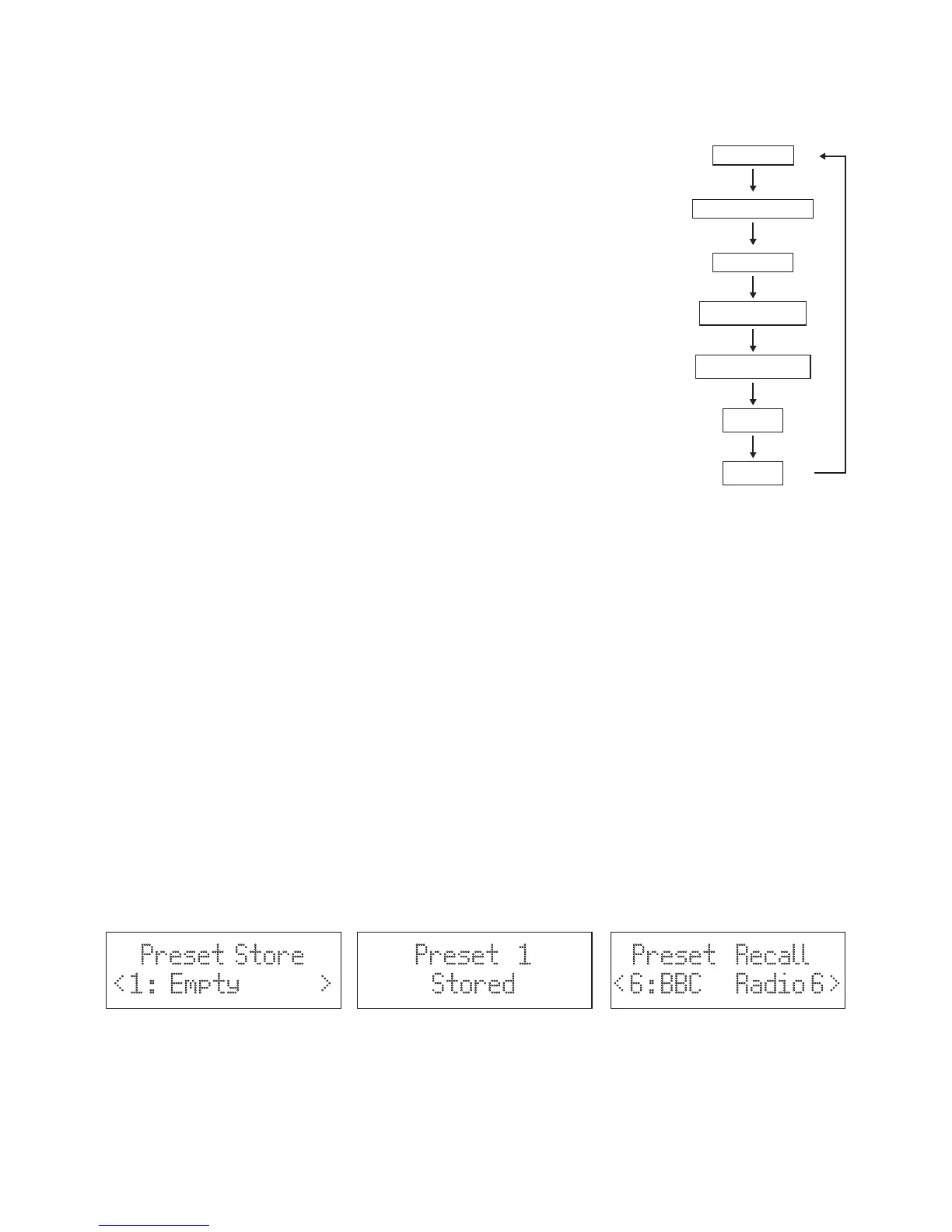
Every time you press the MENU/INFO button, the display will cycle through the following display
modes: Radio Text, Programme Type, Frequency, Audio Type, Power status (Mains/Battery),
Time and Date.
Radio Text
This displays the information about the current programme.
Programme Type
This describes the “style” or “genre” of the programme that is being broadcast.
Frequency
This displays the frequency of the present station, such as “87.8MHz”.
Audio Type
This displays if the station being received is in mono or stereo.
Power status
Display the power supply is adaptor or battery. If the power supply is battery,
the display will show the battery capacity (21-100). When the battery is less than
20, the display will show battery is low.
Time
This display the current time provided automatically by the broadcaster.
Date
This display the current date provided automatically by the broadcaster.
STORING AND RECALLING STORED STATIONS
This function allows up to 10 stations to be programmed into the memory and stored in both DAB
and FM mode.
1. To store a preset, first tune to your desired station, then press and hold the PRESET button for
longer than 2 seconds ,the display will show “Preset Store <#:(Empty)>” (F.7).
2. Press ▼/▲ buttons to select your desired station preset number.
3. Press the SELECT to confirm your selection, the station now broadcasting has now been stored
in the selected location (F.8).
4. To listen to the preset stations, press the PRESET button once and then press ▼/▲ buttons to
select the desired preset location. And press the SELECT button to confirm. (F.9) The station
name or frequency and preset location number will be displayed in the lower half of the display.
If the preset has not been allocated, “Preset Recall <#: (Empty)>” will be shown in the display.
Notes: If the unit is disconnected from the mains supply for any length of time and the batteries are
not installed, the programmed stations will be lost.
Preset Store
< 1 : Empty >
Preset 1
Stored
F.8F.7
Preset Recall
< 6 : BBC Radio 6 >
F.9
Radio Text
Programme Type
Frequency
Audio Type
Power status
Time
Date



 To Next Page