-4-
4. The hour digits will flash in the display, press ▼/▲ buttons to set the correct hour, and then
press the SELECT button to confirm.
5. The minute digits will now flash, press ▼/▲ buttons to set the correct minute.
6. Later you will enter to “set date 1-1-2014”, press ▼/▲ buttons to set date and press SELECT
button to confirm again.
BASIC OPERATION - GETTING STARTED
Press the STANDY button to turn the unit on, it will automatically enter into the DAB mode and
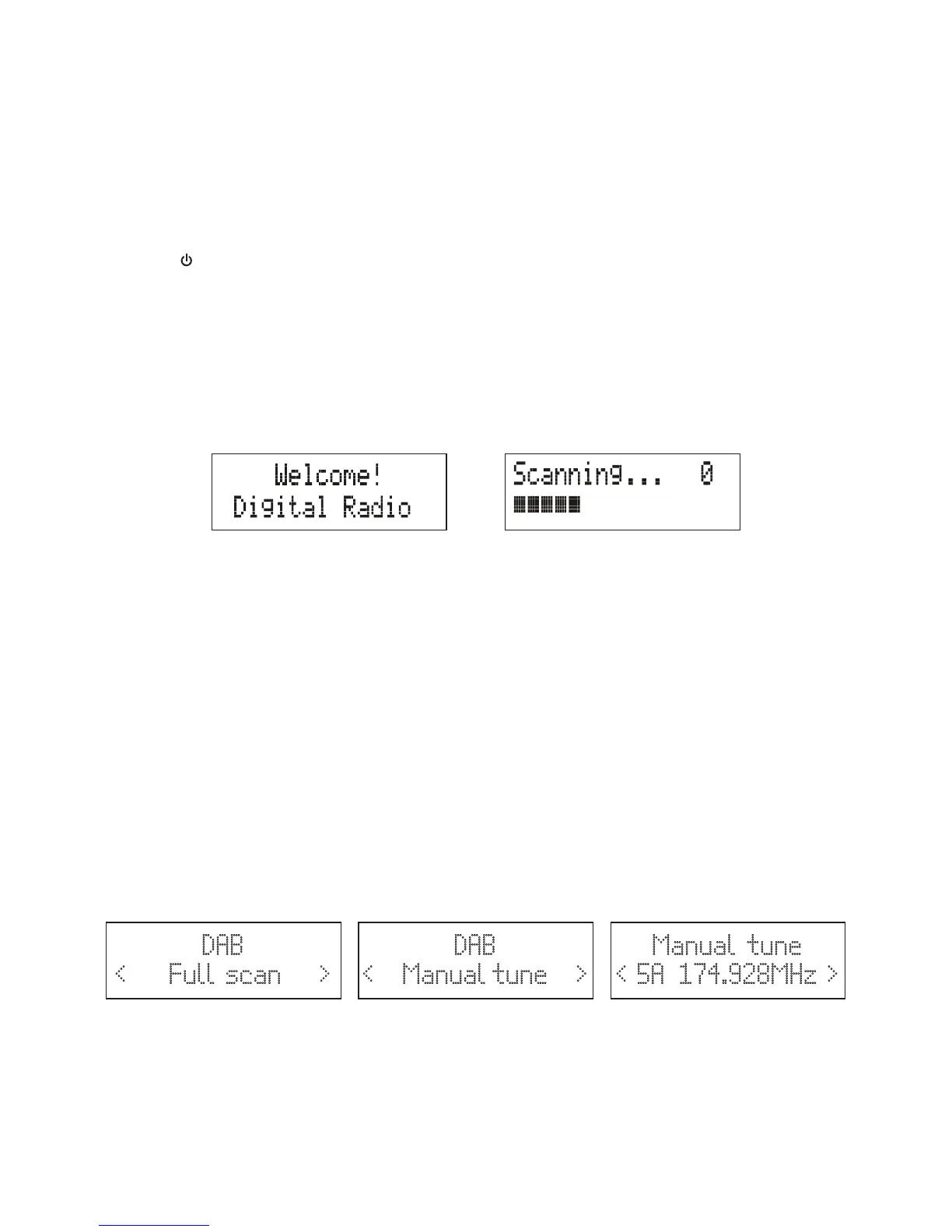
perform auto scan function. During the scan, the display show “Scanning…” together with a slide bar
that indicates the progress of the scan and the amount of stations that have been found so far. (F.2)
Once the scan has finished, the radio will select the first alphanumerically found station. You can
now press ▼/▲ buttons to explore the found stations followed by pressing the SELECT button to
select listening to the stations.
Note: If there is no stations found after auto scan, the radio will display "Full Scan", you can now
press ▼/▲ buttons to select “Full scan” or “Manual tune” for stations, and press SELECT button to
finally confirm.
F.1 F.2
DAB Auto Scan
The auto scan will search for the entire DAB Band III channels, After the scan has finished, the first
alphanumerically found stations will be automatically selected.
1. To activate auto scan, press and hold MENU button, and press ▼/▲ buttons to enter into the
Menu to select “Full scan”, finally press the SELECT button to confirm. The display will show
“Scanning…” and a pressing slide bar.(F.3)
2. All the stations that have been found will be stored automatically, press ▼/▲ buttons to
explore the stations that have been found. When you find a station that you would like to listen,
press the SELECT button to confirm.
DAB Manual tune
1. To select manual tune, press and hold MENU/INFO button, and then press ▼/▲ buttons to
select “Manual tune”(F.4). And press the SELECT button to confirm.
2. Press ▼/▲ buttons to move through the DAB channels, the display will show “5A to 13F” and
their associated frequencies. (F.5)
3. When your desired frequency appears in the display, press the SELECT button to listen, the
name of the station group (ensemble/multiplex) will be displayed.
Prune
You may remove all unavailable station form on the list.
1. During DAB mode, press and hold MENU/INFO button and then press ▼/▲ buttons to select
“Prune”. Press the SELECT button to confirm.
2. Press ▼/▲ buttons to select <Yes> to confirm delete. Or select <No> to cancel.
Manual tune
< 5A 174.928MHz >
F.5
DAB
< Manual tune >
F.4
DAB
< Full scan >
F.3



 To Next Page