5
GENERALPARTSANDCONTROLS
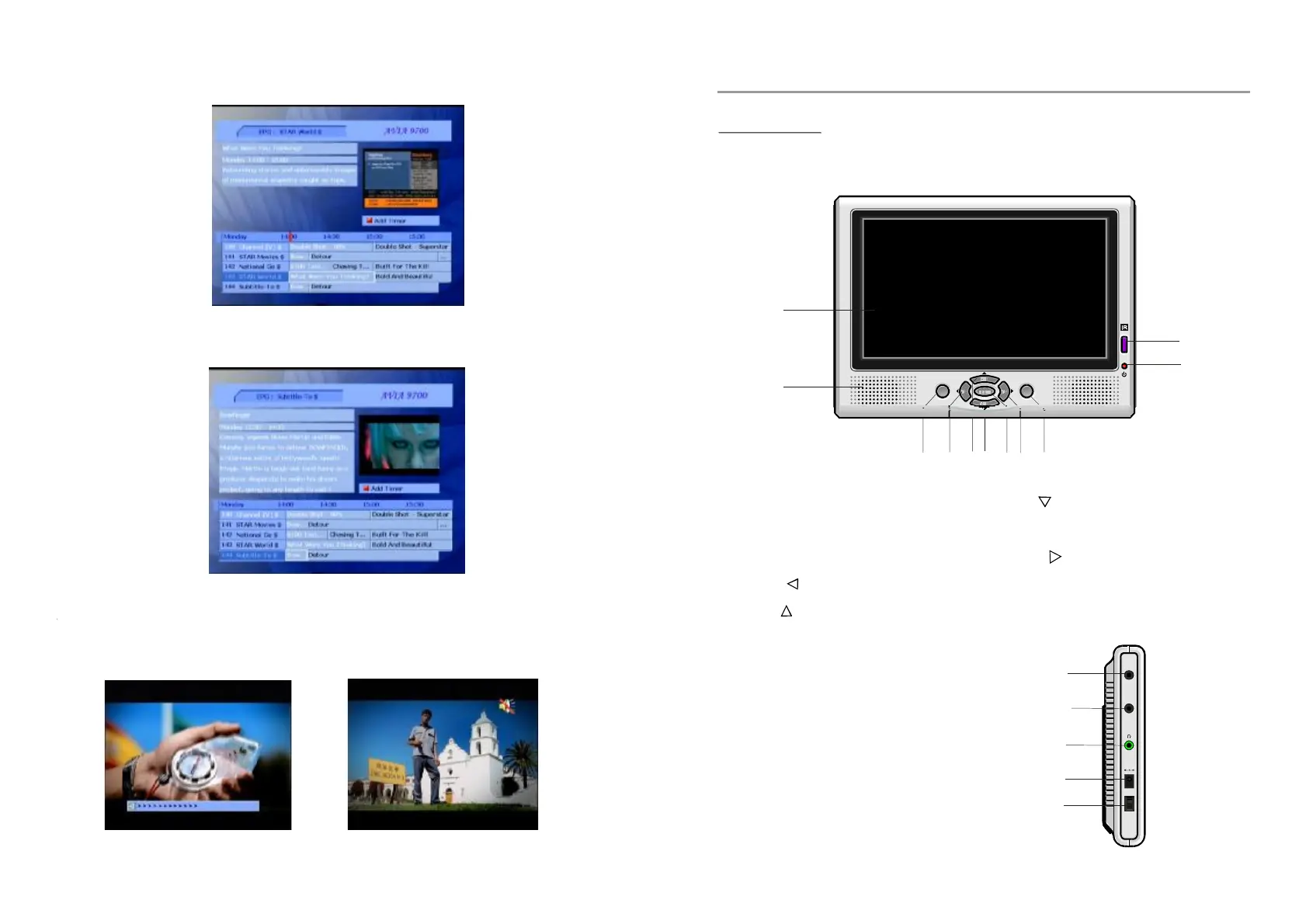
MAINUNIT
SIDEVIEW
FRONTVIEW
12.AVINjack-usetheunitasa
monitor
13.AVOUTjack
14.
15.DCIN12Vinputjack
16.POWERswitch
-usetheunitasa
signalsource
ConnecttoHEADPHONEfor
privatelistening
20
STANDBY
MENU
V
CH
CH
ENTER
V
1.
2.SPEAKER
3.ENTERBUTTON
4.VOL-/BUTTON-
5.CH+/BUTTON-
Toadjust
volumelowerormoveleft.
Toselectprevious
channelormoveup.
TFTDISPLAYWINDOW
-Ifentermenu
setting,itisusedasokbuttonto
confirmaoperationonlyinDVB
mode.
1
2
3 4
5
6
7
8 9
10
11
6.CH+/BUTTON-
7.MENUBUTTON-
8.VOL+/BUTTON-
9.STANDBYBUTTON-
10.REMOTECONTROLSENSOR
11LEDINDICATOR
Toselectnextchannel
ormovedown.
Toentermenusetting
page.
Toadjustvolume
louderormoveright.
Tosettheunitin
standbymode.
AVIN
ON
POWER
OFF
DC
IN12V
AVOUT
12
13
14
15
16
Selectaneventinyourrequiredtimezone,andpressthebutton.Thetimerwillbeset
accordingtoyourpreferredtime.
RED
VolumeControl
Left/right
Mute
-Adjustvolume:Pressbuttonontheremotecontroltomakesoundloweror
louder.
-Mute:Pressbuttonontheremotecontroltomutethesound.Youcancancelthemut
functionresumeitbypressingtheMUTEbuttonagainortherightbutton.



 To Next Page