7
BASICCONNECTION
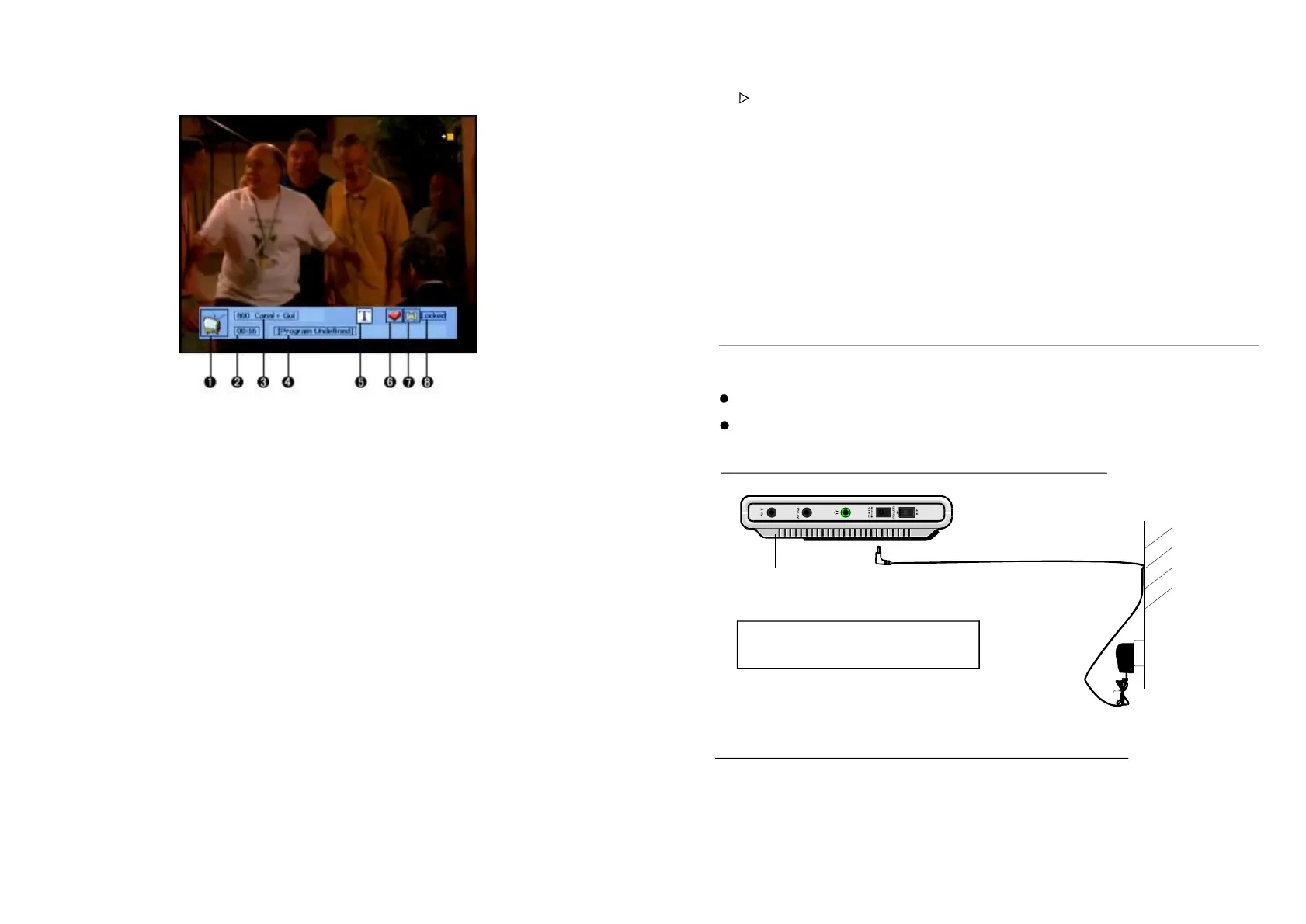
EnsureallthecablesaredisconnectedfromthemainunitbeforeconnectingtoAC
powersourcebyACpoweradaptor.
Readthroughtheinstructionsbeforeconnectingotherequipment.
1.CONNECTINGTOACPOWERSOURCE
NOTE:
BeforeconnectingtoACpower,pushthe
POWERON/OFFswitchtoOFF.
2.CONNECTEXTERNALANTENNATOUNIT
Installexternalantennaintoantennajackforbestpicture.
witchtheunitinAVINorTVmode.This
buttonisdifferentfromthefunctionbuttononpanel.
-Toadjustvolumelouder.
-Toadjustvolumelower.
-Displaythemainmenu.Pressitcanalsoreturntopreviousmenu.
-Toadjustvolumelouderormoveright.
-toreturntoparentmenu.Pressitcancloseallmenu.
-Displaytheuser-settingsfavoritelist
-tostopplaying;pressitagaintogoonplayingfromthestop.
-Todisplayinformationforexplainingcurrentprogram.
-Displaythesatellitelist,andselectAvailablesatellites
-Displaytheone-weekEPG.
SwitchtheunitinAVINorTVmode.Ifyouentermenusetting,itisusedas
okbuttontoconfirmaoperationandalsocans
16.MENU
17.Button
18.EXIT
19.FAV
20.PAUSE
21.TEXT
22.SAT
23.GUIDE
24.FUNCTION-
25.VOL+
26.VOL-
18
ACadaptor
Topoweroutlet
Mainunit
ToDCIN12Vjack
①
②
③
④
⑤
⑥
⑦
⑧
Channeltypeicon,TVorradio
Currenttime
Channelnumberandthenameofchannel
Eventname
Teletexticon
Favoriteicon
Audiotrackstatus,left,rightorstereo
Lockstatus
-:Mutesthecurrentchannelaudiotrack.
-:Turnsthereceiverpoweron/off.
-:Setsthecurrentchannelaudiotracktostereo/left-mono/right-mono.
-:Showsthelistoftheaudiolanguageavailableinthecurrentchannel.(Theselected
audiolanguageinformationisstored)
-:SwitchtheunitfromTVtoradiomode.
Youcanselectchannelbyinputtingthechannelnumberdirectly.
Entertheprevious/nextchannelormoveup/down.
-:ToentertheMainMenu.
-:Toconfirmaselectioninanymode.
-:Pressthisbuttontoexitrootmenu.
:IfyoupresstheINFObuttononce,abannerisdisplayedonthetopofthescreen,
andifyoupressthebuttonagainbeforethebannerhasdisappeared,thebannerwillnow
showthedetailsofthecurrent
MUTE
POWER
SOUND
LANG
TV/RADIO
-Numericbuttons(0-9):
-Up/Down:
MENU
OK
EXIT
-INFO
-PAUSE
FAV
EPG
:Pressittopausecurrentoperation;pressitagaintocontinuefromthestoppoint.
channel.
-:PressthisbuttontodisplayFavoriteList.
-:TodisplaytheELECTRONICPROGRAMMEGUIDEmenu.
Ifyoupressthebuttonontheremotecontrol,thescreenwilldisplayas
showbelow.Youcanpreviewthechannelandselectthechannelbypressingthe
button.
RadioList
TV/RADIO/OK
UP/
DOWN



 To Next Page