Play a record before turning on pairing mode on your bluetooth speaker. Press
the USB/SD/BT/REC/BT OUT button to choose bluetooth mode. The LED light
will flash to indicate the turntable is searching for an available bluetooth
speaker.
When the turntable connects to a Bluetooth speaker, the LED light stays lit.
After the speaker is paired successfully, turntable audio signal can be
transmitted to the Bluetooth speaker.
MAINTENANCE
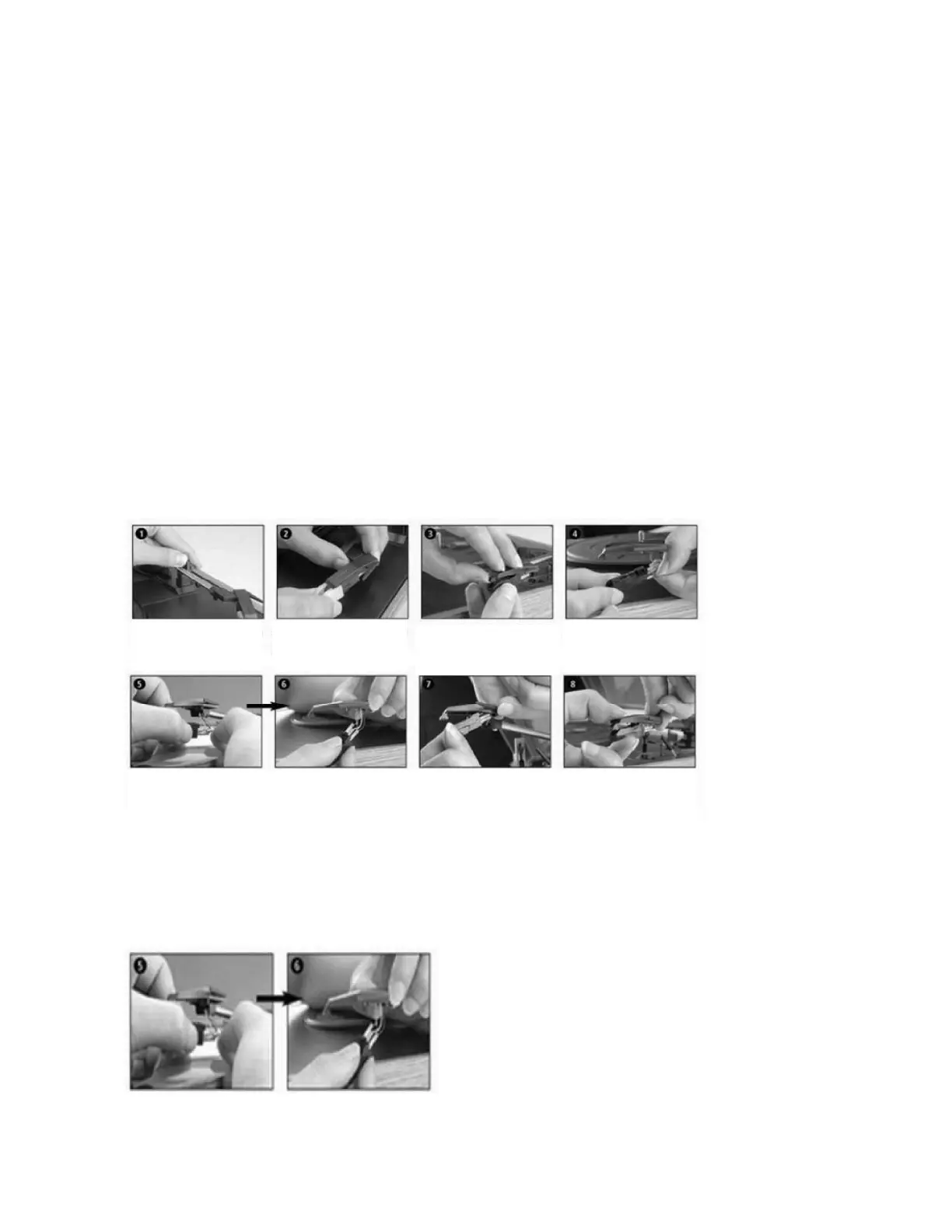
REPLACING THE STYLUS
- Refer to the figures 1-8
INSTALLING A NEW STYLUS CARTRIDGE
- Refer to the figures 5 & 6
Push the arm lock to
releasethe tone-arm.
Remove cap of the
cartridge to expose the
needle out.
Separate the cartridge
from
thesocket lightly.
Remove the audio lines
from the cartridge
comple
tely.
To fit a new one, just proceed in the opposite order,insert the audio lines accordingly,and install the
cartridge to the socket lightly.
NOTE: Please exercise extreme care while performing this operation so as to protect the tone arm and audio
line wires from any damage.
ENG 6


 To Next Page