- 30 -
11. REL
y In LCR Auto mode, this key has no function.
y Press the “REL” key to enter relative mode. The value on the
display will be stored as reference value and “ǻ” annunciator
will appear.
y The secondary display will show the percentage of reference
value for all subsequent measurements
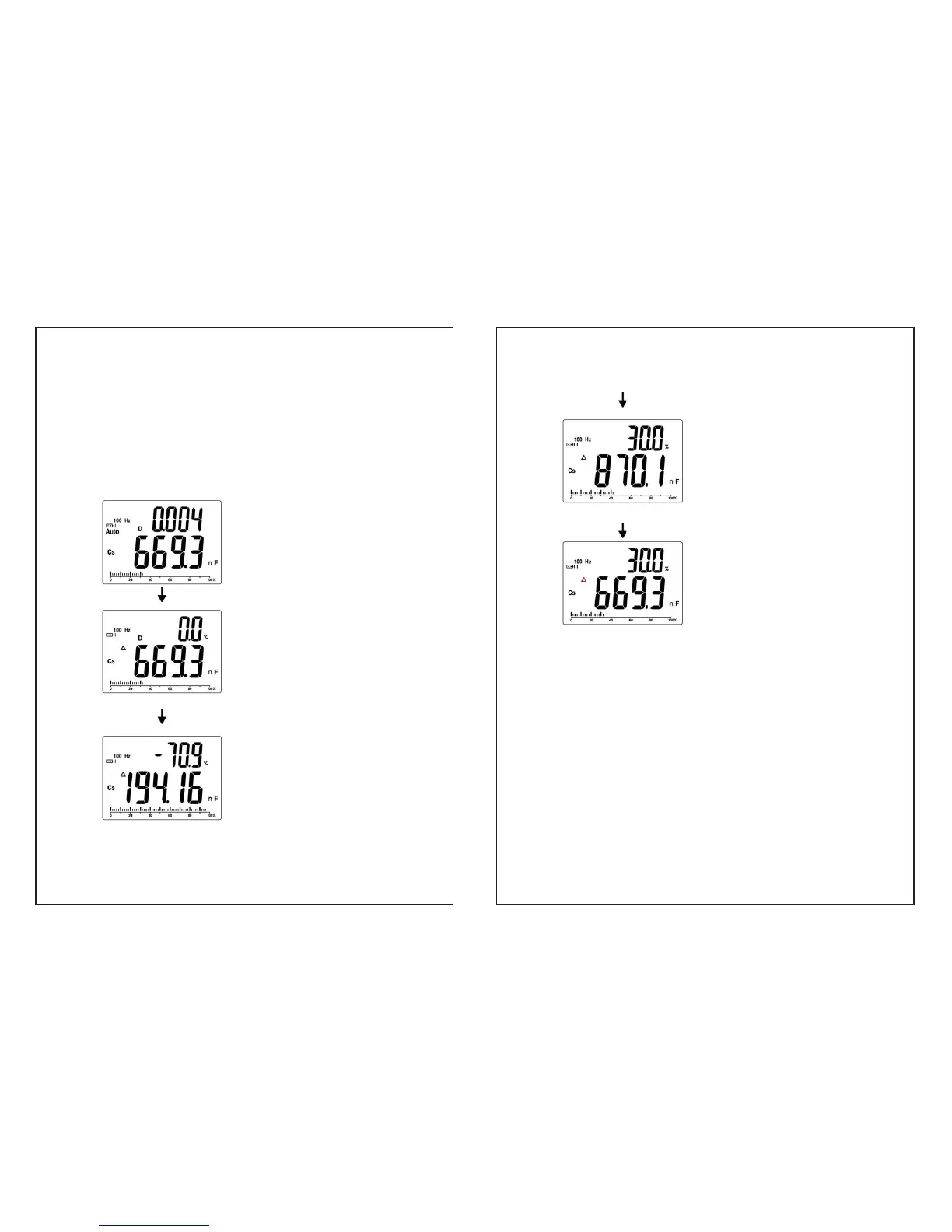
Display the measurement
reading
Ex. 669.3 nF
Press “REL” key
“ǻ” appear
The reading on the display is
stored as reference value.
0.0% is shown on the secondary
display( since the measured
value and the reference are the
same at this point )
Remove the current DUT
( device under test ) and insert
another one
The new reading is shown on the
primary display.
Minus ***% is shown on the
secondary display.
- 31 -
Remove the current DUT
( device under test ) and insert
another one
The new reading is shown on the
primary display.
***% is shown on the secondary
display.
(All subsequent measurements
will be displayed as a percentage
value to the stored value )
Press “REL” key again
“ǻ” flash
The reference value display on
primary display.
y REL% = (DCUR – DREF) / DREF * 100%.
*DCUR = Current DUT(device under test), DREF = Reference
DUT (device under test )
y The percentage range is from -99.9% to 99.9%. When the
new measurement is double than reference value. OL% will
be shown on the secondary display.
y Press “ REL ” key for more than 2 sec. to exit Relative Mode.


 To Next Page