- 22 -
5. FREQ
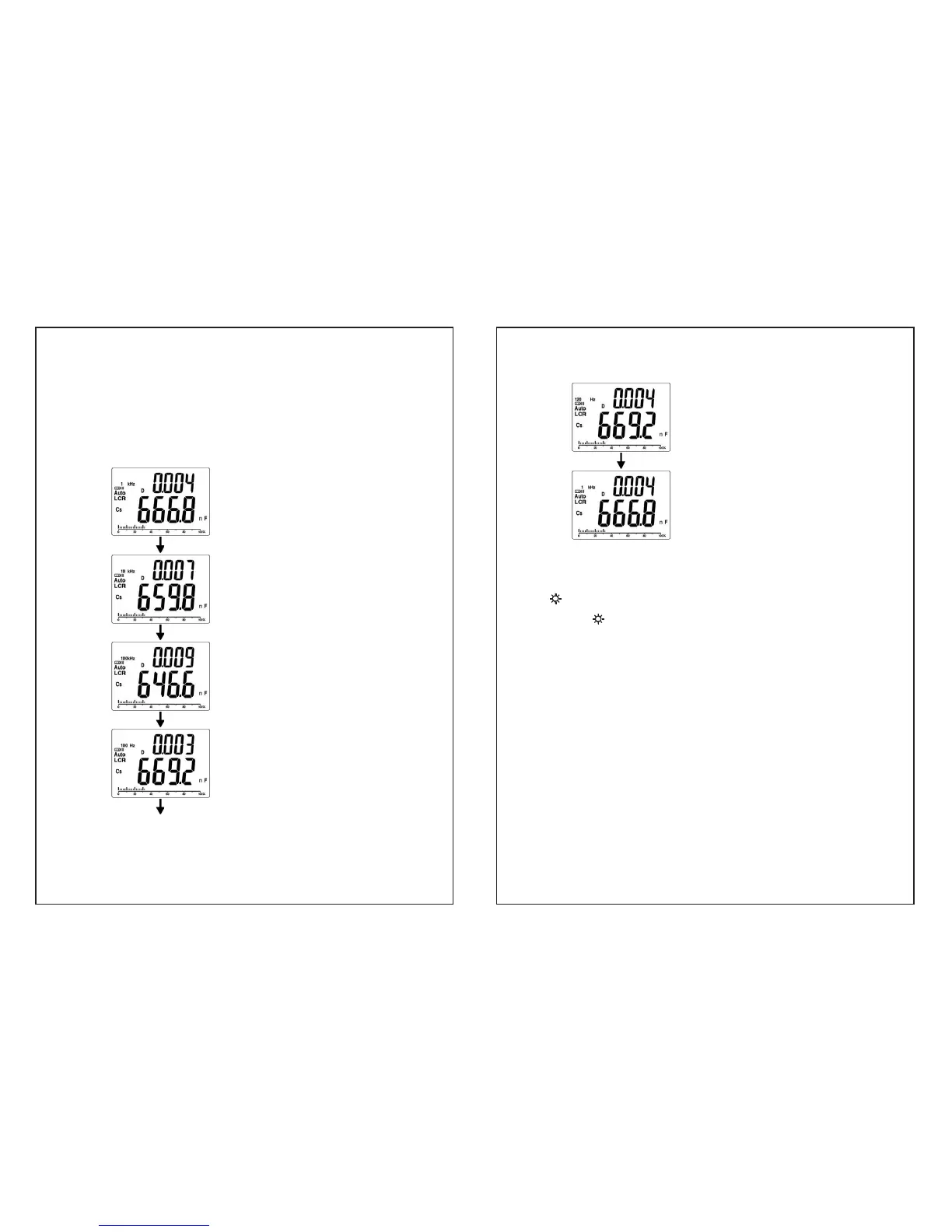
y The “FREQ” key selects the testing frequency. Each press of
the key will select either 1kHz, 10 kHz, 100kHz, 100Hz or
120Hz, total 5 frequency for selection.
y The default frequency setting is 1kHz.
The testing frequency is 1kHz.
Press “FREQ ” key
The testing frequency is 10kHz.
Press “FREQ ” key
The test frequency is 100kHz.
Press “FREQ ” key
The test frequency is 100Hz.
Press “FREQ ” key
- 23 -
The test frequency is 120Hz.
Press “FREQ ” key
Back to test frequency 1 kHz
y The LCR impedance scale ranges are based on the test
frequency.
6.
Backlight
y Press“
”key to toggle backlight on/off.
y The backlight will be disabled in 60 seconds automatically from
the last operation of pushing any key or measurement.
7. SORTING / SETUP / ENTER
y These key functions are disabled in LCR AUTO mode.
y Press “LCR AUTO ” key to select primary parameter
measurement function.
y In measurement (connect DUT), press “ SORTING ” key to
enter the sorting mode which will be set to 2000 digits display
automatically. If the reading is OL or less than 200 counts, the
sorting function is disabled.


 To Next Page