14
V75
• Press DD choose to turn on the DD function, When the display show “DD”, it means the DD function is on;
otherwise, the DD function is off.
• Check the banknote with DD(size) feature.
• During the counting, if the machine detects double or dubious note, the machine will stops counting and emit beeping
sound, while the display will show the message, the user should take away the last banknotes from the stacker and
check. Then the user can press “START” to continue counting or take all the banknotes from the stacker to count again.
• DD sensitivity setting (details please refer to the Point 7.7 - machine sensitivity parameters setting).
• Long press CLEAR after hearing the “beep” sound, then the machine restore to default successfully.
• Calibration paper: 80g/A6 (10.5cm×14.8cm) white paper 1pc.
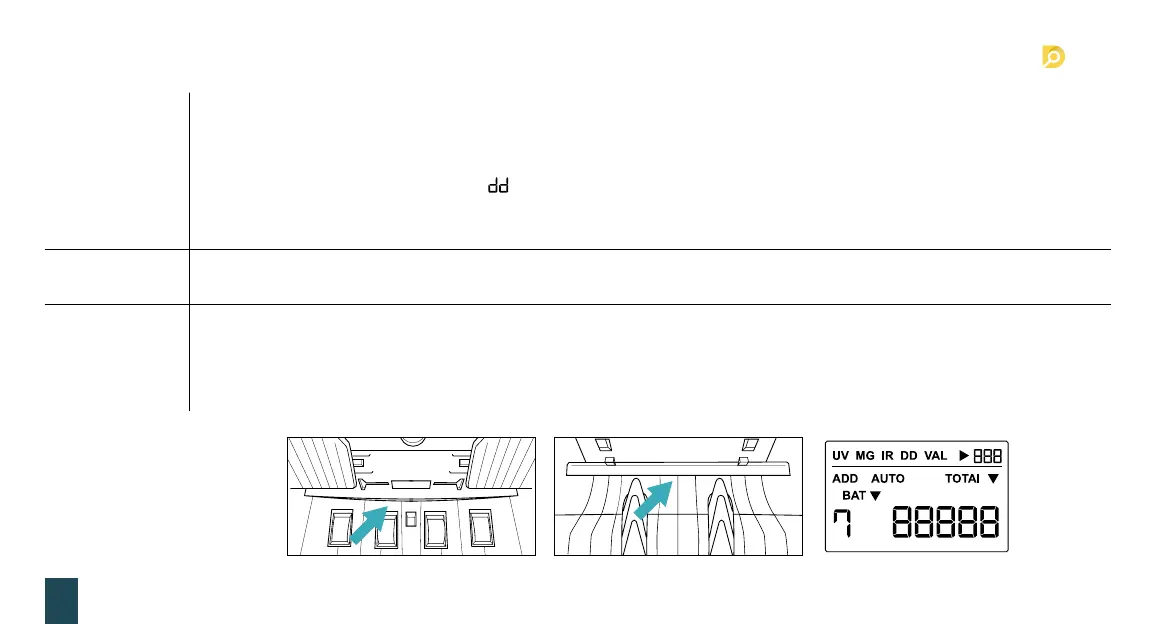
• First should turn off the machine, place 80g/A6 calibration paper into the machine (show as below pic.), make sure the paper
cover the counting and UV sensor.
• Long press START 3 seconds to make the machine enter the self-calibration (display show as the right picture). After success,
the machine will take out the calibration paper automatically.
7.4 DD detection
7.5 Restore to
factory setting
7.6 Self-calibration
function
7. Detection function setting


 To Next Page