15
V75
• Press MENU open menu setting, then press IR or DD again to switch the setting.
• Press +1/+10 increase or ADD to decrease the sensitivity parameter setting, and press ENTER to save the change
and back to the previous interface.
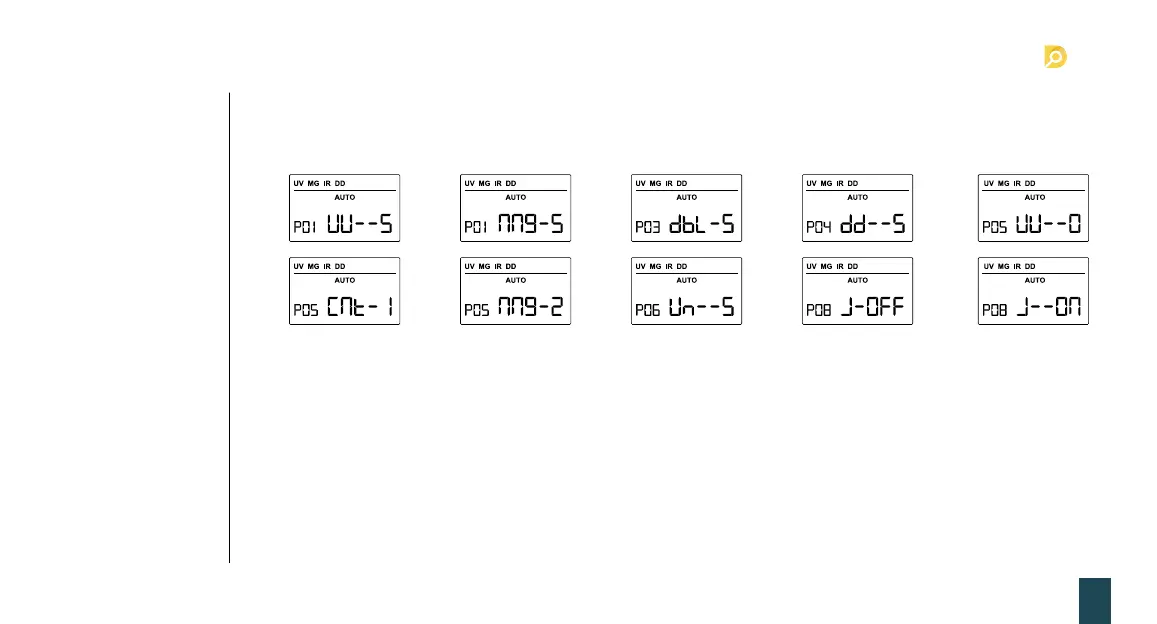
1. P01/UU--* UV sensitivity: 0 is off, 9 is the highest, the default is 5 (ref. picture 6-1.).
2. P02/nng-* MG sensitivity: 0 is off, 9 is the highest, the default is 5 (ref. Pictur 6-2).
3. P03/dbL-* DOUBLE sensitivity, 0 is off, 9 is the highest, the default is 5 (ref. Picture 6-3).
4. P04/dd--* DD sensitivity: 0 is off, 9 is the highest, the default is 5 (ref. Picture 6-4).
5. P05/*-*** mold setting: 0-UU is UV, 1-CNT is COUNT, 2-nng is MG (ref. picture 6-6~7).
Note This setting base on the machine actual situation.
6. P06/Un-5* UV reference value: 0 is off , 9 is highest, the default is 5; (ref. picture 6-8).
7. P08/J-*** Dubious note count or not: J-OFF is dubious note no counted, J-ON is dubious note count; the default
is J-OFF; (ref. Picture 6-9~10).
7.7 Machine sensitivity
parameters setting
6-1
6-6
6-3
6-8
6-2
6-7
6-4 6-5
6-9 6-10
7. Detection function setting


 To Next Page